20

I am working on sql script and I am having a requirement of stop continuing the script if some conditions are not satisfied.

When I Google it, I found the RaisError with 20 severity level will terminate it. But for some reasons I cannot use that option.

Can please provide me what are the possible alternatives to stop SQL script execution.

Jon Seigel
  • 16,922
  • 6
  • 45
  • 85
New Developer
  • 473
  • 2
  • 5
  • 9

5 Answers5

11

The best way is to use SET NOEXEC ON.

You can read more here: How to STOP or ABORT or BREAK the execution of the statements in the current batch and in the subsequent batches separated by GO Statement based on some condition in SQL SERVER

For example:

PRINT '-----FIRST Batch - Start--------'
IF(1=1)
    SET NOEXEC ON
PRINT '-----FIRST Batch - End--------'
GO

PRINT '-----SECOND Batch--------' GO

PRINT '-----THIRD Batch--------' GO

SET NOEXEC OFF

Results:

-----FIRST Batch - Start--------

The second and third batches are compiled, but did not execute.

Michael Green
  • 25,255
  • 13
  • 54
  • 100
Yogesh
  • 111
  • 1
  • 2
11

From the RAISERROR documentation (emphasis mine):

Severity levels from 0 through 18 can be specified by any user. Severity levels from 19 through 25 can only be specified by members of the sysadmin fixed server role or users with ALTER TRACE permissions. For severity levels from 19 through 25, the WITH LOG option is required.

It's highly likely the principal you're executing the script as does not meet these criteria.

There's nothing wrong with using RAISERROR; you're just using a severity level that's excessive. I use level 16 as a default for an error that is raised and the sequence will be terminated. If you want to be more accurate, you can follow the levels given by Microsoft itself:
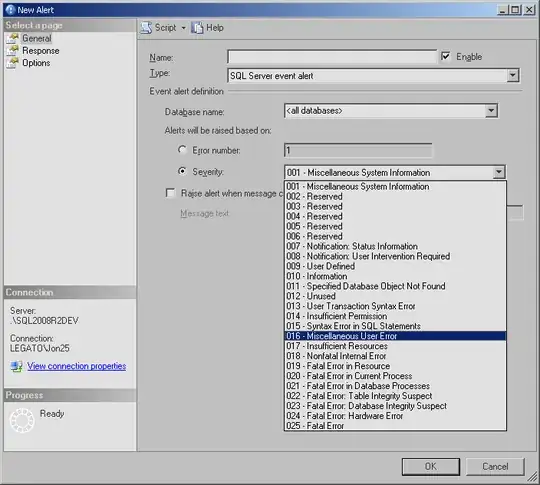
enter image description here

Now, having said all that, depending on the context of the script, using RAISERROR may not be enough, as it doesn't "exit" the script by itself (using normal severity levels).

For example:

RAISERROR(N'Test', 16, 1);

SELECT 1;   /* Executed! */

This will both raise an error and return a result set.

To terminate the script immediately, I prefer to use RETURN (using GOTO-type constructs are generally discouraged in most programming circles where alternatives exist):

RAISERROR(N'Test', 16, 1);
RETURN;

SELECT 1;   /* Not executed */

Or handle the error using TRY/CATCH, which will cause execution to jump to the CATCH block if the severity is 11 or higher:

BEGIN TRY
    RAISERROR(N'Test', 16, 1);
    SELECT 1;   /* Not executed */
END TRY
BEGIN CATCH
    SELECT 2;   /* Executed */
END CATCH

BEGIN TRY
    RAISERROR(N'Test', 10, 1);
    SELECT 1;   /* Executed */
END TRY
BEGIN CATCH
    SELECT 2;   /* Not executed */
END CATCH

A separate problem is if the script spans multiple batches -- RETURN will only exit the batch:

RAISERROR(N'Test', 16, 1);
RETURN;

SELECT 1;   /* Not executed */
GO

SELECT 2;   /* Executed! */

To fix this, you can check @@ERROR at the start of every batch:

RAISERROR(N'Test', 16, 1);
RETURN;

SELECT 1;   /* Not executed */
GO

IF (@@ERROR != 0)
    RETURN;

SELECT 2;   /* Not executed */

Edit: As Martin Smith correctly points out in the comments, this only works for 2 batches. To extend to 3 or more batches, you can cascade raising errors like so (note: the GOTO method does not solve this problem as the target label must be defined within the batch):

RAISERROR(N'Test', 16, 1);
RETURN;

SELECT 1;   /* Not executed */
GO

IF (@@ERROR != 0)
BEGIN
    RAISERROR(N'Error already raised. See previous errors.', 16, 1);
    RETURN;
END

SELECT 2;   /* Not executed */
GO

IF (@@ERROR != 0)
BEGIN
    RAISERROR(N'Error already raised. See previous errors.', 16, 1);
    RETURN;
END

SELECT 3;   /* Not executed */

Or, as he also points out, you can use the SQLCMD method if that's appropriate for your environment.

ahsteele
  • 103
  • 5
Jon Seigel
  • 16,922
  • 6
  • 45
  • 85
8

You can utilize the GOTO statement to skip around wherever you want. In other words, you run into an error or some other condition, and you can have a label at the bottom of the script (i.e. TheEndOfTheScript:) and just issue a goto TheEndOfTheScript; statement.

Here is a quick sample:

print 'here is the first statement...';

print 'here is the second statement...';

-- substitute whatever conditional flow determining factor
-- you'd like here. I have chosen a dummy statement that will
-- always return true
--
if (1 = 1)
    goto TheEndOfTheScript;

print 'here is the third statement...';

print 'here is the fourth statement...';


TheEndOfTheScript:
print 'here is the end of the script...';

The output of this execution will be the following:

here is the first statement...
here is the second statement...
here is the end of the script...

As you can see, the GOTO has skipped printing the third and fourth statements and jumped right to the label (TheEndOfTheScript).

Thomas Stringer
  • 42,434
  • 9
  • 120
  • 155
1

If I am not in the correct server, then I don't want to run my scripts.

this works for me:

BEGIN TRAN T1
SELECT @@TRANCOUNT

IF 'xxx-V-SQL-xxx\xxx_DEVELOPMENT' <> @@ServerName
begin RAISERROR ( 'Wrong Server!!!',1,1) WITH NOWAIT if @@trancount > 0 rollback;

  SELECT [the_transaction_count before return]=@@TRANCOUNT
  RETURN

end;

select [was this executed]='Yes'

SELECT [the_transaction_count]=@@TRANCOUNT

if @@trancount > 0 ROLLBACK SELECT [the_transaction_count]=@@TRANCOUNT

but sometimes when I cannot use return, then this one works:

SET NOEXEC OFF;
BEGIN TRAN T1
SELECT @@TRANCOUNT

IF 'xxx-V-SQL-xxx\xxx_DEVELOPMENT' <> @@ServerName
begin RAISERROR ( 'Wrong Server!!!',1,1) WITH NOWAIT if @@trancount > 0 rollback;

  SELECT [the_transaction_count before return]=@@TRANCOUNT
  SET NOEXEC ON;

end;

select [was this executed]='Yes'

SELECT [the_transaction_count]=@@TRANCOUNT

if @@trancount > 0 ROLLBACK SELECT [the_transaction_count]=@@TRANCOUNT

Marcello Miorelli
  • 17,274
  • 53
  • 180
  • 320
0

Agree with the SET NOEXEC ON/OFF, however in Stored Procs (containing a single block) I simply use RETURN statement.

Caveats: In a script file, if you have multiple GO statements, the RETURN will only come out of the current block and continue with the next block/batch.

Note: GOTO is supposed to be a bad coding practice, use of "TRY..CATCH" is recommended, as it was introduced since SQL Server 2008, followed by THROW in 2012.

Eddie Kumar
  • 101
  • 2