See disclaimer at the end.
First you need to figure out if there is a reason that the log is large/growing. A quick way to do that is to run this query (see http://sqlity.net/en/556/t-sql-tuesday-25-%E2%80%93-sql-server-tips-tricks/ for more info):
SELECT log_reuse_wait_desc,name FROM sys.databases;
If that comes back with "NOTHING" in the log_reuse_wait_desc column for your database you can go ahead and shrink the log file. The easiest way to do that is using SSMS. Right-click your database and select "Tasks", "Shrink", "Files". That brings up this dialog:
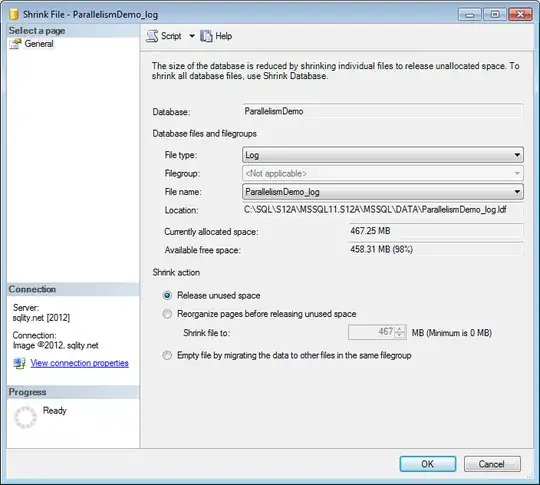
Select "Log" as File Type and select "Release unused space". Click OK to execute.
DISCLAIMER: If you follow these steps, you are doing a fairly un-intrusive operation. However, repeated shrinking and growing can have very bad effects on your database performance. So if your file is 12GB because that is the size needed to support normal operations you are better off leaving it that way. As there is no real good way to determine the necessary size (other then letting it grow) I would leave the file alone unless you are running out of disk space. There is no negative performance impact for having a too big log file.


