26

I have a SQL account with the following permissions on a database:
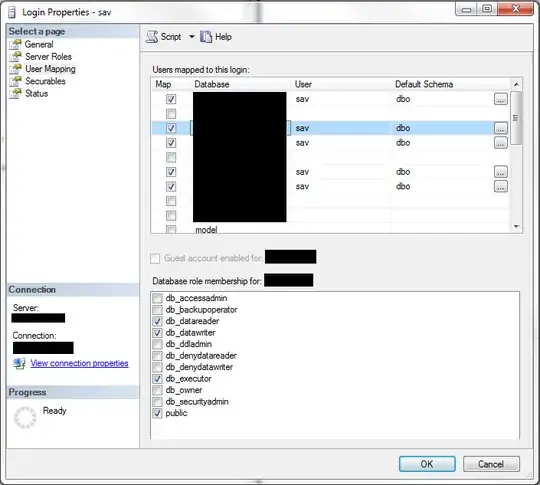
enter image description here

The db_executor role you see this account being a member of was created by this script:

CREATE ROLE [db_executor] AUTHORIZATION [dbo]
GO

GRANT EXECUTE TO [db_executor] 
GO

When I run a select, update, insert or delete on the table, it works fine. When I try to truncate the table, it gives me this error message:

Cannot find the object "TableName" because it does not exist or you do not have permissions.

What permission is this account missing?

John K. N.
  • 18,854
  • 14
  • 56
  • 117
Mansfield
  • 1,061
  • 8
  • 20
  • 33

5 Answers5

42

The best place to look for this information is in books online. The article on TRUNCATE TABLE here indicates:

The minimum permission required is ALTER on table_name. TRUNCATE TABLE permissions default to the table owner, members of the sysadmin fixed server role, and the db_owner and db_ddladmin fixed database roles, and are not transferable. However, you can incorporate the TRUNCATE TABLE statement within a module, such as a stored procedure, and grant appropriate permissions to the module using the EXECUTE AS clause.

So ALTER is the minimum permissions required. You can get that as DB Owner, you can get that as DB_DDLAdmin. Or just grant alter.

If you think about what truncate does and how it works, this makes sense, it is a pretty "severe" command and empties the table of data and does it quickly.

Mike Walsh
  • 18,278
  • 6
  • 50
  • 74
14

As per this reference in BOL:

The minimum permission required is ALTER on table_name. TRUNCATE TABLE permissions default to the table owner, members of the sysadmin fixed server role, and the db_owner and db_ddladmin fixed database roles, and are not transferable. However, you can incorporate the TRUNCATE TABLE statement within a module, such as a stored procedure, and grant appropriate permissions to the module using the EXECUTE AS clause.

Thomas Stringer
  • 42,434
  • 9
  • 120
  • 155
3

You can create a stored procedure with execute as owner to only one table or a stored procedure to any table. In the next code is stored procedure to truncate any table without assinging permission of db_owner or other:

USE [database name]
GO

SET ANSI_NULLS ON
GO
SET QUOTED_IDENTIFIER ON
GO

-- =============================================
-- Author:      Yimy Orley Asprilla
-- Create date: Julio 16 de 2014
-- Description: Función para hacer TRUNCATE a una tabla.
-- =============================================
ALTER PROCEDURE [dbo].[spTruncate]
    @nameTable varchar(60)  


WITH EXECUTE AS OWNER
AS

    SET NOCOUNT OFF;

    DECLARE @QUERY NVARCHAR(200);

    SET @QUERY = N'TRUNCATE TABLE ' + @nameTable + ';'


    EXECUTE sp_executesql @QUERY;
marc_s
  • 9,052
  • 6
  • 46
  • 52
2

You can create a stored procedure with execute as owner to only one table or a stored procedure to any table. In the next code is stored procedure to truncate any table without assinging permission of db_owner or other. In this version of SP is included handling of errors and prevention of SQL Injection

SET ANSI_NULLS ON
GO
SET QUOTED_IDENTIFIER ON
GO


/****** Se validan el parametro de entrada @strTabla para evitar un SQL inyección, Yimy Asprilla ******/
CREATE PROCEDURE [dbo].[spTruncate] 
        @strTabla VARCHAR(50)
WITH EXECUTE AS OWNER
AS
-- =============================================
 -- Author:  Yimy Asprilla
 -- Create date: Julio 16 de 2014
 -- Update: September 21 2017
 -- Description: Función para hacer TRUNCATE a una tabla si ser owner de la tabla. con manejo de errores y SQL Inyection
 -- =============================================
SET NOCOUNT ON

DECLARE @strSQL VARCHAR(500);
DECLARE @object_id int;

SET @object_id = OBJECT_ID(@strTabla);

BEGIN TRY
    IF @object_id IS NOT NULL 
        BEGIN;
            BEGIN TRANSACTION;
            SET @strSQL = 'TRUNCATE TABLE [' + @strTabla + '];'
            EXECUTE (@strSQL);
            COMMIT TRANSACTION;
        END;
    ELSE
    BEGIN;
        PRINT N'La Tabla: ' + @strTabla + ' No existe';
    END;
END TRY
BEGIN CATCH  
    -- se presento un error en la ejcución y s epresenta
    PRINT N'Se presento el error: ';
    SELECT ERROR_NUMBER() AS ErrorNumber, ERROR_MESSAGE() AS ErrorMessage;   
END CATCH;
mustaccio
  • 28,207
  • 24
  • 60
  • 76
Yimy
  • 21
  • 1
-2

As far as I understand it Truncate is not something you can rollback. So the Begin Transaction/Commit Transaction is unnecessary.