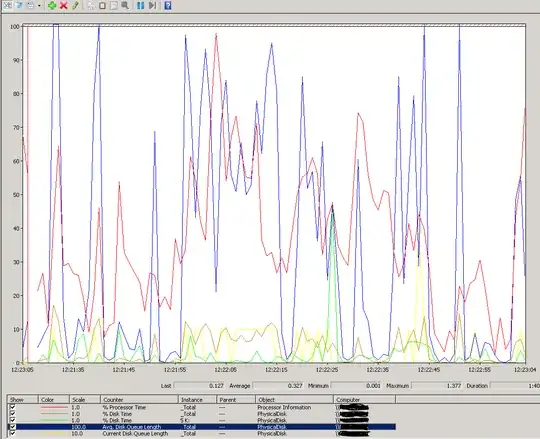
To the question you asked:
I wouldn't rely on disk queue alone. In fact I rarely even ever look at disk queue lengths unless I'm getting in deep with a problem. It is best to look at your disk's latency. Those are the Avg. Disk Sec/Read (or /Write and /Transfer) counters. That tells you what your disk latency is from Windows' perspective. So the time that the request was taking after sent to the disk and brought back.. Disk Queuing nowadays doesn't tell you a lot because most IO subsystems are able to handle a disk queue depth and have multiple spindles doing work in your RAID group often. Finally - In this case - your disk queue length doesn't even look that bad. From here it looks like the max it was in the time of this screenshot (for the average length) was 1.377. That's nothing on most SQL Server systems. Look at your actual latency. Also I don't look at % Disk Time.. I look at the idle time instead. That is a more reliable counter and you just have to do a little math to read it.. The more idle, the less activity.
To The General Question Behind Your Question
I'll ask this one by starting with a question - Why did you go right to your IO? There could be any number of things causing your slowdown. And to answer that exhaustively here is tough but a high level of some things to look at/consider:
- Are you experiencing blocking? I would download SP_Whoisactive and have a look at that while you are getting these errors. Do you see blocking? Do you see the query behind the request(s) that are timing out? What is the duration?
- Have you analyzed your SQL Server Wait Stats to see what your chief cause of waits are?
- Do you know which query or queries are causing the timeouts? If so can you look at those and see if there is any room for tuning?
There could be many other things here. This could be on the connection or network. It could be blocking, it could be a need for index tuning and query tuning, it could be that you expect the queries to take longer than the default 30 second timeout, etc.
But I'd try and gather more data and then choose a path to go down. This is an old whitepaper but it is very useful to performance tuning by waits. While there will be new wait type Tom didn't mention in this paper, it still very much applies and will help you out.