4

I have an Excel file with data and would like to update a table in database based on the data the Excel file contains.

To do that I want to use OpenRowSet command. But I get the error below when even I want to have a SELECT from the Excel data.

SELECT  exl.*
INTO #myExcelData
FROM OPENROWSET ('Microsoft.Ace.OLEDB.12.0'
,'Excel 12.0; Database=C:\Dev\ExcelDataImport.xlsx; Extended Properties=''EXCEL 12.0;HDR=NO;IMEX=1'
,'SELECT * FROM [Sheet1$]') AS exl
GO

OLE DB provider 'Microsoft.ACE.OLEDB.12.0' cannot be used for distributed queries because the provider is configured to run in single-threaded apartment mode.

As error message says, I think I should configure the Microsoft.ACE.OLEDB.12.0 to be able to use it for distributed queries like OpenRowSet. To do that I ran the commond below:

exec sp_configure 'Ad Hoc Distributed Queries', 1
RECONFIGURE

Output message from the command above:

Configuration option 'Ad Hoc Distributed Queries' changed from 1 to 1. Run the RECONFIGURE statement to install.

But still I get the same error when try to run the OpenRowSet query.Could you please give me some hints how to resolve this issue and get the OpenRowSet working?

My environments:

SQL Server 2008 R2, Excel Professional Plus 10 (32 bits)

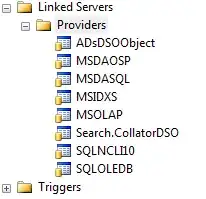
Also the providers I have in Linked sever as as following:enter image description here
Thanks in advance.

Sky
  • 3,744
  • 18
  • 53
  • 68

3 Answers3

3

after installation Restart agent and server services

Enable OLEDB Driver in SQL Server

EXEC sp_configure 'show advanced options', 1;  
GO  
RECONFIGURE;  
GO  
EXEC sp_configure 'Ad Hoc Distributed Queries', 1;  
GO  
RECONFIGURE;  
GO
1

I would recommend using SSIS. As it has the flexibility to allow you to save the package and reuse it for subsequent runs and it can even be scheduled using sql agent job.

You are also compromising security by allowing ad-hoc distributed queries to run (changing it to 1).

I have tried the exact same query that you posted and it works for me.

sp_configure 'Ad Hoc Distributed Queries',1
go
reconfigure with override
go
SELECT  exl.*
INTO #myExcelData
FROM OPENROWSET ('Microsoft.Ace.OLEDB.12.0'
,'Excel 12.0; Database=C:\Documents and Settings\kin\Desktop\test_kin.xlsx; Extended Properties=''EXCEL 12.0;HDR=NO;IMEX=1'
,'SELECT * FROM [Sheet1$]') AS exl
GO

select * from #myExcelData

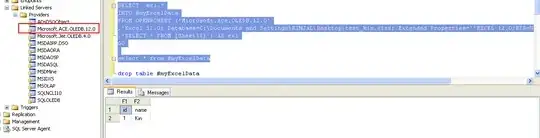
enter image description here

Kin Shah
  • 62,545
  • 6
  • 124
  • 245
0

I would like to Add to 'Kin's answer and add that if you are running a 32 Bit office products and there for a 32 bit version of AccessDatabaseEngine which is what is used for communications to office products (Excel) Then you may have this issue, however if you change to 64 bit this should disappear. (and Ace will appear on your linked servers.)