I have just addressed this a month ago: InnoDB: Error: Table "mysql"."innodb_table_stats" not found after upgrade to mysql 5.6
This usually happens when one upgrades mysql from 5.5 to 5.6. The cuurrent tools for MySQL upgrading does not account for the only 5 system tables that are InnoDB.
Such errors are really innocuous and would not impede InnoDB, provided you do not activate features that need them.
This answer does not address your real issues. It just explain away the error message you posted.
You can create the tables in phpmyadmin. Just run this:
CREATE TABLE `mysql`.`slave_master_info` (
  `Number_of_lines` int(10) unsigned NOT NULL COMMENT 'Number of lines in the file.',
  `Master_log_name` text CHARACTER SET utf8 COLLATE utf8_bin NOT NULL COMMENT 'The name of the master binary log currently being read from the master.',
  `Master_log_pos` bigint(20) unsigned NOT NULL COMMENT 'The master log position of the last read event.',
  `Host` char(64) CHARACTER SET utf8 COLLATE utf8_bin NOT NULL DEFAULT '' COMMENT 'The host name of the master.',
  `User_name` text CHARACTER SET utf8 COLLATE utf8_bin COMMENT 'The user name used to connect to the master.',
  `User_password` text CHARACTER SET utf8 COLLATE utf8_bin COMMENT 'The password used to connect to the master.',
  `Port` int(10) unsigned NOT NULL COMMENT 'The network port used to connect to the master.',
  `Connect_retry` int(10) unsigned NOT NULL COMMENT 'The period (in seconds) that the slave will wait before trying to reconnect to the master.',
  `Enabled_ssl` tinyint(1) NOT NULL COMMENT 'Indicates whether the server supports SSL connections.',
  `Ssl_ca` text CHARACTER SET utf8 COLLATE utf8_bin COMMENT 'The file used for the Certificate Authority (CA) certificate.',
  `Ssl_capath` text CHARACTER SET utf8 COLLATE utf8_bin COMMENT 'The path to the Certificate Authority (CA) certificates.',
  `Ssl_cert` text CHARACTER SET utf8 COLLATE utf8_bin COMMENT 'The name of the SSL certificate file.',
  `Ssl_cipher` text CHARACTER SET utf8 COLLATE utf8_bin COMMENT 'The name of the cipher in use for the SSL connection.',
  `Ssl_key` text CHARACTER SET utf8 COLLATE utf8_bin COMMENT 'The name of the SSL key file.',
  `Ssl_verify_server_cert` tinyint(1) NOT NULL COMMENT 'Whether to verify the server certificate.',
  `Heartbeat` float NOT NULL,
  `Bind` text CHARACTER SET utf8 COLLATE utf8_bin COMMENT 'Displays which interface is employed when connecting to the MySQL server',
  `Ignored_server_ids` text CHARACTER SET utf8 COLLATE utf8_bin COMMENT 'The number of server IDs to be ignored, followed by the actual server IDs',
  `Uuid` text CHARACTER SET utf8 COLLATE utf8_bin COMMENT 'The master server uuid.',
  `Retry_count` bigint(20) unsigned NOT NULL COMMENT 'Number of reconnect attempts, to the master, before giving up.',
  `Ssl_crl` text CHARACTER SET utf8 COLLATE utf8_bin COMMENT 'The file used for the Certificate Revocation List (CRL)',
  `Ssl_crlpath` text CHARACTER SET utf8 COLLATE utf8_bin COMMENT 'The path used for Certificate Revocation List (CRL) files',
  `Enabled_auto_position` tinyint(1) NOT NULL COMMENT 'Indicates whether GTIDs will be used to retrieve events from the master.',
  PRIMARY KEY (`Host`,`Port`)
) ENGINE=InnoDB DEFAULT CHARSET=utf8 STATS_PERSISTENT=0 COMMENT='Master Information';
UPDATE 2014-01-17 11:00 EST
You last commented
It's weird, the database says those tables exist when trying to create them. But the errors say they don't... MySql is behaving ok at the moment. I'm going to keep this question open for a bit I think. Look for more clues next time it dies on me
The reason MySQL says the tables exist in simple. First, here is an XRay of InnoDB
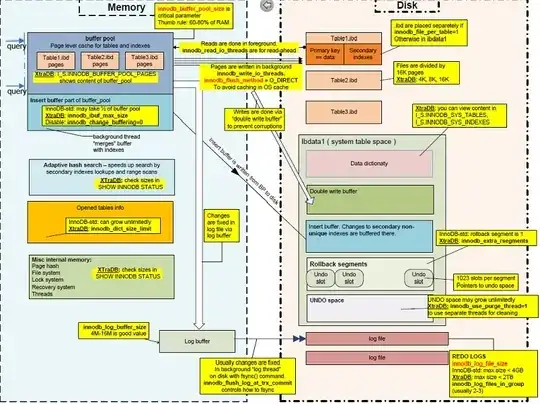
If you look at ibdata1 in the picture, you see the data dictionary. The data dictionary is insisting that the tables exist. Your solution to clean this up is
- Run
set global innodb_fast_shutdown = 0;
- mysqldump everything to a SQL file
- shutdown mysql
- delete ibdata1, ib_logfile0, ib_logfile1
- startup mysql (ibdata1, ib_logfile0, ib_logfile1 get recreated)
- See my posts
With a clean data dictionary, you can now create the missing InnoDB system tables.
Give it a Try !!!


