You should see what is inside ibdata1 from an artist's conception (brought to you by Percona)
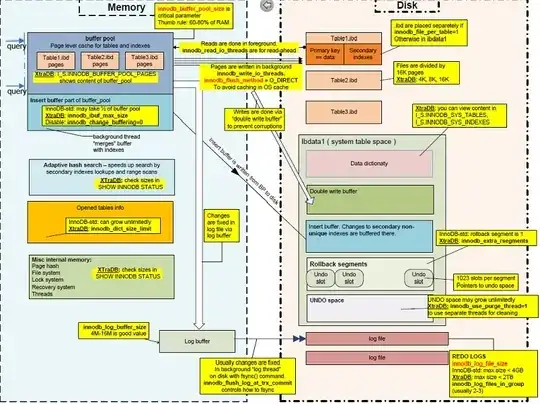
Before you decide to shrink ibdata1, you need to know the following:
From the size of the ibdata1 file (1.7TB), I can safely assume you are using innodb_file_per_table=0. Thus, data and index pages for all InnoDB tables sits inside ibdata1. You need to full summary of what is inside ibdata1:
SET @pw = 3;
SET @bu = power(1024,@pw);
SELECT
    FORMAT(SUM(DL/@bu),2) DataStorage,
    FORMAT(SUM(DL),2) DataStorageBytes,
    FORMAT(SUM(IL/@by),2) IndexStorage,
    FORMAT(SUM(IL),2) IndexStorageBytes,
    FORMAT(SUM(DL+IL),2), InnoDBStorage
FROM
(
    SELECT data_length DL,index_length IL
    FROM information_schema.tables WHERE ENGINE='InnoDB'
    AND information
) A;
Take the InnoDBStorage and subtract it from the filesize of ibdata1
The difference, which I will call Wiggle Room, is left for all other logical structures inside ibdata1:
- Data Dictionary
- Rollback Segments
- Undo Logs
- Double Write buffer
- Insert Buffer
It is possible to get table full errors if the Wiggle Room (difference of ibdata filesize - InnoDBStorage) cannot accommodate the two busiest logical structures that can change size quickly: 1) Rollback Segments, 2) Undo Logs. I have seen this happen as recently as 6 months ago (I wrote about this before : How to solve "The table ... is full" with "innodb_file_per_table"?)
Here are you options
OPTION #1
If you decide to shrink ibdata1, make sure you have enough diskspace for doing a mysqldump and gzip of all the data. If none of the InnoDB table have foreign keys constraints, you could convert all InnoDB tables to MyISAM, shutdown mysql, delete ibdata1, delete ib_logfile0, delete ib_logfile1, set innodb_data_file_path=ibdata1:10M:autoextend in /etc/my.cnf, start mysql, and convert all those tables back to InnoDB. I just recently learned that technique for Shlomi Noach.
OPTION #2
If you decide to enable innodb_file_per_table, ibdata1 should still incredibly small for life. However, accessing metadata about InnoDB tables will be a lot slower.
OPTION #3
If you want to leave things the way they are, please add ibdata2 within /etc/my.cnf:
STEP01 : service mysql stop
STEP02 : Get filesize of ibdata1
cd /var/lib/mysql
IBDATA1_FILESIZE=`ls -l ibdata1 | awk '{print $5}'`
echo ${IBDATA1_FILESIZE}
Let's suppose IBDATA1_FILESIZE is 2000000000000.
STEP03 : Add ibdata2 to InnoDB Data File Path in /etc/my.cnf
innodb_data_file_path=ibdata1:2000000000000;ibdata2:10M:autoextend
STEP04 : service mysql start
Give it a Try !!!
CAVEAT Here are some nice links for InnoDB Internals
Google searches can give you much more InnoDB Internals Documentation


