6

I have a tempdb growth issue. Let me preface everything by giving my tempdb settings.
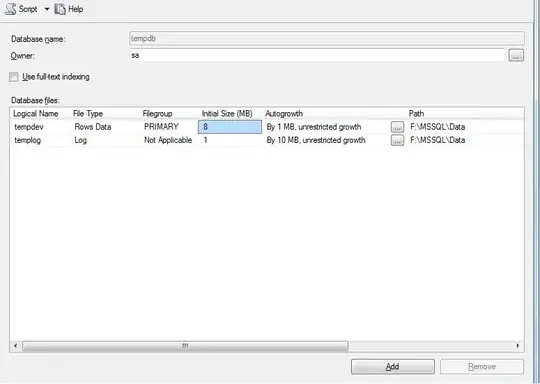
tempdb settings

Even with no queries running on the database/server tempdb keeps on increasing in size, at first rapidly and then slowly without stopping. I've run many queries to figure out what is running, below is the result of the query below which actually gave me the results I could use.
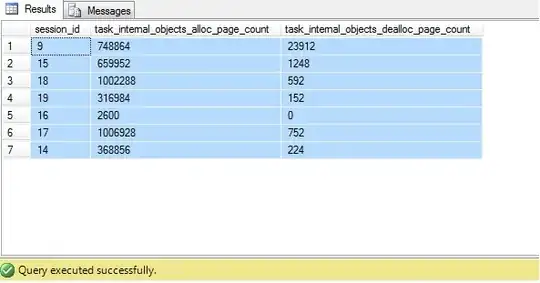
dm_db_task_space_usage

As can be seen they are all internal spid's is there any way to find out why tempdb continues to grow out of control and how to mitigate it? Any help on this problem would be greatly appreciated.

--Query that returned the result set
SELECT session_id,
       SUM(internal_objects_alloc_page_count)   AS task_internal_objects_alloc_page_count,
       SUM(internal_objects_dealloc_page_count) AS task_internal_objects_dealloc_page_count
FROM   sys.dm_db_task_space_usage
GROUP  BY session_id
HAVING SUM(internal_objects_alloc_page_count) > 0 
Aaron Bertrand
  • 181,950
  • 28
  • 405
  • 624
nightmareivy
  • 123
  • 2
  • 2
  • 6

2 Answers2

11

So first, why is your data file growth set to 1MB? If you need to accommodate 20MB worth of data in tempdb the file will have to grow 20 individual times! Imagine if you have a query that requires a 200MB or 2GB spill to disk? Yikes.

Growth events are expensive, especially on older SAS/SATA storage and especially if you don't have instant file initialization enabled. You should really try to pre-size your file so that they're big enough to accommodate your busiest workload, and avoid growth events altogether. This isn't always practical, but in lieu of that, the growth size should be much larger. You really want this to be a rare and isolated event, not one that is occurring constantly. What is the point of keeping tempdb small, when it's going to use more space eventually? Are you going to lease the space out temporarily to the highest bidder, then evict them?

Also, why is there only one tempdb file? This is a common source of contention. Typical wisdom suggests to start with 4 files, even if they're all on the same disk. This can drastically reduce contention especially when multiple concurrent processes are trying to create objects or otherwise use space in tempdb. You may also want to look into enabling trace flag 1117 (which ensures that all of your data files grow at the same time) and trace flag 1118 (which changes extent allocation). Links about these below.

None of this will solve your core issue, of course - lack of (or concern over) disk space. If you don't have enough disk space to support the current usage of your system (whether it's the system or your users), get more disk space, or move the system. You might be able to find some of the culprits (see this answer for some common ones), but you won't be able to squash them all.

You might also find these things useful:

And also, now that we know you are using Service Broker, you may want to read these two pages which might help explain why your conversations aren't clearing out:

Aaron Bertrand
  • 181,950
  • 28
  • 405
  • 624
2

Based on the settings you have listed your tempdb is set insanely small in my opinion. For a small instance try starting out with a 1000MB data file and a 500MB log file. Then change your autogrowth to 100MB for data and 50MB for log. Then monitor. If you are still getting frequent growths then try upping your initial sizes by X10 and your growths by x2 and monitor again. Tempdb doesn't usually just grow randomly. Something is using it.

Now if this is your personal PC then maybe try 100MB and 50MB respectively but even then I would expect some level of growth when you are actually doing things.

All of this of course is based on how much space you have for tempdb. Several of my production servers have tempdbs of 100GB and I've seen MUCH larger.

Kenneth Fisher
  • 24,307
  • 13
  • 63
  • 116