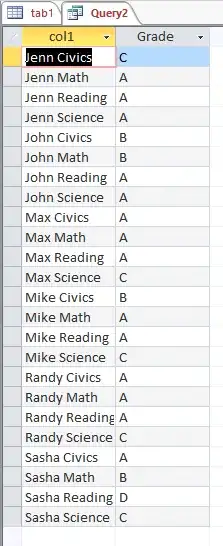
I have Access tables that have the following format:
--------------------------------------
|Name |Math|Science|Reading|Civics|
--------------------------------------
|Mike | A  |  C    |  A    | B    |
|John | B  |  A    |  A    | B    |
|Randy| A  |  C    |  A    | A    |
|Sasha| B  |  C    |  D    | A    |
|Max  | A  |  C    |  A    | A    |
|Jenn | A  |  A    |  A    | C    |
-----------------------------------
Is there any Access Sql code or Access VBA script that I can use so that I can convert (or output in a query/resultset) the above table in the below format?
 --------------------
|   Name      |Grade|
---------------------
|Mike Math    | A   |
|Mike Science | c   |
|Mike Reading | A   |
|Mike Civics  | B   |
|John Math    | B   |
|John Science | A   |
|John Reading | A   |
|John Civics  | B   |
|Randy Math   | A   |
 etc...
What I have found so far are the below 2 threads which shows how to bring in all the field names into an array or just basic output using VBA in Access. It's a start for what I am trying to accomplish (since in essence I will need to bring in the field names into the first column). I'll post back if I'm able to figure it out.
https://stackoverflow.com/questions/11548697/how-to-list-fields-name-in-table-in-access-using-sql
http://forums.asp.net/t/1143922.aspx
I'm wondering If I can do something like...
For each fieldname in table (where fieldname != Name)
Begin
select
Name + ' ' + Subject as Name,
(select Grade from table where Name = Name and Subject = Subject) as Grade
End