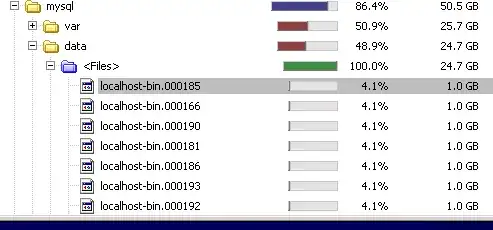
First, you should run the following:
SELECT COUNT(1) ReplicationUserCount
FROM mysql.user WHERE Repl_slave_priv = 'Y';
If ReplicationUserCount > 0, then the DB Server can be used as a Master. Ask your sysadmins or DBAs if there are any active or dormant Slaves.
If ReplicationUserCount = 0, then the DB Server is standalone. You could then just delete all or some of your binlogs using these methods:
METHOD #1
RESET MASTER;
When you run this, all binlogs are erased and localhost-bin.000001 is created.
ALTERNATIVE: Shutdown mysql, delete localhost-bin.*, and startup mysql.
METHOD #2
PURGE BINARY LOGS TO 'localhost-bin.000190';
When you run this, all binlogs before localhost-bin.000190 are erased.
METHOD #3
PURGE BINARY LOGS BEFORE DATE(NOW());
PURGE BINARY LOGS BEFORE DATE(NOW()) + INTERVAL 0 SECOND - INTERVAL 3 DAY;
PURGE BINARY LOGS BEFORE '2014-03-26 15:30:00';
When you run this these, this is what they do
- all binlogs before today are erased
- all binlogs before midnight 3 days ago are erased
- all binlogs before 3:30PM on Mar 26, 2014 are erased
CAVEAT #1
If methods 2 or 3 fail, this indicates that there may be a problem with the file localhost-bin.index. It keeps a text file with the list of the bin logs. If the file is out of sync, use METHOD #1. It will recreate localhost-bin.index.
CAVEAT #2
Do not erase the binlogs from the Linux command line with rm or from the Windows Explorer. Doing so will throw the localhost-bin.index out of sync. If you do that, just do METHOD #1 and mysqld will clean it all up.
CAVEAT #3
If you set expire_logs_days = 7 in your my.cnf (or my.ini), it will automatically run this
PURGE BINARY LOGS BEFORE DATE(NOW()) - INTERVAL 7 DAY;
on every log rotation or mysql restart.
EPILOGUE
Since you are interest in recovering space, choose one of the three methods. You can place expire_logs_days = 7 in your my.cnf (or my.ini) if you want. If you do not want it to grow past2 or 3 binlogs, then set this in your config file:
[mysqld]
expire_logs_days=1
and run
SET GLOBAL expire_logs_days=1;
to limit the number of binlogs to a single day.
Keep in mind that setting expire_logs_days does not work if localhost-bin.index is out of sync.