I'm having 2 databases in 2 different servers(.246 and .252). I need to create backup for all stored procedures, triggers and function from 252 server and restore it in 246 server.database name in both server is transcredit. around 500SP are there in 252 server. can anyone help me?
Asked
Active
Viewed 3.4k times

3 Answers
6
I guess you have framed your question to somewhat misleading.
You want to script out all stored procedures, triggers and functions from one server and create them on the new server.
Option 1 : USING SSMS
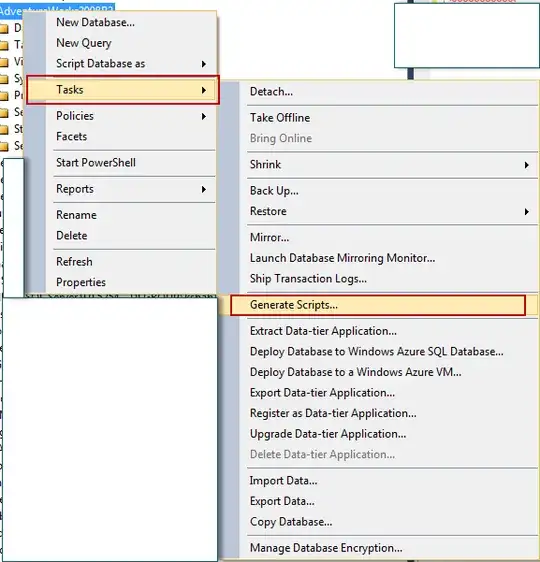
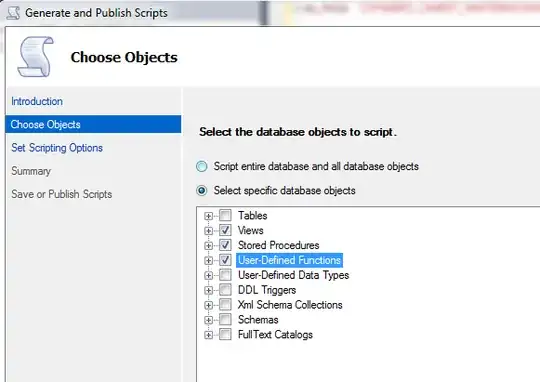
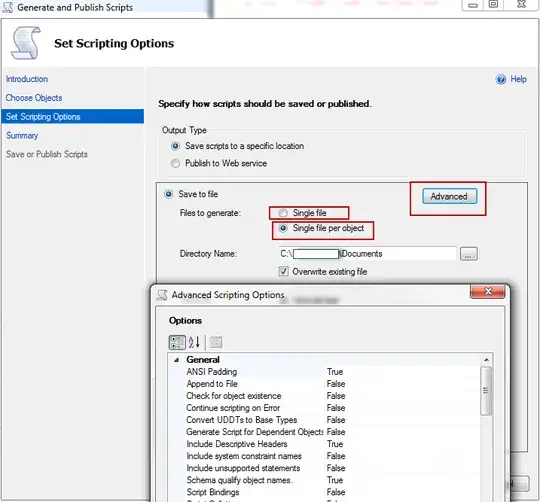
OPTION 2 : USING TSQL - sys.sql_modules with sys.objects

Kin Shah
- 62,545
- 6
- 124
- 245
1
I have create following Procedure which goes thru all SP and Views in particular DB (can be extend to Functions, ...) and store each code script one by one into TXT files. Tested ON MS SQL 2008 R2 and 2014
First part Inserting all scripts of SP and Views into Temp table. Then later using BCP utility. If you wish you can can use for export SSIS package and not SP as I did in this example.
DECLARE  @File_name AS VARCHAR(255)
        ,@Folder_path AS VARCHAR(255)
        ,@File_Path_Name AS VARCHAR(255)
        ,@CMD AS VARCHAR(8000)

IF OBJECT_ID('tempdb..#TEMP_AA') IS NOT NULL DROP TABLE #TEMP_AA;
SELECT
 T1.NAME AS ObjectName
,T1.type AS ObjectType
,STUFF(((SELECT ' ' + T.[TEXT]
         FROM (SELECT SC.[id],SC.colid,SC.[TEXT]
               FROM SYSCOMMENTS sc
               ) AS T
         WHERE T.[id] = T1.[id]
         ORDER BY T.colid
         FOR XML PATH(''),TYPE
         ).value('.[1]', 'NVARCHAR(MAX)')
         ), 1, 1, '')
 AS ObjectText
INTO #TEMP_AA
FROM SYSOBJECTS AS T1
WHERE 1=1
  AND T1.type IN ('P', 'V') /* Procedures and Views*/
  AND NOT T1.[name] LIKE 'dt_%'
Loop which goes thru Global temp table creating file name with Prefix P_ or V_ and with suffix as Date in format YYYYMMDD:
-- Exporting Scripts one by one into TXT files
WHILE (SELECT TOP 1 objectName FROM ##TEMP_AA) IS NOT NULL
BEGIN
    SELECT TOP 1
    @File_name = RTRIM(LTRIM(ObjectType)) + '_' + ObjectName +'_' + REPLACE(CAST(CAST(GETDATE()AS DATE) AS VARCHAR),'-','')
    FROM #TEMP_AA;

    IF OBJECT_ID('tempdb..##TEMP_BB') IS NOT NULL DROP TABLE ##TEMP_BB;
    CREATE TABLE ##TEMP_BB (ObjectText VARCHAR(MAX));
    INSERT INTO ##TEMP_BB
    SELECT TOP 1 ObjectText
    FROM #TEMP_AA;

    --'Setting File name'
    SET @Folder_Path = 'C:\AAAA\'
    SET @File_Path_Name = @Folder_Path + @File_name + '.txt'
    SET @CMD ='BCP ##TEMP_BB OUT "'+@File_Path_Name+'" -T -c -t "Your Server"'
     -- 'Output via BCP into TXT file'
    EXEC xp_cmdshell @CMD;

    --Delete Line From temp which has been procese already
    WITH  CTE AS (SELECT TOP 1 *  FROM  #TEMP_AA)
    DELETE FROM CTE;
END

Milan Minarovic
- 11
- 1
1
If you have access to visual studio or a 3rd party tool like Redgate schema compare your can run a comparison of the databases and select the objects you want copied from DB to another. The tool will build a script to recreate those objects in the 2nd DB.
Visual Studio DB chema compare here
Redgate Schema Compare here

James Anderson
- 5,794
- 2
- 27
- 43