7

Is there a suggested way to rebuild an entire SQL Server database from another database in SQL Server 2012 SP2?

Let me explain... we have a database that we are trying to enable partial containment on and then add it to our AlwaysOn cluster. We are getting nothing but deadlock errors while trying to set the containment to partial. The database has gone from SQL Server 2008 to 2008R2 to 2012 (no SP, SP1, SP2) and had TDE for a while.

Microsoft support has been looking at it for a couple of days, but it's not looking very promising and I think we're now leaning towards some form of corruption. Our application and everything else seems to be able to still access it just fine, it's just setting this one little flag isn't working. Very strange issue.

The only reference I found online that shows the same exact issue is from a Technet forum post in Portuguese (translated link), but it was never resolved.

At this point, I can't wait any longer and I just want to rebuild this data in a new database. I suppose I could script the entire thing out, but this DB is around 20GB already, so that would be one nasty script.

Does anyone have a suggestion on how to recreate a new database based off of another - without the standard Backup / Restore? Is scripting it out the right way to go?

Colin 't Hart
  • 9,455
  • 15
  • 36
  • 44
Adam Plocher
  • 203
  • 2
  • 5

3 Answers3

8

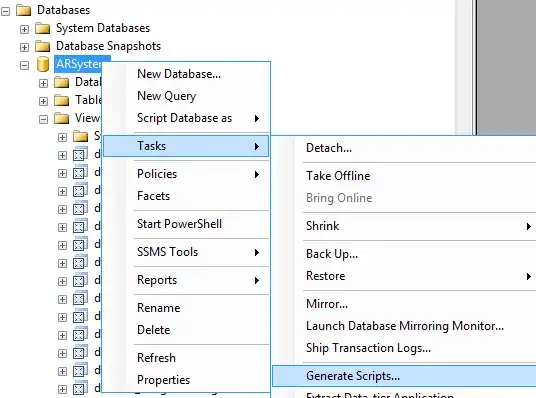
Use SSMS to generate scripts for the entire database DDL.

enter image description here

Use the script to create a new, empty database.

Use BCP to export the data from all tables. Use BCP to import that data into the new database.

MAKE SURE YOU BACKUP THE ORIGINAL DATABASE before DROPing it (if you in fact intend to drop it at all). MAKE SURE YOU TEST RESTORE THE BACKUP.

Hannah Vernon
  • 70,928
  • 22
  • 177
  • 323
5

To make the scripting task alot easier, you can also use 3rd party tools. MSVisualStudio has both a Schema and Data comparison toolset. I personnally prefer RedGate's SQLCompare tool.

I also use theses kind of tools all the time to ease DEV->QA->PROD deployments. Once the schema is in place, you do a simple "Data import Wizard" to copy the data over, as needed.

The plus side of using theses tools is that they are more intelligent when building the scripts, putting items in the proper creation order, warning you beforehand of possible errors, scripting only items you need created/updated, and including server items you may forget when only using the DBscripting tool, like logins or linked servers or security.

Philippe
  • 517
  • 6
  • 15
1

There is another way to rebuild an entire MS SQL database.

Step 1: Use script to copy data of all tables from Old to New database.

Declare @OldDBName Varchar(200)
Declare @NewDBName Varchar(200)

Select @OldDBName='OldDB',@NewDBName='NewDB'

    Select 'Select * into '+@NewDBName+'.'+sc.name+'.'+tbl.Name+ ' From '+@OldDBName+'.'+sc.name+'.'+tbl.Name
    from sys.tables tbl inner join sys.schemas sc on sc.schema_id=tbl.schema_id
     where type='U'

Step 2: Apply all type of Constraints on tables of New database.
1. Primary Keys
2. Foreign keys
3. Default Constraints
4. Computed Columns
5. Identities
6. Indexes

Note: You can find those constraint synchronization scripts on Connectsql.com (http://www.connectsql.com/2013/11/sql-server-database-sychronization_29.html?utm_source=BP_recent)

Step3: Generate script for objects through SSMS respectively and execute on New database.
1. Generate Functions script through SSMSS and execute on New database.
2. Generate Views script through SSMSS and execute on New database.
3. Generate Stored Procedures script through SSMSS and execute on New database.
4. Generate Triggers script through SSMSS and execute on New database.

AA.SC
  • 4,073
  • 4
  • 28
  • 45