0

We have a typical master-slave set up. When we find ourselves under considerable load, the master grinds to a halt. The slave continues to march along all happy like.

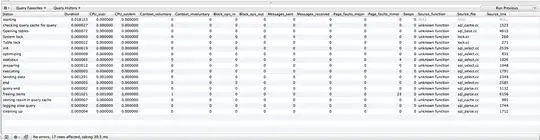
So during a recent slow-down, I took a VERY simple query (no joins, nicely indexed, not many results) and ran it on the slave and master, with profiling turned on.

Notice how different the results of the profiling are.

Master Bad performance on the master
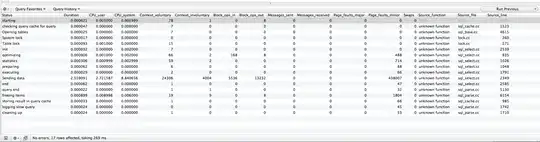
Slave Good performance on the slave

I fear someone might tell me: "Of course your database will perform worse when it's under heavy load." And to them, I say: "You're right!"

But I am really curious if the results from the profile would suggest anything like:

  • Your DB server needs more memory, or
  • It's writing to disk too much, or
  • Change this setting and everything will be fixed, or
  • ...

EDIT 1 The following graph shows how queries slow down when we're having a problem. The gold line is average write time and the green line is average read time. As you can see writes get really slow. The average write peaks at around 500 ms. When things are running smoothly, average writes peaks are down around 2ms.
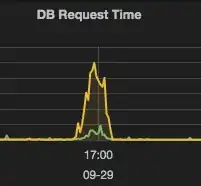
Write times (gold) and read times (green) during slow down

Alan C.
  • 347
  • 1
  • 11

2 Answers2

1

If you stay with MySQL 5.1

Since you cannot upgrade at this time, you need to install the InnoDB Plugin. It was available since MySQL 5.1.38 (See the Release Notes). I wrote a post about it : MySQL - Installing InnoDB Plugin

Surprising fact: Percona already ahd the InnoDB in Percona Server 5.0.45 long before

Once you do, you need to set the following

You can increase the innodb_buffer_pool_size, but do not exceed half the installed RAM. Set it to 20G.

When you upgrade to MySQL 5.6

#1: Tune Read and Write I/O

InnoDB has new options to engage multiple CPUs. I wrote about this over the past 3 years

#2: Partition the InnoDB Buffer Pool

Since MySQL 5.5, you can partition the InnoDB Buffer Pool to reduce I/O thread contention and swapping

#3: You can snapshot the InnoDB Buffer Pool to Disk

You can use the following

There is so much more I could write, but I'll stop here.

CAVEAT : Why is this tuning necessary ?

See my post Why mysql 5.5 slower than 5.1 (linux,using mysqlslap)

I have mentioned the Plugin for InnoDB Before : Performance settings for MyISAM tables - keep everything in memory

GIVE IT A TRY !!!

RolandoMySQLDBA
  • 185,223
  • 33
  • 326
  • 536
0

The same query can react differently under heavy load or not and this is the case here. Your query is taking time on the Sending data part on the master. It indicates that this query is gathering, computing and sending back data to the client. It probably stresses data on memory or on disk.

If your query is accessing data on InnoDB tables, you can check the output of SHOW ENGINE INNODB STATUS\G, especially the BUFFER POOL AND MEMORY part. If the Free buffers value is 0 and you have some RAM space available, you can increase the value of innodb_buffer_pool_size. Be careful to not increase it too much. Your server will swap and crashes everything if you're going too far.

If your query is accessing data on MyISAM tables, it uses the filesystem cache. But there is a high chance to have concurrency issues due to table level lock when you fire a data modification. This is not recommended under heavy load.

In any case, you have to monitor the disks activity (read & write). For reads, if you can't upgrade memory because your dataset can't fit into it (very large dataset), you should use cache systems before hitting the database, use disks with more speed capacity or different hardware. This is easy to kick a new slave and to spread the read load on it. Be aware that the replication is async. Reads on a slave can be in a different state in a given time because of this. Monitor the replication lag between the master and its slaves.

For writes, be sure that it is the bottleneck because this is more complicated to scale such workload. At least, you can redirect your reads and your writes to different instances in order to stress different piece of hardware. Be sure to write only on the master.

riouj
  • 266
  • 2
  • 6