133

I have this huge 32 GB SQL dump that I need to import into MySQL. I haven't had to import such a huge SQL dump before. I did the usual:

mysql -uroot dbname < dbname.sql

It is taking too long. There is a table with around 300 million rows, it's gotten to 1.5 million in around 3 hours. So, it seems that the whole thing would take 600 hours (that's 24 days) and is impractical. So my question is, is there a faster way to do this?

Further Info/Findings

  1. The tables are all InnoDB and there are no foreign keys defined. There are, however, many indexes.
  2. I do not have access to the original server and DB so I cannot make a new back up or do a "hot" copy etc.
  3. Setting innodb_flush_log_at_trx_commit = 2 as suggested here seems to make no (clearly visible/exponential) improvement.
  4. Server stats during the import (from MySQL Workbench): https://imgflip.com/gif/ed0c8.
  5. MySQL version is 5.6.20 community.
  6. innodb_buffer_pool_size = 16M and innodb_log_buffer_size = 8M. Do I need to increase these?
RolandoMySQLDBA
  • 185,223
  • 33
  • 326
  • 536
SBhojani
  • 1,433
  • 3
  • 10
  • 4

5 Answers5

175

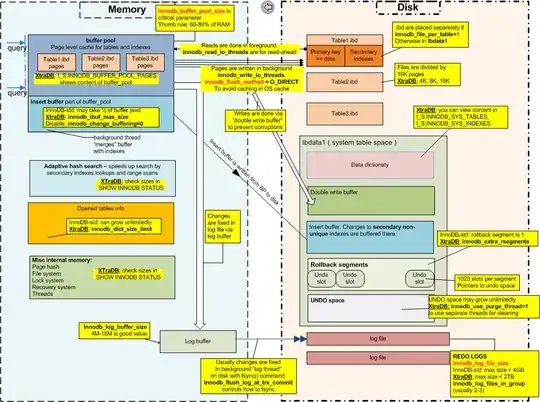
Percona's Vadim Tkachenko made this fine Pictorial Representation of InnoDB

InnoDB Architecture

You definitely need to change the following

innodb_buffer_pool_size = 4G
innodb_log_buffer_size = 256M
innodb_log_file_size = 1G
innodb_write_io_threads = 16
innodb_flush_log_at_trx_commit = 0

Why these settings ?

Restart mysql like this

service mysql restart --innodb-doublewrite=0

This disables the InnoDB Double Write Buffer

Import your data. When done, restart mysql normally

service mysql restart

This reenables the InnoDB Double Write Buffer

Give it a Try !!!

SIDE NOTE : You should upgrade to 5.6.21 for latest security patches.

T.Todua
  • 184
  • 2
  • 14
RolandoMySQLDBA
  • 185,223
  • 33
  • 326
  • 536
17

Do you really need the entire database to be restored? If you don't, my 2c:

You can extract specific tables to do your restore on "chunks". Something like this:

zcat your-dump.gz.sql | sed -n -e '/DROP TABLE.*`TABLE_NAME`/,/UNLOCK TABLES/p' > table_name-dump.sql

I did it once and it took like 10 minutes to extract the table I needed - my full restore took 13~14 hours, with a 35GB (gziped) dump.

The /pattern/,/pattern/p with the -n parameter makes a slice "between the patterns" - including them.

Anyways, to restore the 35GB I used an AWS EC2 machine (c3.8xlarge), installed Percona via yum (Centos) and just added/changed the following lines on my.cnf:

max_allowed_packet=256M
wait_timeout=30000

I think the numbers are way too high, but worked for my setup.

Paul White
  • 94,921
  • 30
  • 437
  • 687
Bruno J. Araujo
  • 271
  • 2
  • 3
6

One way to help speed up the import is to lock the table while importing. Use the --add-locks option to mysqldump.

mysqldump --add-drop-table --add-locks --database db > db.sql

or you could turn on some useful parameters with --opt this turns on a bunch of useful things for the dump.

mysqldump --opt --database db > db.sql

If you have another storage device on the server, then use that - copying from one device to another is a way to speed up transfers.

You can also filter out tables that are not required with --ignore-table

auspicious99
  • 105
  • 1
  • 8
pgee70
  • 171
  • 1
  • 5
6

The fastest way to import your database is to copy the ( .frm, .MYD, .MYI ) files if MyISAM, directly to the /var/lib/mysql/"database name".

Otherwise you can try : mysql > use database_name; \. /path/to/file.sql

Thats another way to import your data.

Alex
  • 77
  • 1
3

This is how to set RolandoMySQLDBA configuration in linux:

  1. Open mysql conf file in your favourite text editor:

    sudo vi /etc/mysql/my.conf

  2. Type the following configuration at the end of the file:

    [mysqld]
    innodb_buffer_pool_size = 4G
    innodb_log_buffer_size = 256M
    innodb_log_file_size = 1G
    innodb_write_io_threads = 16
    innodb_flush_log_at_trx_commit = 0
    innodb_doublewrite = 0
  1. Save the file and run this command in mysql:

    set global innodb_fast_shutdown = 0

    you can see the new configuration with @@ followed by command in mysql:

    select @@innodb_buffer_pool_size;

    similarly with other commands

  2. Restart mysql:

    service mysql restart

  3. Restore your database state:

    mysql -u username -p database_name < /path/to/file.sql

I had to import 5.8GB of data which took me 40min with the pc configuration of inter corei5 2.5GHZ and 16gb ram

Ahtisham
  • 161
  • 4