The way we have our db configured, case does not matter, but in the query editor intelisense is using case much to my frustration. I like that autocomplete feature of intelisense but I have had to disable it until I can find a way to get it to ignore case.
Asked
Active
Viewed 1,697 times

1 Answers
0
In case your using Sql Server 2008, Intellisense in SSMS 2008 R2 is case sensitive but T-SQL itself may not.
It was marked as fixed for later versions.
It have been fixed on SQL 2012. I know because I am using it. You don’t need to upgrade in order to use a new version of the SQMS but you need to have the license for the new version. SSMS is compatible with older SS Database Engine Instances but the license requires purchasing the new version. If you have a MSDN subscription or a SA agreement maybe you already have it.
http://www.microsoft.com/licensing/products/products.aspx
Can I use SQL Server Management Studio 2012 on a 2008 server?
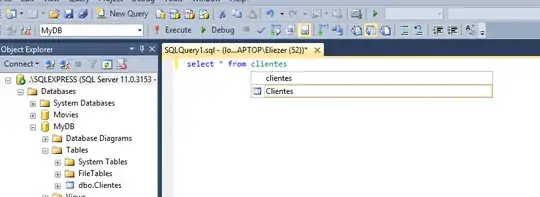
P.D.
Workaround suggested by OP : In SSMS, click on Tools->options, then navigate to Text Editor->Transact-SQL->General and uncheck Auto list members and OK. This will prevent SSMS from replacing something that you typed perfectly with something else that is very wrong. You can still manually list members, when you want to by typing Ctrl-Space, choosing what you want from the list and pressing enter to complete what you typed.

