4

I have a mysql installed inside a windows virtual machine. The hard drive was crashed and the system is not able to restore all again. But I can have access to entire c: ROOT. So I went to

c:/ProgramData/Mysql/Mysql Server 5.5/data/myDatabaseName 

There I can see different files like: .frm, .opt, .trg and .trn. In a regular way, I could run a mysqldump to backup and restore all database from command line, but the system is not able to be restored. So I had to copy all these files and past inside inside the same directory inside same database in another physical instance.

The issue is some tables are not been recognized by this new instance. So I think copy and past is not enough to restore the database.

What am I missing?

Note: Database has innoDb and Myisam tables.

RolandoMySQLDBA
  • 185,223
  • 33
  • 326
  • 536
IgorAlves
  • 337
  • 3
  • 5
  • 16

1 Answers1

4

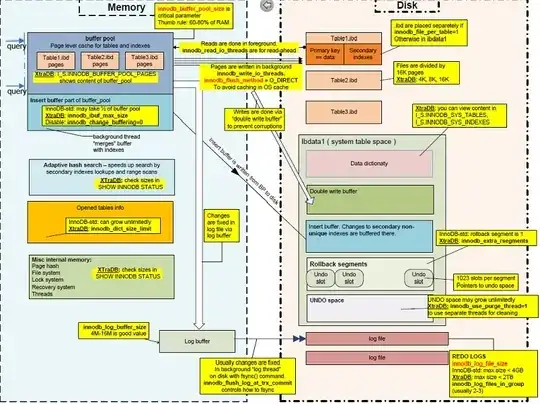
InnoDB makes it impossible to just cut and paste a database because each .ibd files has tablespace_id that are referenced in the data dictionary within c:/ProgramData/Mysql/Mysql Server 5.5/data/ibdata1.

Here is a Pictorial Representation of InnoDB (from Percona CTO Vadim Tkachenko)

sx

You cannot recover just a database. You must restore the entire data folder c:/ProgramData/Mysql/Mysql Server 5.5/data. Please see my old post restore table from .frm and .ibd file? on reattaching .ibd files to the data dictionary.

If the database folder has no .ibd files but only .frm files, then all the data are contained within c:/ProgramData/Mysql/Mysql Server 5.5/data/ibdata1.

You may have mangled the data dictionary. You have to do a complete restore of your datadir or mysqldump from an original database, shutdown mysqld, delete all of datadir, restart mysqld, and reload the mysqldump.

RolandoMySQLDBA
  • 185,223
  • 33
  • 326
  • 536