0

I'm trying to create some infrastructure for a service I am building on AWS using AWS Fargate. I'm using SSM as a value store for some of my application configuration, so I need both the regular permissions for Fargate as well as additional permissions for SSM. However, after banging my head against this particular wall for a while, I've come to the conclusion that I just don't understand AWS IAM in general or this problem in particular, so I'm here for help.

The basis of my IAM code comes from this tutorial; the IAM code is actually not in that tutorial but rather in this file in the github repo linked to that tutorial. I presume I need to retain that STS permission for something although I'm not entirely sure what.

I've converted the IAM code from the tutorial into a JSON document because I find JSON easier to work with than the Terraform native thing. Here's what I've come up with. It doesn't work. I would like to know why it doesn't work and how to fix it. Please ELI5 (explain like I'm 5 years old) because I know nothing about this.

{
  "Version": "2012-10-17",
  "Statement": [
    {
      "Effect": "Allow",
      "Action": [
        "ssm:GetParameters",
        "secretsmanager:GetSecretValue",
        "kms:Decrypt",
        "sts:AssumeRole"
      ],
      "Principal": {
        "Service": ["ecs-tasks.amazonaws.com"]
      }
    }
  ]
}
Ertai87
  • 141
  • 4

2 Answers2

1

IAM Role for Fargate has two policies:

  1. The first one describes which service can assume the role and its permissions. In this case it will be the ecs-tasks.amazonaws.com service (= Fargate) that can call sts:AssumeRole to get all the permissions from this Role.

  2. When Fargate assumes the role it gets the permissions specified within, these are the SSM, KMS and SecretsManager permissions.

If you are using CloudFormation you can do something like this:

  FargateRole:
    Type: AWS::IAM::Role
    Properties:
      AssumeRolePolicyDocument:
        # This says that Fargate can assume this role
        Version: '2012-10-17'
        Statement:
        - Action: sts:AssumeRole
          Effect: Allow
          Principal:
            Service: ecs-tasks.amazonaws.com
      Path: /
      Policies:
      - PolicyName: FargatePermissions
        PolicyDocument:
          # This says what permissions will 
          # the Fargate container receive
          Statement:
          - Action:
            - ssm:GetParameters
            - secretsmanager:GetSecretValue
            - kms:Decrypt
            Effect: Allow
            Resource: '*'

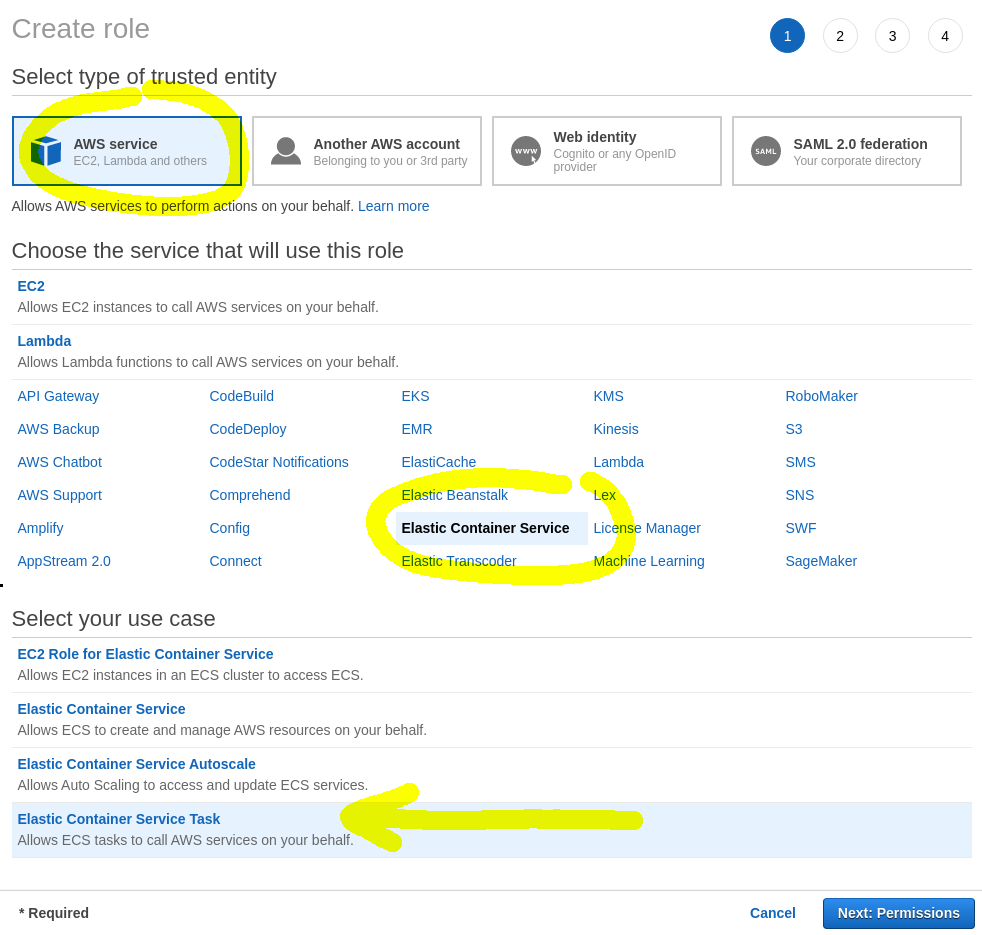
If you are building the role manually in the console be sure to select in the first step that it's an IAM Role for ECS Task, that will create the equivalent of AssumeRolePolicyDocument from the above code snippet.

IAM Role Configuration

Then in the next step add the policy without the sts:AssumeRole:

{
    "Version": "2012-10-17",
    "Statement": [
        {
            "Effect": "Allow",
            "Action": [
                "secretsmanager:GetSecretValue",
                "ssm:GetParameters",
                "kms:Decrypt"
            ],
            "Resource": "*"
        }
    ]
}

That should create the IAM Role you need. Ideally you should also restrict the access only to specific resources instead of using "Resource": "*" but for start it's easier to just use the wildcard.

Hope that helps :)

MLu
  • 1,011
  • 5
  • 7
0

The answer was that my IAM configuration did not include a Task Role, only a Task Execution Role. I needed to add a Task Role which included the permissions I needed to access SSM, and then it worked.

Ertai87
  • 141
  • 4