These are pretty much the steps I have followed in order. Basically what is outlined in the documentation:
https://docs.microsoft.com/en-us/azure/aks/azure-files-dynamic-pv
azure-storage-claim.yaml
kind: StorageClass
apiVersion: storage.k8s.io/v1
metadata:
  name: test-app-sc
provisioner: kubernetes.io/azure-file
mountOptions:
  - dir_mode=0777
  - file_mode=0777
  - uid=1000
  - gid=1000
  - mfsymlinks
  - nobrl
  - cache=none
parameters:
  skuName: Standard_LRS
  location: westus
azure-storage.yaml
apiVersion: v1
kind: PersistentVolumeClaim
metadata:
  name: test-app-storage
spec:
  accessModes:
    - ReadWriteMany
  storageClassName: test-app-sc
  resources:
    requests:
      storage: 15Gi<br>
PVC is now setup.
Changed the mountPath per the Postgres image documentation:
PGDATA
This optional variable can be used to define another location - like a subdirectory - for the database files. The default is /var/lib/postgresql/data, but if the data volume you're using is a filesystem mountpoint (like with GCE persistent disks), Postgres initdb recommends a subdirectory (for example /var/lib/postgresql/data/pgdata ) be created to contain the data.
This is an environment variable that is not Docker specific. Because the variable is used by the postgres server binary (see the PostgreSQL docs), the entrypoint script takes it into account.
Based on that, I have my postgres.yaml setup like the following:
apiVersion: apps/v1
kind: Deployment
metadata:
  name: postgres-deployment
spec:
  replicas: 1
  selector:
    matchLabels:
      component: postgres
  template:
    metadata:
      labels:
        component: postgres
    spec:
      containers:
        - name: postgres
          image: postgres
          # I don't know, someone suggested this, but doesn't work apparently
          securityContext:
            runAsUser: 0
          ports:
            - containerPort: 5432
          env:
            - name: POSTGRES_DB
              valueFrom:
                secretKeyRef:
                  name: test-app-secrets
                  key: PGDATABASE
            - name: POSTGRES_USER
              valueFrom:
                secretKeyRef:
                  name: test-app-secrets
                  key: PGUSER
            - name: POSTGRES_PASSWORD
              valueFrom:
                secretKeyRef:
                  name: test-app-secrets
                  key: PGPASSWORD
            - name: POSTGRES_INITDB_ARGS
              value: "-A md5"
            - name: PGDATA
              value: /var/lib/postgresql/data/pgdata
          volumeMounts:
            - name: postgres-storage
              mountPath: /var/lib/postgresql/data/pgdata
              subPath: postgres-storage
      volumes:
        - name: postgres-storage
          persistentVolumeClaim:
            claimName: test-app-storage
---
apiVersion: v1
kind: Service
metadata:
  name: postgres-cluster-ip-service
spec:
  type: ClusterIP
  selector:
    component: postgres
  ports:
    - port: 1423
      targetPort: 5432
You get the error:
chmod: changing permissions of '/var/lib/postgresql/data/pgdata': Operation not permitted
So with either of that as the Dockerfile:
FROM postgres:11-alpine
EXPOSE 5432
RUN /bin/bash -c 'chmod 777 /var/lib/postgresql/data'
RUN /bin/bash -c 'chmod 777 /var/lib/postgresql/data/pgdata'
Or
FROM postgres:11-alpine
EXPOSE 5432
It doesn't really matter, you still get the same type of error by doing any the following:
            ...
            - name: POSTGRES_INITDB_ARGS
              value: "-A md5"
          volumeMounts:
            - name: postgres-storage
              mountPath: /var/lib/postgresql/data/pgdata
              subPath: postgres-storage
      volumes:
        - name: postgres-storage
          persistentVolumeClaim:
            claimName: test-app-storage
     ...<br>
Results in the following error:
The files belonging to this database system will be owned by user "postgres". This user must also own the server process.
The database cluster will be initialized with locale "en_US.utf8". The default database encoding has accordingly been set to "UTF8". The default text search configuration will be set to "english".
Data page checksums are disabled.
initdb: error: directory "/var/lib/postgresql/data" exists but is not empty If you want to create a new database system, either remove or empty the directory "/var/lib/postgresql/data" or run initdb with an argument other than "/var/lib/postgresql/data".
Try this:
            ...
            - name: POSTGRES_INITDB_ARGS
              value: "-A md5"
          volumeMounts:
            - name: postgres-storage
              mountPath: /var/lib/postgresql/data
              subPath: postgres-storage
      volumes:
        - name: postgres-storage
          persistentVolumeClaim:
            claimName: test-app-storage
     ...
And it results in this:
chmod: changing permissions of '/var/lib/postgresql/data': Operation not permitted
Try this:
            ...
            - name: POSTGRES_INITDB_ARGS
              value: "-A md5"
              value: "-D /var/lib/postgresql/data/pgdata"
          volumeMounts:
            - name: postgres-storage
              mountPath: /var/lib/postgresql/data/pgdata
              subPath: postgres-storage
      volumes:
        - name: postgres-storage
          persistentVolumeClaim:
            claimName: test-app-storage
     ...
And it results in this:
The files belonging to this database system will be owned by user "postgres". This user must also own the server process.
The database cluster will be initialized with locale "en_US.utf8". The default database encoding has accordingly been set to "UTF8". The default text search configuration will be set to "english".
Data page checksums are disabled.
initdb: error: could not change permissions of directory "/var/lib/postgresql/data/pgdata": Operation not permitted fixing permissions on existing directory /var/lib/postgresql/data/pgdata ...
So nothing seems to work that I've tried and following the documentation where I can.
Someone suggested to get rid of the volume mounts like so:
            ...
            - name: POSTGRES_INITDB_ARGS
              value: "-A md5"
            - name: PGDATA
              value: /var/lib/postgresql/data/pgdata
      volumes:
        - name: postgres-storage
          persistentVolumeClaim:
            claimName: test-app-storage
     ...
Which, hey, that actually works! But doesn't persist data given it just uses the Pod storage so is pretty pointless:
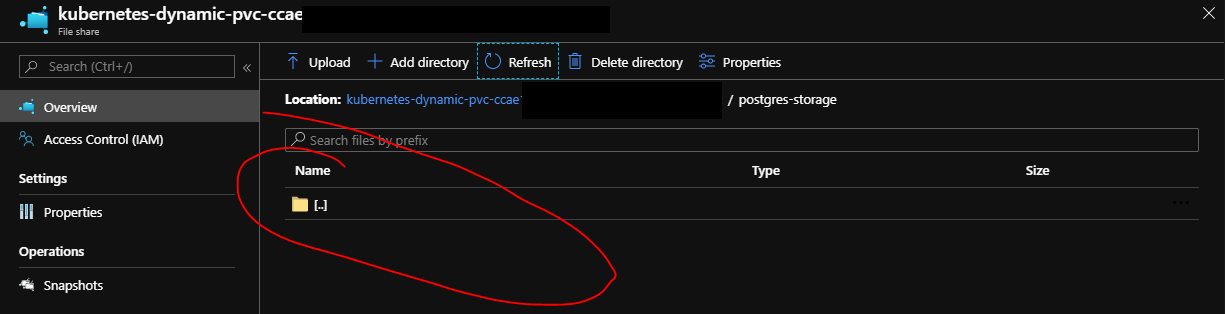
And sure enough when you create a table in Postgres, destroy the Pod, and then redeploy it, of course the table is no longer there.
So more than likely I'm doing something wrong, but I've been following the documentation and seems like this should work.
Where are things going wrong?
EDIT: Permissions in Pod
Apparently it is a permissions issue that occurs when PGDATA is the same directory as mountPath. For example:
...
- name: PGDATA
value: /var/lib/postgresql-data
volumeMounts:
- name: test-app-storage
mountPath: /var/lib/postgresql-data
subPath: postgres-storage
...
or
...
if PGDATA is not specified it defaults to /var/lib/postgresql/data
- name: PGDATA
value: /var/lib/postgresql-data
volumeMounts:
- name: test-app-storage
mountPath: /var/lib/postgresql/data
subPath: postgres-storage
...
Something like this where they do not match will create the Pod, but uses Pod storage which I obviously don't want:
  # Thus /var/lib/postgresql/data
  # - name: PGDATA
  #   value: /var/lib/postgresql-data
volumeMounts:
  - name: test-app-storage
    mountPath: /var/lib/postgresql-data
    subPath: postgres-storage
Permissions ls -l looks like this:
$ ls -l
drwxr-xr-x 1 root     root     4096 Feb  2 06:06 apt
drwxr-xr-x 1 root     root     4096 Feb  2 06:07 dpkg
drwxr-xr-x 2 root     root     4096 Feb  2 06:06 exim4
drwxr-xr-x 2 root     root     4096 Aug 28  2018 logrotate
drwxr-xr-x 2 root     root     4096 Nov 10 12:17 misc
drwxr-xr-x 2 root     root     4096 Jan 30 00:00 pam
drwxr-xr-x 1 postgres postgres 4096 Feb  2 06:07 postgresql
drwxrwxrwx 2     1000     1000    0 Jan 31 21:46 postgresql-data
drwxr-xr-x 1 root     root     4096 Jan 30 00:00 systemd
drwxr-xr-x 3 root     root     4096 Feb  2 06:07 ucf
$ ls -l postgresql && ls -l postgresql/data && ls -l postgresql-data
total 4
drwx------ 19 postgres postgres 4096 Feb  5 23:28 data
total 124
drwx------ 6 postgres postgres  4096 Feb  5 23:28 base
drwx------ 2 postgres postgres  4096 Feb  5 23:29 global
drwx------ 2 postgres postgres  4096 Feb  5 23:28 pg_commit_ts
drwx------ 2 postgres postgres  4096 Feb  5 23:28 pg_dynshmem
-rw------- 1 postgres postgres  4281 Feb  5 23:28 pg_hba.conf
-rw------- 1 postgres postgres  1636 Feb  5 23:28 pg_ident.conf
drwx------ 4 postgres postgres  4096 Feb  5 23:33 pg_logical
drwx------ 4 postgres postgres  4096 Feb  5 23:28 pg_multixact
drwx------ 2 postgres postgres  4096 Feb  5 23:28 pg_notify
drwx------ 2 postgres postgres  4096 Feb  5 23:28 pg_replslot
drwx------ 2 postgres postgres  4096 Feb  5 23:28 pg_serial
drwx------ 2 postgres postgres  4096 Feb  5 23:28 pg_snapshots
drwx------ 2 postgres postgres  4096 Feb  5 23:28 pg_stat
drwx------ 2 postgres postgres  4096 Feb  5 23:51 pg_stat_tmp
drwx------ 2 postgres postgres  4096 Feb  5 23:28 pg_subtrans
drwx------ 2 postgres postgres  4096 Feb  5 23:28 pg_tblspc
drwx------ 2 postgres postgres  4096 Feb  5 23:28 pg_twophase
-rw------- 1 postgres postgres     3 Feb  5 23:28 PG_VERSION
drwx------ 3 postgres postgres  4096 Feb  5 23:28 pg_wal
drwx------ 2 postgres postgres  4096 Feb  5 23:28 pg_xact
-rw------- 1 postgres postgres    88 Feb  5 23:28 postgresql.auto.conf
-rw------- 1 postgres postgres 26588 Feb  5 23:28 postgresql.conf
-rw------- 1 postgres postgres    36 Feb  5 23:28 postmaster.opts
-rw------- 1 postgres postgres    94 Feb  5 23:28 postmaster.pid
total 0
The permissions for where it creates the data files is postgres. However, doing this, it doesn't map to Azure Files and the PVC. It just stays and is destroyed with the Pod.
I think what is happening is mountPath uses root and PGDATA uses postgres, and somehow mountPath is trying to use postgres???
Really, not sure and still lost as to how to resolve it.
EDIT2
Came across this answer:
https://stackoverflow.com/a/51203031/3123109
So added the following to mine:
- name: postgres
  image: postgres
  command:
  - /bin/chown
  - -R
  - "1000"
  - /var/lib/postgresql/data
But this generates a new error:
The selected container has not logged any messages yet.
Progress, I guess.


