I have a requirement where I want to stop my lambda from receiving messages from SQS. And I want to implement this like an API which can toggle between the disabling and enabling of the AWS Lambda getting triggered by SQS. I tried looking for options but there were suggestions telling to invoke the permission which I don't find feasible.
Asked
Active
Viewed 6,275 times

1 Answers
2
Call Lambda's UpdateEventSourceMapping API with the {"Enabled":true/false} request body.
If, for some reason, you want your own API for this, you can create one in API Gateway as described below.
Before you begin, you need the UUID of the event source mapping you wish to enable/disable. Use the AWS CLI to get this (it isn’t shown on the UI):
aws lambda list-event-source-mappings --function-name my-func
{
    "EventSourceMappings": [
        {
            "UUID": "b962dcee-173c-47r1-9600-5c6d81catf85",
            "BatchSize": 1,
            "EventSourceArn": "arn:aws:sqs:us-east-1:123456789012:my-queue",
            "FunctionArn": "arn:aws:lambda:us-east-1:123456789012:function:my-func",
            "LastModified": 1595058588.141,
            "State": "Enabled",
            "StateTransitionReason": "USER_INITIATED"
        }
    ]
}
Next, either create a new API in API Gateway or add a resource & a GET method to your existing API. Configure it as shown below. The UUID you got above is highlighted below:
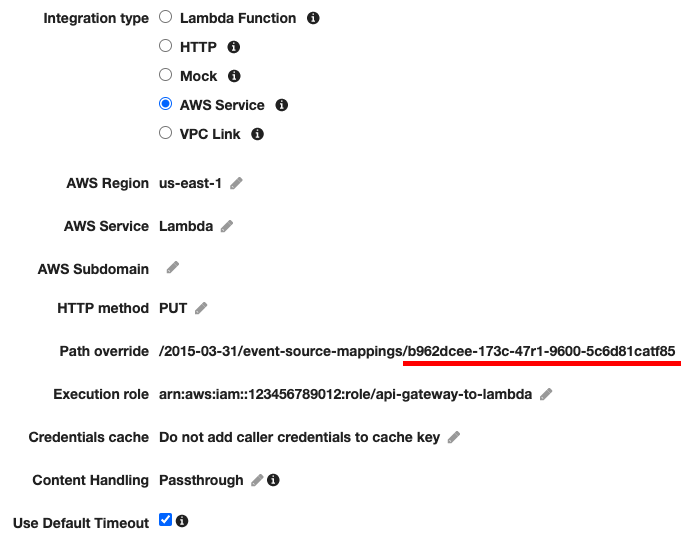
The execution role shown above must allow API Gateway to invoke Lambda APIs.
Scroll further down & provide this mapping template:
Content-Type: application/json
{
    "Enabled" : $input.params("Enabled")
}
Save & deploy to a stage. Now you can hit this API with the query param Enabled=true / Enabled=false to enable/disable your Lambda's SQS trigger. Here's a test done from the API Gateway console:
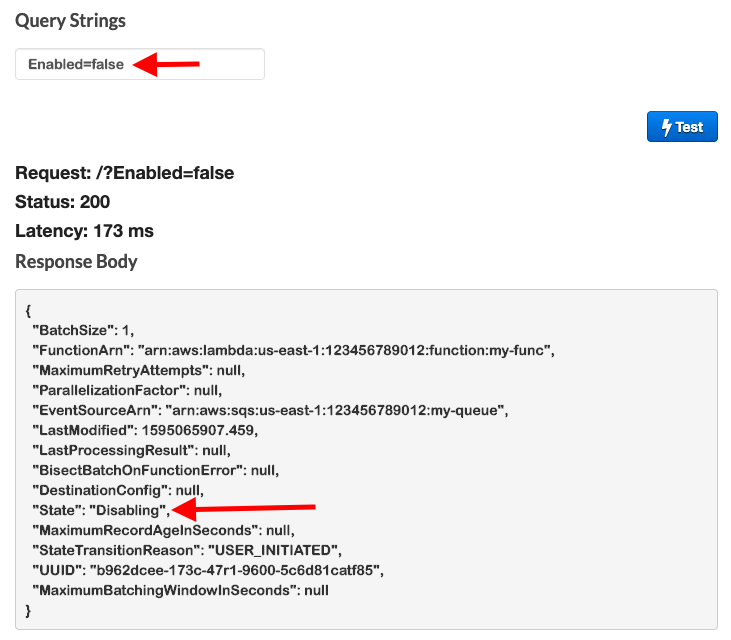
For a detailed screenshot-guided walkthrough of this entire process, see my blog post.

Harish
- 311
- 1
- 6