Some background:
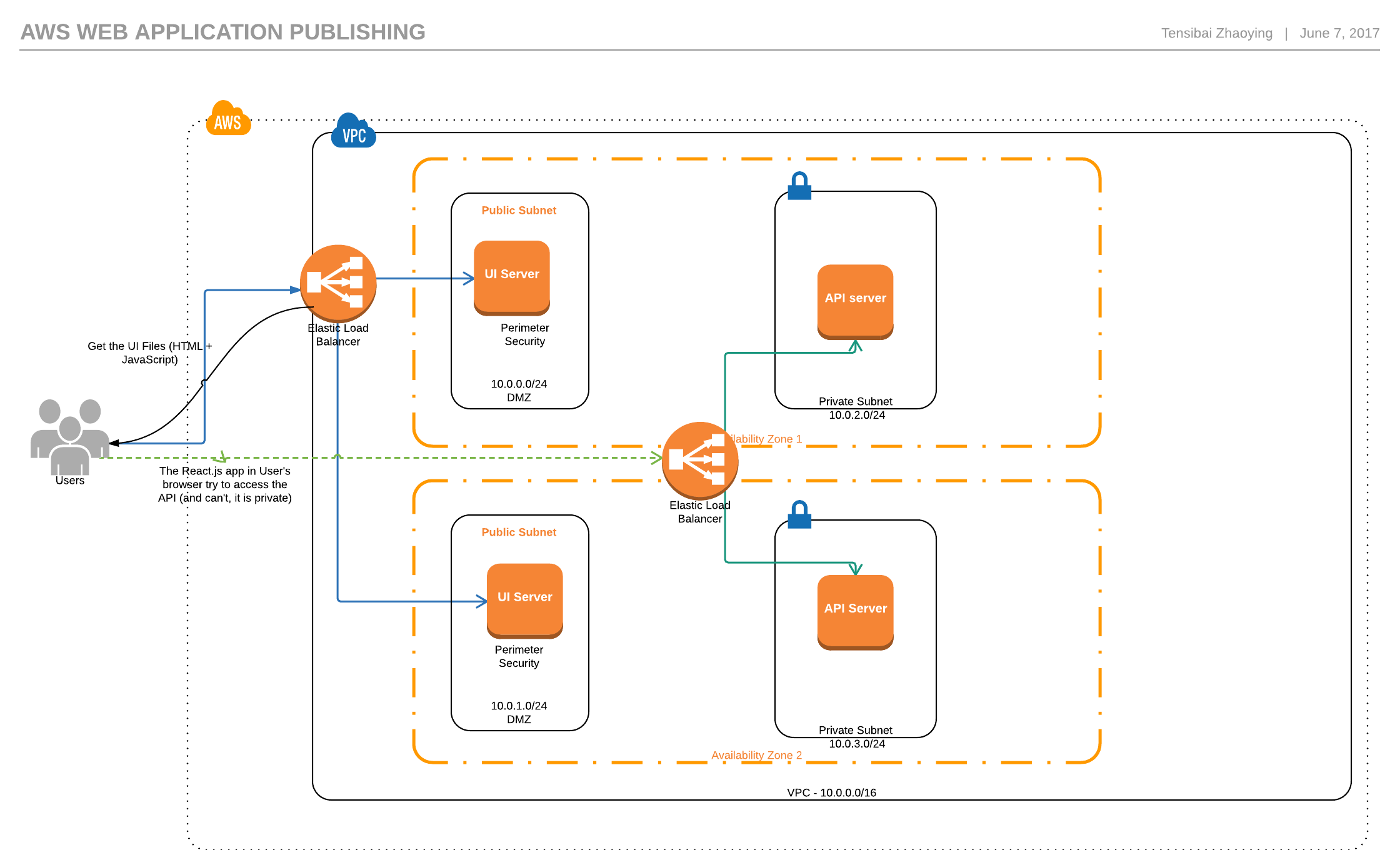
I've created a moderately complex network using Amazon's vpc. It's a three-tiered network across two availability zones. Each layer has a subnet in zone-a and zone-b. The presentation layer is at the top, there’s an application layer in the middle, and a core layer at the bottom.
All of the security groups and ACL's for the subnets are currently allowing ALL inbound and outbound traffic to help me reduce surface area of the issue.
The presentation layer’s routing table is pointing all traffic to an internet gateway. The NAT gateway is in a segregated subnet also pointing all traffic to the internet gateway.
My application has two components, a UI (React.js) and an API (Node/Express). They are deployed as docker images. In front of each is a classic load balancer.
The UI-ELB is internet facing and resides in the presentation layer, routing traffic from 80/443 to port 8080 and is associated with my app-ec2 that is placed in the application-layer subnet.
My API has an internal load balancer in front of it. The API-ELB is in the application layer (in the same subnet as the app-ec2), and takes traffic on port 80/443 and routes it down to the api-ec2 in the core on port 3000.
Both load balancers are offloading the certificate before passing traffic to their instances.
I have both my load balancers associated as alias's in Route53, and referenced in the applications by their pretty url (https://app.website.com). Each load balancer passes the defined healthchecks and reports all ec2 instances in use.
Lastly, on the API I have enabled cors using the cors nodejs package.
Here's a quick and dirty diagram of my network.
The problem:
The APP-ELB successfully routes me to the application. However, when the app tries to send a GET request to the API-ELB, it first sends an OPTIONS request that tims out with the error code 408.
Where it gets weird
Some of the weirdest things I've encountered while debugging are:
- I can SSH into the app-ec2 instance and can run a successful curl against the API-ELB. I’ve tried many, and they all work. A few examples are:
curl -L https://api.website.com/system/healthcheckandcurl -L -X OPTIONS https://api.website.com/system/healthcheck. It always returns the desired information. - I've moved the entire application out of my network into a public default vpc and it works as it's supposed to.
- I have the api-ec2 writing all network requests to the console. While it shows the healthcheck requests, it does not show any requests from the app-ec2. This leads me to believe traffic is not even reaching the api.
Really the biggest thing that has me at a complete loss is that curling the internal api elb works, but the axios request to the same exact url does not. This doesn't make sense to me at all.
What I've tried
I originally spent a lot of time playing with ACL rules and security groups thinking I did something wrong. Eventually I just said, "screw it", and opened everything up to try and take that piece out of the equation.
I've spent way to much time playing with Cors on my api. Eventually landing on the configuration I have now, that is the default app.use(cors()) callback provided by the cors node package. I've also included the app.options('*', cors()) that is recommended in the documentation.
I've google everything under the sun, but specifically whether I need to define some special custom headers with the elbs? But can't seem to find anything. Plus, when I moved my app out of the network it worked just fine.
I'm sure I've tried many other things, but these seem to be the most pertinent. What am I missing? I realize this is potentially a very vague and broad issue, and an enormous post, but I appreciate any insight and your time in reading in it!