41

I need to make some configuration changes on our Jenkins instance that will involve restarting Jenkins a couple of times. However, our developers are committing frequently enough that I haven't seen Jenkins without jobs running in three days.

Is there a native way (either through the GUI or via command line) to safe-restart Jenkins? IE: wait for current jobs to finish before going down, and keep track of queued jobs to start once Jenkins comes back up.

I know there's a plugin but in order to install it I need to restart Jenkins...

Pierre.Vriens
  • 7,225
  • 14
  • 39
  • 84
Alex
  • 4,612
  • 6
  • 29
  • 49

7 Answers7

35

Visiting https://youjenkinsdomain/safeRestart will set it in the mode when it waits for jobs to stop and then restarts.

Nakilon
  • 544
  • 3
  • 7
23

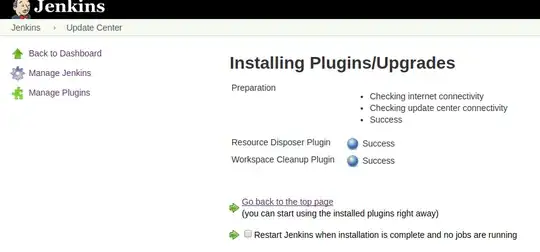
If you navigate to $YOUR_JENKINS_URL/updateCenter/ you should see the following page:

Here you can check Restart Jenkins when installation is complete and no jobs are running which should be fairly safe.

eyalzek
  • 471
  • 4
  • 5
12

You can execute the safeRestart command using either the Jenkins Rest API ([jenkins_url]/safeRestart) or you can execute the command via the Jenkins CLI.

sudo /etc/init.d/jenkins safeRestart

Running a CLI command

The general syntax is as follows (the design is similar to tools like svn/git):

java -jar jenkins-cli.jar [-s JENKINS_URL] command [options...] [arguments...]

JENKINS_URL can be specified via the environment variable $JENKINS_URL. This environment variable is automatically set when Jenkins fork a process during builds, which allows you to use Jenkins CLI from inside the build without explicitly configuring the URL.

NOTE: When running the safeRestart command, any jobs set to be executed during the restart will be queued up and executed when the server is back online. Make sure this does not cause any conflicts upon reboot!

Preston Martin
  • 3,288
  • 4
  • 18
  • 39
5

To restart Jenkins manually, you can use either of the following commands (by entering their URL in a browser):

(jenkins_url)/safeRestart - Allows all running jobs to complete. New jobs will remain in the queue to run after the restart is complete.

(jenkins_url)/restart - Forces a restart without waiting for builds to complete.

Subhash
  • 1,586
  • 11
  • 18
2

Navigate to the Plugin Manager, then click on the Installed tab and scroll to the bottom. There should be a button there that says something along the lines of Restart Jenkins once no jobs are running.

2

I think this is a real problem that many are trying to solve. There are at times where it is preferable to restart Jenkins upon plugin installation. One of the suggestions that I can provide based on my experience is to:

  • Restrict access to the admin module so that not every developer can install plugins
  • Instruct developers on the downtime and inform them ahead of time
  • Install all the required plugins in bulk and restart Jenkins
  • Inform the developers that Jenkins is ready for use

I understand that this requires a manual effort and coordination. But this has worked so far so well in our project, thought no harm in mentioning.

1

Visiting "https://jenkins/safeRestart" does not wait for "jobs/builds" to be finished completely in case of pipeline jobs.

It seems to wait for steps to finish and perform jenkins restart and resume the pipline after jenkins have came up again.