I am very new to ansible and I think I am lacking something basic that I am not finding in the examples or on github as to the directory structure and its use.
I have set up my directory structure using ansible best practices document located here:
https://docs.ansible.com/ansible/latest/user_guide/playbooks_best_practices.html#directory-layout
But the documentation is not clear on how the structure should be used in practice. I have multiple clients in which the inventories must be kept seperate. My directory structure is set up as follows:
inventory/
   client1/
      group_vars/
        all
        credentials.yml <encrypted>
        router
        switch
        firewall
      host_vars/
        router1
        switch1
        firewall1
      hosts
   client2/
      group_vars/
        all
        credentials.yml <encrypted>
        router
        switch
        firewall
      host_vars/
        router1
        switch1
        firewall1
      hosts
roles/
  role1/
     tasks/
       main.yml
  role2/
     tasks/
       main.yml
The hosts files contain routers, switches and firewalls (grouped as such) like this:
[router]
router1 ansible_host=1.2.3.4

[switch]
switch1 ansible_host=5.6.7.8

[firewall]
firewall1 ansible_host=9.10.11.12
The group_vars have router, switch and firewall files with the appropriate variables. There is a credentials.yml in the ./inventory/client name/group_vars directory that is encrypted and should be loaded for every playbook. I understand precedence and I am not having any trouble there.
If I run ansible-playbook -i /path to hostfile/ how do I pick the specific host I want to run against?
ansible-playbook -i inventory/client1/hosts myplaybook.yml <--where can I put the specific host that is in the hosts file? I have tried several different methods and none seem to work. My guess is that I am running the ansible-playbook command from the wrong directory.
If I run ansible-playbook in the correct inventory folder (./inventory/client1/) I can pick the host, but how do I point to the playbooks that are in the root folder without backing up directories each time like this:
ansible-playbook -i hosttarget ../../myplaybook.yml
It seems poor form to have to back out of the directory each time just to run a playbook. If I just put the playbook name, it does not find it so I am thinking that it was not the intention to run ansible-playbook in this way either.
How can I load additional credentials files or group variables? It would be nice if there was a way to pull this from the directory that contains the inventory but I can't figure that out. I was thinking of possibly loading extra_vars in the playbook and setting a value for a variable called "client" in the "all" file, but it seems kludgy and prone to error. I was hoping that there was some type of automatic pull that can be done like the loading of the group_vars and host_vars but maybe I am missing something.
cat ./inventory/client1/all
client=client1

extra_vars=~/inventory/{{ client }}/credentials.yml
My thought is that since the inventory layout is shown as Ansible best practices, then maybe I am not fully understanding of how I should be running playbooks.
It would seem to me that I should be able to run ansible-playbook in the root directory that contains all my plays and point it to an inventory file easily. The playbooks should be reusable across all clients with no changes required and there should be an easy way to load variable files without having to specify them each time at the command line. Ansible already does this very well with group_vars and host_vars so I am thinking that I am just missing something simple.
I have a workaround for this now using the following command line: ansible-playbook -i inventory/atcog ecats_l2l.yml --extra-vars @inventory/atcog/group_vars/credentials.yml
This run a configuration playbook that runs a task that builds a VPN. This VPN is built for a client called atcog. I have to add this very long --extra-vars @inventory/atcog/group_vars/credentials.yml to access the credentials file for the client "atcog". I also have to manually modify the playbook to have it only run the play on a single host by adding - hosts: atcogfirewall-1. It seems like there should be a better way.
So let's say I now want to push this VPN to another client. I now have to edit the playbook and change - hosts: krifirewall-6, then I need to send this command to make sure the right credential file is used: ansible-playbook -i inventory/kri ecats_l2l.yml --extra-vars @inventory/kri/group_vars/credentials.yml
Seems like a lot of places where a typo or forgetting to update a playbook host entry can cause this to run on the wrong device or run with the wrong credentials.
So if I add something like extra_vars=~/inventory/{{ client }}/credentials.yml in the playbook I can likely mitigate the need to put the --extra-vars in the command line but I can't figure out a way to resolve the whole choosing the individual host issue without manually updating the playbook each time which is just asking for human error.
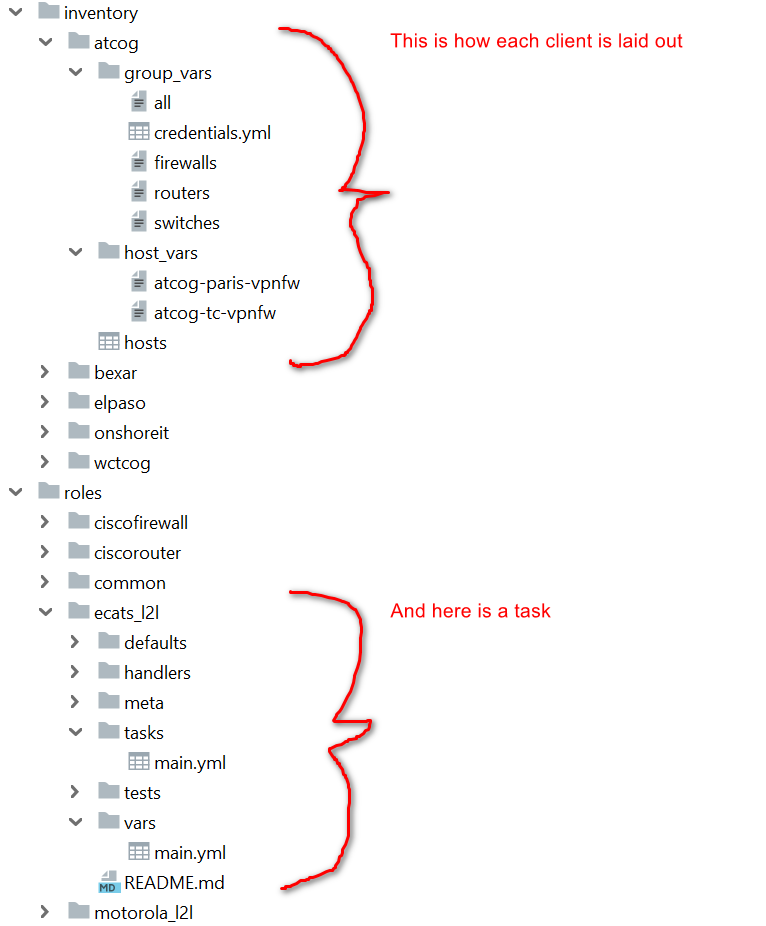
Here is a screenshot of the layout. The playbook I am running is in the root directory but is not shown as I could not capture it all on 1 screen.