My understanding is you want to temporarily assert DTR to see if anything comes out of TXD.
Your documentation says that the vending machine has "DTS" on Pin 1. There is no RS-232 signal with this name: they meant either DTR or possibly CTS. Edit following update in question: It seems like that this is an input.
RS-232 is asymmetric and is defined between a Data Terminal Equipment DTE such as a computer or terminal, and a Data Communication Equitement DCE such as a modem, with "straight through cables". In its classical incarnation you have a visual display such as a VT220 (which is DTE) connected by RS-232 to a modem (which is DCE), and which is then connected by the phone network to another modem (DCE), connected by RS-232 to a minicomputer such as a VAX, which is DTE.
RS-232 is very frequently "misused" to connect two DTEs; either by one of them pretending to be DCE, or wiring it so that both think the other is a DCE -- indeed, this is almost always the case nowadays, and is what is suggested by your cabling note. The trick is all in the wiring and we use a "null modem", "swap cable", or, as in your case, some special cable as the connector is non-standard.
For practical purposes a device wired as DTE means "transmits on TXD, listens on RXD", and if implemented, sends on DTR and RTS, listens on DSR, DCD, CTS. A DCE listens on TXD (and perhaps DTR, RTS), transmits of RXD (and perhaps DSR, DCD, CTS). Devices may very well not implement any handshaking, may implement it "strangely" or indeed "very badly".
But since your device describes itself as connecing to a printer (which is likely to be slow): it looks like TXD is an output from Machine Pin 3, Machine Pin 1 "DTS" is very probably an input designed to be connected to the DTR of the printer, and this needs to be asserted (by the printer) for the machine to consider the printer as ready.
- First, find out if you have RS-232 levels or something else.
- RS-232 levels are Logic 1 = -3 to -15V, Logic 0 = +3 to +15 V
- Put a voltmeter on the TXD pin, should be below -3V ("logic 1")
- Second, find out if Machine Pin 1 is input or output
- If output, will be <-3V or >+3V
- If input, will measure as 0 (though possibly there could be a pullup/pulldown and it will measure nonzero)
- NB: On handshaking lines +ve voltage means "asserted", whereas on data lines +ve voltage means "space". You will see all kinds of voltages given for RS-232, the most usually implemented are +/-5V and +/-12V.
If it turns out that Machine Pin 1 is an input
Then it probably actually is "CTS", "Clear To Send", which tells a DTE it's permitted to transmit. Regardless of the correct RS-232 name for this signal, following your update, it's pretty clear this is indeed an input.
- Try any serial port on a laptop; such as a USB-to-serial converter
- Try looking on an oscilloscope on TXD if necessary with so-called DTR asserted "manually"
Assuming Machine Pin 1 is an input and it is actually RS-232 Levels
- To assert Machine Pin 1 manually, you need to set it to RS-232 Logic 0, which is +3 to +15 V. I normally do this with a 9V battery through 1K resistor (just in case something's wrong), as it's easy to de-assert if necessary. The suggestion in comments of shorting it to the supplied 12V (measure it first!) through 1k is essentially the same, but you can't drive it negative easily.
Cable
Once you get it working, you're basically doing one of the following, shown with D-types for a) clarity, and b) that's how most USB-RS-232 adaptors are:
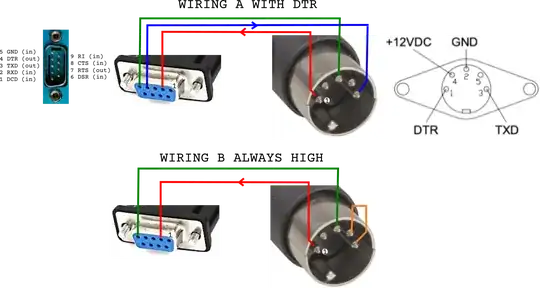
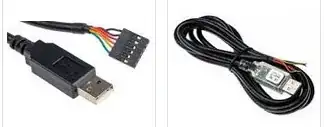
But depending on what's convenient for you, find a USB adaptor which has wire ends like these and make the cable, and then you don't need any of the D-types. As noted in comments, make sure it has RS-232 levels, not TTL levels, on the wires.
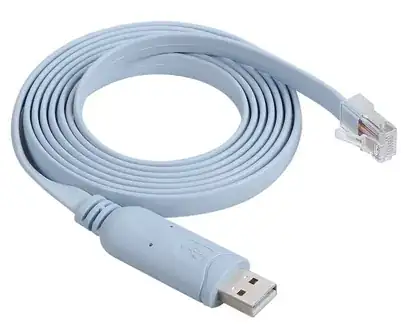
You may well find that those intended for Cisco consoles work well and are easy to adapt by cutting off the RJ-45 plug; they are almost always light blue.
I recommend you read, at least RS-232 at wikipedia, but TI's RS-232 FAQ is also very informative.


