Question
Rpi4B 2GB here. How to install TensorFlow?
Answer
My first installation failed because Rpi's swap file was too small. I
set swap file to 2GB and second installation is more or less
successful (See Appendix B).
Learning Notes
Update 2019 sep29 hkt1613
I increased the swap file to 2GB and installed again.
pi@raspberrypi:~ $ pip install --upgrade tensorflow
This time the installation completed in about 15 minutes, with the message saying something like:
Successfully built absl-py wrapt keras-applications termcolor gast
Failed to build h5py, ...
I think the h5py thing might not be a big deal. I will move on to study the tutorial and do the Keras experiments.
So this is more or less the end of my answer.
Update 2019 sep29 hkt2241
Apology - I missed something very important. When I got the "memory error" message, my immediate thought was that Tensor Flow is for big Windows/Linux machines with perhaps at least 4GB RAM. So I was thinking of trying again on my PC with 6GB RAM.
It was only when @Dmitry Grigoryev suggested me to increase swap size then I realized that the error message "memory error" is for hackers with IQ > 120+. For newbie with IQ a "little bit" lower, a friendly error message should read:
Sorry, your virtual memory seems too small for TensorFlow to do big
things. Perhaps you should increase the swap memory/storage/file a bit
and try your luck again.
Update 2019sep26hkt1743
Bad news. I tried but got "memory error". (My Rpi4B is 2GB version.)
My Rpi4B is 2GB version, free -m shows Total 1939, used 131, free 1525, ...
References
(1) Install TensorFlow - tensor.org (CPU only, Raspbian 9+, python3, pip3)

(2) Installing Machine Learning Software TensorFlow on Raspberry Pi - Rishabh Jain 2019may30
(3) Detect ANY Object (Eg Guitar) with Raspberry Pi and TensorFlow - 2018dec21
(4) How to Install TensorFlow on Rpi - MagPi 2018
(5) How to change Raspberry Pi's Swapfile Size on Raspbian - Shane Pfaffly 2015feb11
(6) Raspberry Pi - How to increase swap size
(7) TensorFlow Tutorials - 2019sep30
(8) Intro to Machine Learning (ML Zero to Hero, part 1) - 2019aug30
(9) TensorFlow 2.0 and Keras (#AskTensorFlow) - 2019jul03
(10) What’s coming in TensorFlow 2.0 - 2019jan15
(11) Standardizing on Keras: Guidance on High-level APIs in TensorFlow 2.0 - 2018dec07
(12) tlfong01's Second TensorFlow Installation Record (PenZu)
Appendices
Appendix A - TensorFlow Installation Error Record
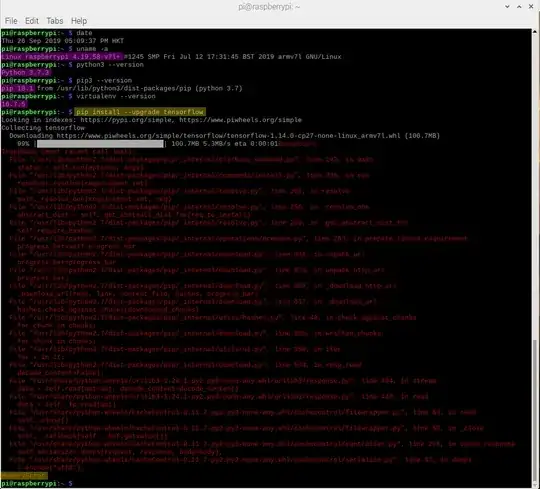
Appendix B - TensorFlow installation looks OK, after enlarging swap to 2GB
(1) Successfully built absl-py wrapt keras-applications termcolor gast
(2) Failed to build h5py
PenZu Record
*** Swap file size testing - tlfong01  2019sep30hkt1540

pi@raspberrypi:~ $ date
Mon 30 Sep 2019 01:47:40 PM HKT

pi@raspberrypi:~ $ uname -a
Linux raspberrypi 4.19.66-v7l+ #1253 SMP Thu Aug 15 12:02:08 BST 2019 armv7l GNU/Linux

pi@raspberrypi:~ $ sudo /etc/init.d/dphys-swapfile stop
[ ok ] Stopping dphys-swapfile (via systemctl): dphys-swapfile.service.

pi@raspberrypi:~ $ sudo /etc/init.d/dphys-swapfile start
[ ok ] Starting dphys-swapfile (via systemctl): dphys-swapfile.service.

pi@raspberrypi:~ $ free -m
              total        used        free      shared  buff/cache   available
Mem:           1939         177        1146          44         615        1632
Swap:          2047           0        2047

---

*** Swap file sizing setting - tlfong01 2019sep30hkt1538 ***

# /etc/dphys-swapfile - user settings for dphys-swapfile package

# where we want the swapfile to be, this is the default
#CONF_SWAPFILE=/var/swap

# set size to absolute value, leaving empty (default) then uses computed value
#   you most likely don't want this, unless you have an special disk situation

#CONF_SWAPSIZE=100 *** comment out tlfong01 2019sep30hkt1343 ***

# set size to computed value, this times RAM size, dynamically adapts,
#   guarantees that there is enough swap without wasting disk space on excess

#CONF_SWAPFACTOR=2 *** uncomment to belwo  tlfong01  2019sep30hkt1345 ***

CONF_SWAPFACTOR=2

# restrict size (computed and absolute!) to maximally this limit
#   can be set to empty for no limit, but beware of filled partitions!
#   this is/was a (outdated?) 32bit kernel limit (in MBytes), do not overrun it
#   but is also sensible on 64bit to prevent filling /var or even / partition

#CONF_MAXSWAP=2048

---

pi@raspberrypi:~ $ pip install --upgrade tensorflow

Looking in indexes: https://pypi.org/simple, https://www.piwheels.org/simple

Collecting tensorflow
  Downloading https://www.piwheels.org/simple/tensorflow/tensorflow-1.14.0-cp27-none-linux_armv7l.whl (100.7MB)
  ...

Building wheels for collected packages: absl-py, wrapt, keras-applications, termcolor, gast, h5py
  ...
  Running setup.py bdist_wheel for h5py ... error
  Complete output from command /usr/bin/python -u -c "import setuptools, tokenize;__file__='/tmp/pip-install-ST0RXd/h5py/setup.py';f=getattr(tokenize, 'open', open)(__file__);code=f.read().replace('\r\n', '\n');f.close();exec(compile(code, __file__, 'exec'))" bdist_wheel -d /tmp/pip-wheel-cgtYcy --python-tag cp27:
  Unable to find pgen, not compiling formal grammar.

  Compiling /tmp/easy_install-9rHdMa/Cython-0.29.13/Cython/Plex/Scanners.py because it changed.
  Compiling /tmp/easy_install-9rHdMa/Cython-0.29.13/Cython/Plex/Actions.py because it changed.
  Compiling /tmp/easy_install-9rHdMa/Cython-0.29.13/Cython/Compiler/Scanning.py because it changed.
  Compiling /tmp/easy_install-9rHdMa/Cython-0.29.13/Cython/Compiler/Visitor.py because it changed.
  Compiling /tmp/easy_install-9rHdMa/Cython-0.29.13/Cython/Compiler/FlowControl.py because it changed.
  Compiling /tmp/easy_install-9rHdMa/Cython-0.29.13/Cython/Runtime/refnanny.pyx because it changed.
  Compiling /tmp/easy_install-9rHdMa/Cython-0.29.13/Cython/Compiler/FusedNode.py because it changed.
  Compiling /tmp/easy_install-9rHdMa/Cython-0.29.13/Cython/Tempita/_tempita.py because it changed.
  [1/8] Cythonizing /tmp/easy_install-9rHdMa/Cython-0.29.13/Cython/Compiler/FlowControl.py
  [2/8] Cythonizing /tmp/easy_install-9rHdMa/Cython-0.29.13/Cython/Compiler/FusedNode.py
  [3/8] Cythonizing /tmp/easy_install-9rHdMa/Cython-0.29.13/Cython/Compiler/Scanning.py
  [4/8] Cythonizing /tmp/easy_install-9rHdMa/Cython-0.29.13/Cython/Compiler/Visitor.py
  [5/8] Cythonizing /tmp/easy_install-9rHdMa/Cython-0.29.13/Cython/Plex/Actions.py
  [6/8] Cythonizing /tmp/easy_install-9rHdMa/Cython-0.29.13/Cython/Plex/Scanners.py
  [7/8] Cythonizing /tmp/easy_install-9rHdMa/Cython-0.29.13/Cython/Runtime/refnanny.pyx
  [8/8] Cythonizing /tmp/easy_install-9rHdMa/Cython-0.29.13/Cython/Tempita/_tempita.py
  warning: no files found matching 'Doc/*'
  warning: no files found matching '*.pyx' under directory 'Cython/Debugger/Tests'
  warning: no files found matching '*.pxd' under directory 'Cython/Debugger/Tests'
  warning: no files found matching '*.pxd' under directory 'Cython/Utility'
  warning: no files found matching 'pyximport/README'

  Installed /tmp/pip-install-ST0RXd/h5py/.eggs/Cython-0.29.13-py2.7-linux-armv7l.egg
  running bdist_wheel
  running build
  running build_py
  creating build
  creating build/lib.linux-armv7l-2.7
  creating build/lib.linux-armv7l-2.7/h5py
  ...

  running build_ext
  ('Loading library to get version:', 'libhdf5.so')
  error: libhdf5.so: cannot open shared object file: No such file or directory

  ----------------------------------------
  Failed building wheel for h5py
  Running setup.py clean for h5py

Successfully built absl-py wrapt keras-applications termcolor gast
Failed to build h5py

Installing collected packages: absl-py, keras-preprocessing, futures, setuptools, protobuf, grpcio, markdown, tensorboard, wrapt, backports.weakref, h5py, keras-applications, astor, termcolor, gast, google-pasta, tensorflow-estimator, tensorflow
  The script markdown_py is installed in '/home/pi/.local/bin' which is not on PATH.
  Consider adding this directory to PATH or, if you prefer to suppress this warning, use --no-warn-script-location.
  The script tensorboard is installed in '/home/pi/.local/bin' which is not on PATH.
  Consider adding this directory to PATH or, if you prefer to suppress this warning, use --no-warn-script-location.
  Running setup.py install for h5py ... error
    Complete output from command /usr/bin/python -u -c "import setuptools, tokenize;__file__='/tmp/pip-install-ST0RXd/h5py/setup.py';f=getattr(tokenize, 'open', open)(__file__);code=f.read().replace('\r\n', '\n');f.close();exec(compile(code, __file__, 'exec'))" install --record /tmp/pip-record-uS3h19/install-record.txt --single-version-externally-managed --compile --user --prefix=:
    running install
    running build
    running build_py
    running build_ext
    ('Loading library to get version:', 'libhdf5.so')
    error: libhdf5.so: cannot open shared object file: No such file or directory

    ----------------------------------------
Command "/usr/bin/python -u -c "import setuptools, tokenize;__file__='/tmp/pip-install-ST0RXd/h5py/setup.py';f=getattr(tokenize, 'open', open)(__file__);code=f.read().replace('\r\n', '\n');f.close();exec(compile(code, __file__, 'exec'))" install --record /tmp/pip-record-uS3h19/install-record.txt --single-version-externally-managed --compile --user --prefix=" failed with error code 1 in /tmp/pip-install-ST0RXd/h5py/
pi@raspberrypi:~ $

.END
End of answer and learning notes. Comments follow, ...


