13

I have 3 raspberryPIs and all them are dropping wifi connection after sometime.

  1. Wifi chipset is Ralink RT5370
  2. Tried power supply with 1000A and 1500A
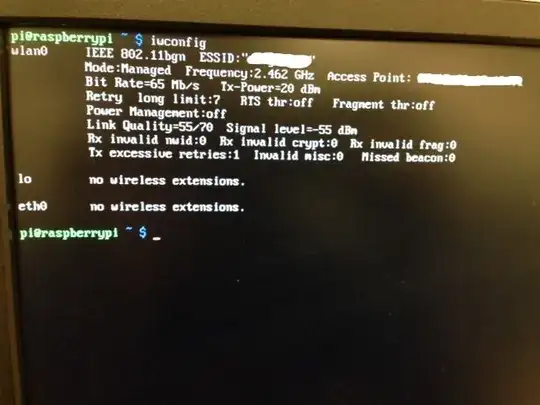
  3. Power management is turned off.
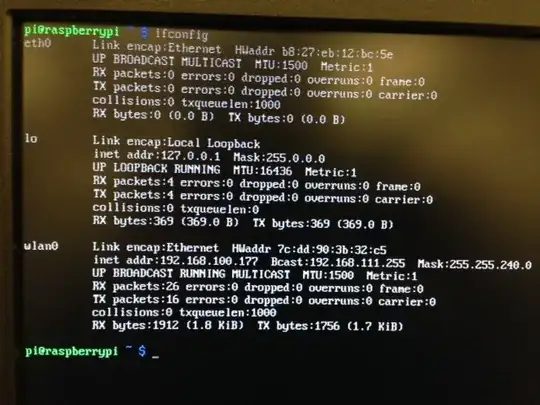
  4. ifconfig gives this:

enter image description here

But when I do a ping google.com, it times out. So technically it has a valid IP address and it is connected.

The problem is consistently reproducible when I do data intensive job from the internet. Like when I do a apt-get install nmap, it hangs after 48-50% and the network drops.

So how can I troubleshoot this problem?

iwconfig: enter image description here

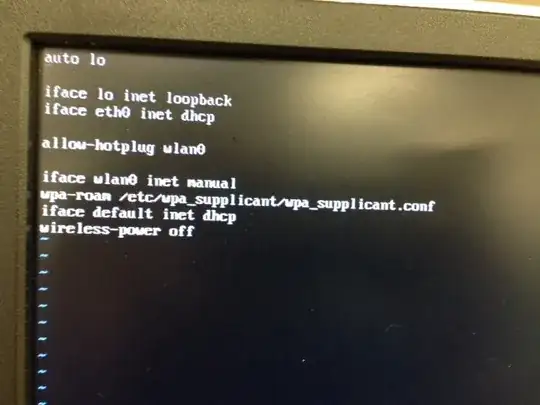
/etc/network/interfaces file

enter image description here

zengr
  • 525
  • 2
  • 5
  • 17

9 Answers9

8

I see that you mentioned the power management, but this may help somebody else as it helped me:

I used the steps from https://learn.adafruit.com/adafruits-raspberry-pi-lesson-3-network-setup/test-and-configure#fixing-wifi-dropout-issues to disable the power-saving mode in WiFi and it helped with my rpi2, no powered USB hub needed.

Create new file:

sudo nano /etc/modprobe.d/8192cu.conf

and paste this:

# Disable power saving
options 8192cu rtw_power_mgnt=0 rtw_enusbss=1 rtw_ips_mode=1

then reboot

sudo reboot
Ekus
  • 181
  • 1
  • 2
6

Forget the "rating" of the PSU - this is often misleading, and the Pi limits current, so it is not possible to draw more than 1A, even if the PSU can really supply this.

Use a powered hub (or otherwise power the WiFi adapter). The Pi can supply at most 300mA to peripherals, and this is often insufficient for WiFi.

One other option is to bypass the polyfuse.

Milliways
  • 62,573
  • 32
  • 113
  • 225
6

In new Linux OS version installed via NOOBS, the name of the 8192 driver has been changed from 8192cu to rtl8192cu. You will need to set the power management options in /etc/modprobe.d/8192cu.conf file as follows:

options rtl8192cu rtw_power_mgnt=0 rtu_enusbss=0

If you do not rename this driver in options, the options are not recognized by the OS during boot up.

For naming conventions, I renamed 8192cu.conf file to rtl8192cu.conf.

Jacobm001
  • 11,904
  • 7
  • 47
  • 58
Rofe
  • 61
  • 1
  • 1
3

The other solutions here did not help me, however this solution from modmypi.com did:

Edit the wlan0 section of: /etc/network/interfaces

auto wlan0
allow-hotplug wlan0
iface wlan0 inet dhcp
wpa-conf /etc/wpa_supplicant/wpa_supplicant.conf
wireless-power off
iface default inet dhcp 

The above code block turns WiFi power saving off, brings up the wlan interface automatically, and ensures you are using DHCP.

zengr
  • 525
  • 2
  • 5
  • 17
Ralph
  • 447
  • 5
  • 8
3

the final solution is running a scrip to reconnect the net. here is a script: https://github.com/wxlcat/NetReconnector

nickwang
  • 31
  • 1
2

I encountered this problem with the with the Edimax WiFi Adapter (EW-7811UN).

After a bit of frustration I finally solved it. This is taken from my post on sparkfun.com

Many users complain that this drops connections. I found this to be true, but after some digging I found that the root of the problem was not the adapter, but Raspian attempting to save power by shutting off the WiFi adapter when it becomes idle. If you are experiencing dropped connections, open terminal and make a file 8192cu.conf in directory /etc/modprobe.d/ with the command:

sudo nano /etc/modprobe.d/8192cu.conf

Then add the following line to the file

options 8192cu rtw_power_mgnt=0 rtw_enusbss=0

You should be all set! No more dropped connections!

Accentrix
  • 122
  • 1
  • 2
  • 10
2

From the perspective today. You should not work rename your 8192cu.conf to rtl8192cu.conf because it is blacklisted on dist Linux 4.14.72-v7+ due to driver problems. Even the other informations above won't work for me.

If you want to confirm it by urself just look...

ls -a /etc/modprobe.d/

You will see "blacklist-rtl8192.cu.conf"

You can try this. It helped me with my bad connection and i'm on a fresh installed raspbian light with linux latest dist 4.14.72-v7+

 sudo iwconfig wlan0 channel auto
 sudo iwconfig wlan0 power off
 sudo iwconfig wlan0 txpower auto
 sudo iwconfig wlan0 rate auto
 sudo iwconfig wlan0 rts 2304
 sudo iwconfig wlan0 frag 2304

confirm with sudo iwconfig that all settings applied.

rts and frag can b set 0 - 2347 and represents bytes. You can play with this values and look what fits best for you.

The problem ist that you have to restart your wlan after that and after reboot your settings get lost. So put them into startup properly to start them with your system.

sudo nano /etc/rc.local

paste above the stuff before exit 0 and don't forget to save!

Last but not least. Your HDMI Cable can make you hard times also. Don't use cheap cables because the signals will be interrupted from the wlan. Even hardmetal cases and +48v phantom sound stuff can interrupt your wifin con on pie. (my cable made me hard times and i read about it in the raspbian forums)

The script will be lost every time after restart. You should build a bashscript or start up script to load it on start (Follow link for more infos on that):Execute script on start-up
Alex
  • 21
  • 2
0

I tried this fix, and it seemed to help some, but I was still getting dropouts. But another forum suggested setting rtw_enusbss=0, and that seems to be working better.

0

What worked for me:

  1. Go to the menu options.
  2. Preferences -> Raspberry PI Configuration -> Localisation -> Set WiFi Country.
  3. Set the country.
  4. Reboot.

Problem solved.