I'm trying to film with my PI B+ with motion. I'm using the RPi camera board (so no USB), and got that working (which is nice).
The thing is, is that the recorded video is not real time. What I mean is that you see all the images behind each other instead of an fluid film.
How can I achieve something that is as closed as possible to normal filming?
Here's an link to the motion.conf file
The most important settings:
###########################################################
# Capture device options
############################################################

# Videodevice to be used for capturing  (default /dev/video0)
# for FreeBSD default is /dev/bktr0
videodevice /dev/video0

# v4l2_palette allows to choose preferable palette to be use by motion
# to capture from those supported by your videodevice. (default: 8)
# E.g. if your videodevice supports both V4L2_PIX_FMT_SBGGR8 and
# V4L2_PIX_FMT_MJPEG then motion will by default use V4L2_PIX_FMT_MJPEG.
# Setting v4l2_palette to 1 forces motion to use V4L2_PIX_FMT_SBGGR8
# instead.
#
# Values :
# V4L2_PIX_FMT_SN9C10X : 0  'S910'
# V4L2_PIX_FMT_SBGGR8  : 1  'BA81'
# V4L2_PIX_FMT_MJPEG   : 2  'MJPEG'
# V4L2_PIX_FMT_JPEG    : 3  'JPEG'
# V4L2_PIX_FMT_RGB24   : 4  'RGB3'
# V4L2_PIX_FMT_UYVY    : 5  'UYVY'
# V4L2_PIX_FMT_YUYV    : 6  'YUYV'
# V4L2_PIX_FMT_YUV422P : 7  '422P'
# V4L2_PIX_FMT_YUV420  : 8  'YU12'
v4l2_palette 8

# Tuner device to be used for capturing using tuner as source (default /dev/tuner0)
# This is ONLY used for FreeBSD. Leave it commented out for Linux
; tunerdevice /dev/tuner0

# The video input to be used (default: 8)
# Should normally be set to 0 or 1 for video/TV cards, and 8 for USB cameras
input 8

# The video norm to use (only for video capture and TV tuner cards)
# Values: 0 (PAL), 1 (NTSC), 2 (SECAM), 3 (PAL NC no colour). Default: 0 (PAL)
norm 0

# The frequency to set the tuner to (kHz) (only for TV tuner cards) (default: 0)
frequency 0

# Rotate image this number of degrees. The rotation affects all saved images as
# well as mpeg movies. Valid values: 0 (default = no rotation), 90, 180 and 270.
rotate 0

# Image width (pixels). Valid range: Camera dependent, default: 352 // 640
width 1280

# Image height (pixels). Valid range: Camera dependent, default: 288 // 480
height 720

# Maximum number of frames to be captured per second.
# Valid range: 2-100. Default: 100 (almost no limit).
framerate 100

# Minimum time in seconds between capturing picture frames from the camera.
# Default: 0 = disabled - the capture rate is given by the camera framerate.
# This option is used when you want to capture images at a rate lower than 2 per second.
minimum_frame_time 0
As you can see, I've setup the frame rate all the way up to 100 (maximum), So I don't know what I could do more...
Update
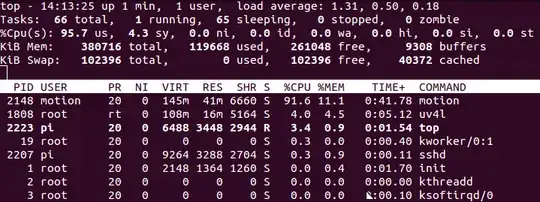
Here's an screenshot of top when motion is on 100fps:
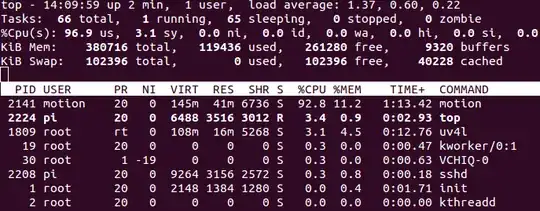
Here's an screenshot of top when motion is on 60fps: