I have a VPN server with Wireguard and OpenVPN on it. Most of my tunnels are OpenVPN, but I am working on transitioning over to Wireguard. The Wireguard server is at a main location, and I have 3 clients the same remote site. Two have a Wireguard tunnel, and one has an OpenVPN tunnel. The client on the OpenVPN tunnel sees no packet loss. I have a ping running to from a system at the site that doesn't have a tunnel at all and see no packet loss from that site to the VPN server.
But the two Wireguard clients see packet loss of about 5-10 minutes every ~2 hours. I have included an image with the smokeping results for the 3 clients the OpenVPN is the top graph, the following two are Wireguard clients.
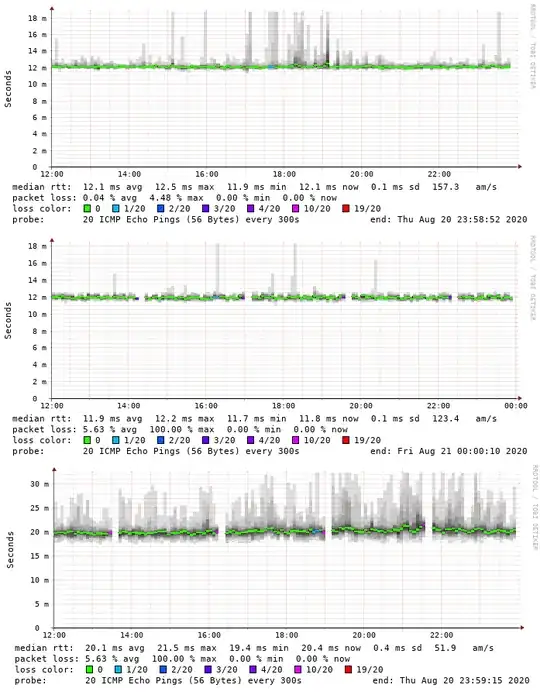
Right now since it is just in a testing phase my Wireguard clients have a bare-bones config with basically no routing. I have wg setup as several of point-to-point tunnels.
The config for one of the tunnels between the client/server looks like this. The smokeping is running on the VPN server and pinging the far end IPv4 address of the tunnels
vpn server config
[Interface]
PrivateKey = ...
ListenPort = 32012
Address = 10.3.199.24
Address = fd6c:d0ed:2749:20c7::18
[Peer]
AllowedIPs = 10.3.199.24/31
AllowedIPs = fd6c:d0ed:2749:20c7::18/127
PublicKey = ...
PersistentKeepalive = 120
vpn client config
[Interface]
PrivateKey = ...
Address = 10.3.199.25
Address = fd6c:1111:1111:20c7::19
[Peer]
AllowedIPs = 10.3.199.24/31
AllowedIPs = fd6c:1111:1111:20c7::18/127
Endpoint = publicvpnip:32012
PublicKey = ...
PersistentKeepalive = 120
Since a ping running outside of Wireguard shows no loss, and OpenVPN shows no loss, it makes me suspect something isn't right with Wireguard, but I have no idea what.
All computers involved are running Debian buster with the the latest backports version of Wireguard and a 5.7 'amd64' kernel.
ii  wireguard                          1.0.20200513-1~bpo10+1            all          fast, modern, secure kernel VPN tunnel (metapackage)
ii  wireguard-tools                    1.0.20200513-1~bpo10+1            amd64        fast, modern, secure kernel VPN tunnel (userland utilities)
ii  linux-image-5.7.0-0.bpo.2-amd64    5.7.10-1~bpo10+1                  amd64        Linux 5.7 for 64-bit PCs (signed)
So does anyone have any ideas about where do I find out where this is coming from? I don't see anything useful being logged anywhere, and no apparently packet loss of a client not using a VPN, or an OpenVPN client I assume it is not related to anything about the network.
