0

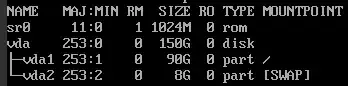
My question is how to resize partition on Debian 8 without losing any data? I have 90 GB partition but my disk has 150 GB space on VPS server, so 50 GB is free and I want to add this 50 GB without losing any data, this is how it presents:

2

I've tried using resize2fs command but this didn't helped me because it shows me an error :

Filesystem is already n blocks long. Nothing to do!

I've already extended a partition on Debian 11 with resize2fs and everything was fine, here I don't know why but It doesn't want to work.

EDIT

enter image description here

Piotror
  • 13

2 Answers2

2

According to your disk layout, you have to

(0) move away the swap partition to leave space for extending vda1; partition space must be contiguous. for this purpose:

  • disable swap, with swapoff /dev/vda2 (/dev/vda2 is your swap device file. Always check my arguments)
  • remove swap partition using parted /dev/vda rm partno where partno is the swap partition number according to parted /dev/vda, (it should 2 ?)
  • recreate the swap partition at the end of the disk, with /dev/parted /dev/vda mkpart -4G -1s. Negative numbers here are references from the end of the disk, meaning that the partition spans the last 4GiB of the disk (-1s means the partition ends at the last sector of disk, which is impossible as this will overwrite the secondary GPT header, so parted will modify the exact start/end and alignment of the partition (you'll be prompted). The partition will be created with the same number 2. So the device file will be named /dev/vda2. You have to check it.
  • re-enable the swap, with mkswap /dev/vda2 then swapon /dev/vda2
  • update the line having RESUME= in /etc/initramfs-tools/conf.d/resume if any. This line specifies the partition used for hibernation, and it is identified either with UUID=... or LABEL=.... You can find the swap partition UUID or label using blkid
  • update the line describing the swap partition in the fs table /etc/fstab. Just update UUID, label or partition number (depending on how the swap partition is designated in the file)

Once swap is moved away, you have to

(1) resize your root partition, which now has free space next to it. You can use command growpart (from package cloud-utils) which makes a partition use all the available space. If you cannot get this package on your system, you can do it manually with the subcommand resizepart of parted, telling only partition number (1?) and the END position (in blocks). Refer to parted /dev/vda to get expected END position. parted will prevent you from accidentally overwrite the swap.

(2) resize the filesystem (ext4 can be grown online, no need to unmount it) using resize2fs /dev/vda1

These steps will solve your issue, normally with no dataloss. However it is recommended to backup the most important data.

0

You need to remove swap partition, extend the data partition and re-create the swap if you need it.

If you have enough free memory (swap is not used much), you may do this without interruption the service. Begin with: swapoff /dev/vda2, to release the swap. If you unable to do that (not enough memory), you'll need to stop memory-consuming services until you can disable swap.

After successfull swapoff, run fdisk /dev/vda and remove the second partition.

Now decide how much swap do you need and calculate where should it begin. For instance, if you want to have exactly 8 GiB (16777216 sectors) swap as you have now, and you have exactly 150 GiB (314572800 sectors) disk, your swap should begin at sector 314572800-16777216 = 297795584. So create new vda2 partition of type 82 (Linux swap), which begins on this sector and the 314572799 (it should suggest this value by itself). Don't use my numbers blindly, calculate them yourself, because I made an assumption about the disk size — you somewhat hide parts of information that could make this calculation exact. (And in the future don't post screenshots of the console, but just copy and paste it as text, that's much better. And don't omit such information as disk partitioning, better copy complete output; it couldn't be used to identify you or to do any harm, but makes life easier.)

When you recreated swap partition at the end of the drive, you may extend your first partition. It is described in detail in this answer, so I just outline it here and you can always refer there for the details.

Notice your vda1 begins at sector 2048. This is very important!

  1. Remove the first partition. Yes, do it. Yes, on the running system. Nothing will happen and nothing will be lost.
  2. Create new partition 1, it should begin at exact sector 2048 and end at or past the current last sector, 188745727. Make sure your new partition begins at 2048 and is not any smaller that it was! Also notice, it may detect a file system signature and suggest to wipe it. Don't wipe.
  3. Commit changes to disk (w), fdisk should exit and say that partition table is written, but kernel still uses old partition table. Use kpartx or partprobe to reload it, as it suggests. Or disable swap in /etc/fstab and reboot (you need to disable it for it to not halt boot due to missing swap signature).
  4. At this point your lsblk should already show new partition size. You may extend the file system with resize2fs /dev/vda1. As for swap, create new swap structure with mkswap /dev/vda2 and, if /etc/fstab refers to swap using UUID, update it with new value that mkswap had printed to you.