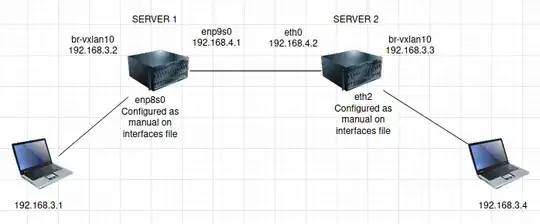
Drop the dev parameter when you create the vxlan links (ip link add vxlan10 type vxlan id 10 local 198.168.4.1 remote 192.168.4.2 dev enp9s0 dstport 4789); this isn't necessary when creating point-to-point links. The bridge fdb append command is also unnecessary (but harmless).
I set up a simulation of your network topology to test things out; in my environment, server1 and server2 have interfaces eth0 and eth1, with eth0 connected to the "transit" network (192.168.4.0/24) and eth1 connected to the "lan" network (192.168.3.0/24).
With the following configuration on server1:
ip addr add 192.168.4.1/24 dev eth0
ip link set eth0 up
ip link add br-vxlan10 type bridge
ip addr add 192.168.3.2/24 dev br-vxlan10
ip link set br-vxlan10 up
ip link set master br-vxlan10 dev eth1
ip link set eth1 up
ip link add vxlan10 type vxlan id 10

  local 192.168.4.1 remote 192.168.4.2 dstport 4789
ip link set master br-vxlan10 dev vxlan10
ip link set vxlan10 up
And this configuration on server2:
ip addr add 192.168.4.2/24 dev eth0
ip link set eth0 up
ip link add br-vxlan10 type bridge
ip addr add 192.168.3.3/24 dev br-vxlan10
ip link set br-vxlan10 up
ip link set master br-vxlan10 dev eth1
ip link set eth1 up
ip link add vxlan10 type vxlan id 10

  local 192.168.4.2 remote 192.168.4.1 dstport 4789
ip link set master br-vxlan10 dev vxlan10
ip link set vxlan10 up
I can successfully ping from 192.168.3.1 to 192.168.3.4:
root@lan1host1:/# ping -c1 192.168.3.4
PING 192.168.3.4 (192.168.3.4) 56(84) bytes of data.
64 bytes from 192.168.3.4: icmp_seq=1 ttl=64 time=0.690 ms
--- 192.168.3.4 ping statistics ---
1 packets transmitted, 1 received, 0% packet loss, time 0ms
rtt min/avg/max/mdev = 0.690/0.690/0.690/0.000 ms
Watching traffic on server1, we see:
root@server1:/# tcpdump -i any -nn
[...]
16:33:38.082586 eth1  P   IP 192.168.3.1 > 192.168.3.4: ICMP echo request, id 83, seq 1, length 64
16:33:38.082599 vxlan10 Out IP 192.168.3.1 > 192.168.3.4: ICMP echo request, id 83, seq 1, length 64
16:33:38.082607 eth0  Out IP 192.168.4.1.41829 > 192.168.4.2.4789: VXLAN, flags [I] (0x08), vni 10
IP 192.168.3.1 > 192.168.3.4: ICMP echo request, id 83, seq 1, length 64
16:33:38.082845 eth0  In  IP 192.168.4.2.41829 > 192.168.4.1.4789: VXLAN, flags [I] (0x08), vni 10
IP 192.168.3.4 > 192.168.3.1: ICMP echo reply, id 83, seq 1, length 64
16:33:38.082845 vxlan10 P   IP 192.168.3.4 > 192.168.3.1: ICMP echo reply, id 83, seq 1, length 64
16:33:38.082859 eth1  Out IP 192.168.3.4 > 192.168.3.1: ICMP echo reply, id 83, seq 1, length 64
And on server2:
root@server2:/# tcpdump -i any -nn
[...]
16:34:22.302069 eth0  In  IP 192.168.4.1.41829 > 192.168.4.2.4789: VXLAN, flags [I] (0x08), vni 10
IP 192.168.3.1 > 192.168.3.4: ICMP echo request, id 84, seq 1, length 64
16:34:22.302069 vxlan10 P   IP 192.168.3.1 > 192.168.3.4: ICMP echo request, id 84, seq 1, length 64
16:34:22.302096 eth1  Out IP 192.168.3.1 > 192.168.3.4: ICMP echo request, id 84, seq 1, length 64
16:34:22.302198 eth1  P   IP 192.168.3.4 > 192.168.3.1: ICMP echo reply, id 84, seq 1, length 64
16:34:22.302204 vxlan10 Out IP 192.168.3.4 > 192.168.3.1: ICMP echo reply, id 84, seq 1, length 64
16:34:22.302213 eth0  Out IP 192.168.4.2.41829 > 192.168.4.1.4789: VXLAN, flags [I] (0x08), vni 10
IP 192.168.3.4 > 192.168.3.1: ICMP echo reply, id 84, seq 1, length 64