I'm currently facing some troubles while trying to set up a Lab between Windows 11 PC (with Credential Guard & TLS 1.3 enabled by default) and a FreeRADIUS server using EAP-TLS.
- Basically, it looks like
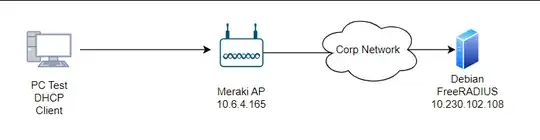

Where Win 11 PC is configured to use EAP-TLS with its machine certificate to authenticate to my Lab SSID. Machine certificate is delivered by GPO (machine cert auto-enroll) with an on prem Windows 3-tiers PKI.
Where FreeRADIUS server (v3.2.7-1) based on Debian 12 is configured to allow 10.0.0.0/8 NACs with a passphrase.
client test {
    ipaddr = 10.0.0.0/8
    secret = testing123
}
Also, I enabled the current configuration for EAP within mods-available/eap
eap {
        default_eap_type = tls
        timer_expire = 60
        ignore_unknown_eap_types = no
        cisco_accounting_username_bug = no
        max_sessions = ${max_requests}
}
        tls-config tls-common {
                #private_key_password = whatever
                private_key_file = ${certdir}/myfreeradius_server.key
                certificate_file = ${certdir}/myfreeradius_server.pem
                ca_file = ${cadir}/my_corp_root_ca.pem
                ca_path = ${cadir}
                tls_min_version = "1.2"
                tls_max_version = "1.3"
}
- At the moment, if I try this configuration from another Debian server with eapol cli
eapol_test -c wpa_supplicant-tls.conf -a 10.230.102.108 -s testing123where wpa_supplicant-tls.conf contains :
ap_scan=0
network={
    eap=TLS
    eapol_flags=0
    key_mgmt=IEEE8021X
    identity="my_ad_account@domain.net"
    client_cert="my_user_cert.pem"
    private_key="my_user_privkey.key"
    # CA certificate to validate the RADIUS server's identity
    ca_cert="my_corp_root_ca.pem"
    phase1="tls_disable_tlsv1_3=0"
}
=> It works well, client show SUCCESS status and RADIUS server proceed to the request.
The pain is :
When I try to access the test SSID, wifi connection from Win 11 PC loads,loads, and never ends.
Meraki AP say :
Client made an 802.1X authentication request to the RADIUS server, but it did not respond. auth_mode='wpa2-802.1x' vlan_id='32' radius_proto='ipv4' radius_ip='10.230.102.108' reason='radius_timeout' reassoc='1' radio='0' vap='10' channel='1' rssi='40'
FreeRadius receives that kind of logs :
Waking up in 4.7 seconds.
(5) Received Access-Request Id 5 from 10.6.4.165:50147 to 10.230.102.108:1812 length 413
(5)   User-Name = "host/my_PC.my-domain.net"
(5)   NAS-IP-Address = 10.6.4.165
(5)   NAS-Identifier = "E0-CB-BC-8B-65-ED:vap10"
(5)   NAS-Port-Type = Wireless-802.11
(5)   Service-Type = Framed-User
(5)   NAS-Port = 1
(5)   Calling-Station-Id = "F4-D1-08-87-72-56"
(5)   Connect-Info = "CONNECT 54.00 Mbps / 802.11n / RSSI: 38 / Channel: 1"
(5)   Acct-Session-Id = "479273B6606E05AE"
(5)   Acct-Multi-Session-Id = "BA3341F3610DFCF9"
(5)   WLAN-Pairwise-Cipher = 1027076
(5)   WLAN-Group-Cipher = 1027076
(5)   WLAN-AKM-Suite = 1027073
(5)   Meraki-Network-Name = "APW-Wifi- - wireless"
(5)   Meraki-Ap-Name = "MyWifiAP"
(5)   Meraki-Ap-Tags = "  recently-added "
(5)   Called-Station-Id = "E0-CB-BC-8B-65-ED:00-Test-W11"
(5)   Meraki-Device-Name = "MyWifiAP"
(5)   Framed-MTU = 1400
(5)   EAP-Message = 0x021b00060d00
(5)   State = 0x943a85b2902188fe8217870d8617c1ba
(5)   Message-Authenticator = 0x63c15f58f21aa1566869606e3b3b7609
(5) Restoring &session-state
(5)   &session-state:Framed-MTU = 994
(5)   &session-state:TLS-Session-Information = "(TLS) TLS - recv TLS 1.3 Handshake, ClientHello"
(5)   &session-state:TLS-Session-Information = "(TLS) TLS - send TLS 1.3 Handshake, ServerHello"
(5)   &session-state:TLS-Session-Information = "(TLS) TLS - send TLS 1.3 ChangeCipherSpec"
(5)   &session-state:TLS-Session-Information = "(TLS) TLS - send TLS 1.3 Handshake, EncryptedExtensions"
(5)   &session-state:TLS-Session-Information = "(TLS) TLS - send TLS 1.3 Handshake, CertificateRequest"
(5)   &session-state:TLS-Session-Information = "(TLS) TLS - send TLS 1.3 Handshake, Certificate"
(5)   &session-state:TLS-Session-Information = "(TLS) TLS - send TLS 1.3 Handshake, CertificateVerify"
(5)   &session-state:TLS-Session-Information = "(TLS) TLS - send TLS 1.3 Handshake, Finished"
(5) # Executing section authorize from file /etc/freeradius/sites-enabled/default
(5)   authorize {
(5)     policy filter_username {
(5)       if (&User-Name) {
(5)       if (&User-Name)  -> TRUE
(5)       if (&User-Name)  {
(5)         if (&User-Name =~ / /) {
(5)         if (&User-Name =~ / /)  -> FALSE
(5)         if (&User-Name =~ /@[^@]*@/ ) {
(5)         if (&User-Name =~ /@[^@]*@/ )  -> FALSE
(5)         if (&User-Name =~ /\.\./ ) {
(5)         if (&User-Name =~ /\.\./ )  -> FALSE
(5)         if ((&User-Name =~ /@/) && (&User-Name !~ /@(.+)\.(.+)$/))  {
(5)         if ((&User-Name =~ /@/) && (&User-Name !~ /@(.+)\.(.+)$/))   -> FALSE
(5)         if (&User-Name =~ /\.$/)  {
(5)         if (&User-Name =~ /\.$/)   -> FALSE
(5)         if (&User-Name =~ /@\./)  {
(5)         if (&User-Name =~ /@\./)   -> FALSE
(5)       } # if (&User-Name)  = notfound
(5)     } # policy filter_username = notfound
(5)     [preprocess] = ok
(5)     [chap] = noop
(5)     [mschap] = noop
(5)     [digest] = noop
(5) suffix: Checking for suffix after "@"
(5) suffix: No '@' in User-Name = "host/my_PC.my-domain.net", looking up realm NULL
(5) suffix: No such realm "NULL"
(5)     [suffix] = noop
(5) eap: Peer sent EAP Response (code 2) ID 27 length 6
(5) eap: No EAP Start, assuming it's an on-going EAP conversation
(5)     [eap] = updated
(5)     [files] = noop
(5)     [expiration] = noop
(5)     [logintime] = noop
(5)     [pap] = noop
(5)   } # authorize = updated
(5) Found Auth-Type = eap
(5) # Executing group from file /etc/freeradius/sites-enabled/default
(5)   authenticate {
(5) eap: Removing EAP session with state 0x943a85b2902188fe
(5) eap: Previous EAP request found for state 0x943a85b2902188fe, released from the list
(5) eap: Peer sent packet with method EAP TLS (13)
(5) eap: Calling submodule eap_tls to process data
(5) eap_tls: (TLS) Peer ACKed our handshake fragment
(5) eap: Sending EAP Request (code 1) ID 28 length 857
(5) eap: EAP session adding &reply:State = 0x943a85b2912688fe
(5)     [eap] = handled
(5)   } # authenticate = handled
(5) Using Post-Auth-Type Challenge
(5) # Executing group from file /etc/freeradius/sites-enabled/default
(5)   Challenge { ... } # empty sub-section is ignored
(5) session-state: Saving cached attributes
(5)   Framed-MTU = 994
(5)   TLS-Session-Information = "(TLS) TLS - recv TLS 1.3 Handshake, ClientHello"
(5)   TLS-Session-Information = "(TLS) TLS - send TLS 1.3 Handshake, ServerHello"
(5)   TLS-Session-Information = "(TLS) TLS - send TLS 1.3 ChangeCipherSpec"
(5)   TLS-Session-Information = "(TLS) TLS - send TLS 1.3 Handshake, EncryptedExtensions"
(5)   TLS-Session-Information = "(TLS) TLS - send TLS 1.3 Handshake, CertificateRequest"
(5)   TLS-Session-Information = "(TLS) TLS - send TLS 1.3 Handshake, Certificate"
(5)   TLS-Session-Information = "(TLS) TLS - send TLS 1.3 Handshake, CertificateVerify"
(5)   TLS-Session-Information = "(TLS) TLS - send TLS 1.3 Handshake, Finished"
(5) Sent Access-Challenge Id 5 from 10.230.102.108:1812 to 10.6.4.165:50147 length 921
(5)   EAP-Message = 0x011c03590d80000012c7f6cbc153327171b2bc76c1934410b97b378c7eae3013184e9818477a0023577d5b678d502568f0b09628dbd76f62fecf4371422aaa1538c9da69ac89b654746eac2c9f6ed32ad40d84ee1574974b0ef24eb77fb357fc4033f32c14c4a0ba5ff1703b1bb950bcfb58cb5999a9b58ad84acea5472e349b4d7da305c7f1340da2c48c075b78837cd46a00e0c775fd4367b4c5074bed51e00ad9de13b607b679da5c5319129ce28ef91a2ac3c2ffaca88ddea2b8c6e969d1e804db5257c7a801ac6402f6480f4e554e4dc00cd52b08341bd3e9bfa69d0c74fc24e20daeb8a8fed4f2084fe4786915c317030302196928863add7ee4ea6274589fd4f86b88e9a0a3c6361300c86330893c81ac7176a8c00d601e988ff7782ef6a94021e7da2105a2168eb1939064bbe10bbf90c5dfe7e8ca4e99905b38ea8befb911fc3ea7f86b3dfb12ad311e11334edfa51564d697962deb990430f8b9c16580074080727774b679663bb376b839bd8b99ab529406
(5)   Message-Authenticator = 0x00000000000000000000000000000000
(5)   State = 0x943a85b2912688fe8217870d8617c1ba
(5) Finished request
Waking up in 4.7 seconds.
(0) Cleaning up request packet ID 0 with timestamp +69 due to cleanup_delay was reached
(1) Cleaning up request packet ID 1 with timestamp +69 due to cleanup_delay was reached
(2) Cleaning up request packet ID 2 with timestamp +69 due to cleanup_delay was reached
(3) Cleaning up request packet ID 3 with timestamp +69 due to cleanup_delay was reached
(4) Cleaning up request packet ID 4 with timestamp +69 due to cleanup_delay was reached
(5) Cleaning up request packet ID 5 with timestamp +69 due to cleanup_delay was reached
Ready to process requests
From a Wireshark flows perspective, it seems Meraki AP sends Access-Request to FreeRadius, which never answers.

My questions are :
Do we agree that such a configuration on FreeRADIUS should verify machine (or eventually user) certificate thanks to the configured root CA ? and so, every machine or user that has a certificate provided by the PKI should be authorized to access network ?
How can I investigate more to know if it's a freeRADIUS misconfiguration ?
I'm kind of stuck at the moment..
