I've been round and round with this for days and am making no progress.
I need help.
I have a Google Compute VM, assigned external ip 104.196.57.33 assoc with the domain dropin.today
dnschecker.org confirms this as shown below
id: 3850
opcode: QUERY
status: NOERROR
flags: QR RD RA CD
;; QUESTION SECTION:
;dropin.today.      IN A
;; ANSWER SECTION:
dropin.today.       600 IN A 104.196.57.33
My nginx.conf is as shown below:
user www-data;
worker_processes auto;
pid /run/nginx.pid;
include /etc/nginx/modules-enabled/*.conf;
events {
    worker_connections 768;
}
http {
##
# Basic Settings
##

sendfile on;
tcp_nopush on;
tcp_nodelay on;
keepalive_timeout 65;
types_hash_max_size 2048;
# server_tokens off;

include /etc/nginx/mime.types;
default_type application/octet-stream;

##
# SSL Settings
##

ssl_protocols TLSv1 TLSv1.1 TLSv1.2; # Dropping SSLv3, ref: POODLE
ssl_prefer_server_ciphers on;

##
# Logging Settings
##

access_log /var/log/nginx/access.log;
error_log /var/log/nginx/error.log debug;

##
# Gzip Settings
##

gzip on;

##
# Virtual Host Configs
##

include /etc/nginx/conf.d/*.conf;
include /etc/nginx/sites-enabled/*;

}
I have a config file for dropin.today in /etc/nginx/sites-available as shown below
server {
    listen 80;
    server_name dropin.today;
# Define the root directory for your website files
root /var/www/dropin.today/public;
index index.html index.htm;

# Optional: Add logging configurations
access_log /var/log/nginx/dropin.today.access.log;
error_log /var/log/nginx/dropin.today.error.log debug;

location / {
    try_files $uri $uri/ =404;
}

}
Its linked properly to /etc/nginx/sites-enabled
ufw status shows
Status: active
To                         Action      From

8080                       ALLOW       Anywhere

Nginx HTTP                 ALLOW       Anywhere

Nginx Full                 ALLOW       Anywhere

OpenSSH                    ALLOW       Anywhere

80                         ALLOW       Anywhere

80 (v6)                    ALLOW       Anywhere (v6)
iptables -L shows
Chain INPUT (policy DROP)
target     prot opt source               destination
sshguard   all  --  anywhere             anywhere
ufw-before-logging-input  all  --  anywhere             anywhere
ufw-before-input  all  --  anywhere             anywhere
ufw-after-input  all  --  anywhere             anywhere
ufw-after-logging-input  all  --  anywhere             anywhere
ufw-reject-input  all  --  anywhere             anywhere
ufw-track-input  all  --  anywhere             anywhere
Chain FORWARD (policy DROP)
target     prot opt source               destination

ufw-before-logging-forward  all  --  anywhere             anywhere

ufw-before-forward  all  --  anywhere             anywhere

ufw-after-forward  all  --  anywhere             anywhere

ufw-after-logging-forward  all  --  anywhere             anywhere

ufw-reject-forward  all  --  anywhere             anywhere

ufw-track-forward  all  --  anywhere             anywhere
Chain OUTPUT (policy ACCEPT)
target     prot opt source               destination

ufw-before-logging-output  all  --  anywhere             anywhere

ufw-before-output  all  --  anywhere             anywhere

ufw-after-output  all  --  anywhere             anywhere

ufw-after-logging-output  all  --  anywhere             anywhere

ufw-reject-output  all  --  anywhere             anywhere

ufw-track-output  all  --  anywhere             anywhere
Chain sshguard (1 references)
target     prot opt source               destination

DROP       all  --  118.122.75.4         anywhere

DROP       all  --  43.156.45.190        anywhere

DROP       all  --  218.92.0.147         anywhere
Chain ufw-after-forward (1 references)
target     prot opt source               destination
Chain ufw-after-input (1 references)
target     prot opt source               destination

ufw-skip-to-policy-input  udp  --  anywhere             anywhere             udp dpt:netbios-ns
ufw-skip-to-policy-input  udp  --  anywhere             anywhere             udp dpt:netbios-dgm
ufw-skip-to-policy-input  tcp  --  anywhere             anywhere             tcp dpt:netbios-ssn
ufw-skip-to-policy-input  tcp  --  anywhere             anywhere             tcp dpt:microsoft-ds
ufw-skip-to-policy-input  udp  --  anywhere             anywhere             udp dpt:bootps
ufw-skip-to-policy-input  udp  --  anywhere             anywhere             udp dpt:bootpc
ufw-skip-to-policy-input  all  --  anywhere             anywhere             ADDRTYPE match dst-type BROADCAST
Chain ufw-after-logging-forward (1 references)
target     prot opt source               destination

LOG        all  --  anywhere             anywhere             limit: avg 3/min burst 10 LOG level warning prefix "[UFW BLOCK] "
Chain ufw-after-logging-input (1 references)
target     prot opt source               destination

LOG        all  --  anywhere             anywhere             limit: avg 3/min burst 10 LOG level warning prefix "[UFW BLOCK] "
Chain ufw-after-logging-output (1 references)
target     prot opt source               destination
Chain ufw-after-output (1 references)
target     prot opt source               destination
Chain ufw-before-forward (1 references)
target     prot opt source               destination

ACCEPT     all  --  anywhere             anywhere             ctstate RELATED,ESTABLISHED
ACCEPT     icmp --  anywhere             anywhere             icmp destination-unreachable
ACCEPT     icmp --  anywhere             anywhere             icmp time-exceeded
ACCEPT     icmp --  anywhere             anywhere             icmp parameter-problem
ACCEPT     icmp --  anywhere             anywhere             icmp echo-request
ufw-user-forward  all  --  anywhere             anywhere
Chain ufw-before-input (1 references)
target     prot opt source               destination

ACCEPT     all  --  anywhere             anywhere

ACCEPT     all  --  anywhere             anywhere             ctstate RELATED,ESTABLISHED
ufw-logging-deny  all  --  anywhere             anywhere             ctstate INVALID
DROP       all  --  anywhere             anywhere             ctstate INVALID
ACCEPT     icmp --  anywhere             anywhere             icmp destination-unreachable
ACCEPT     icmp --  anywhere             anywhere             icmp time-exceeded
ACCEPT     icmp --  anywhere             anywhere             icmp parameter-problem
ACCEPT     icmp --  anywhere             anywhere             icmp echo-request
ACCEPT     udp  --  anywhere             anywhere             udp spt:bootps dpt:bootpc
ufw-not-local  all  --  anywhere             anywhere

ACCEPT     udp  --  anywhere             mdns.mcast.net       udp dpt:mdns
ACCEPT     udp  --  anywhere             239.255.255.250      udp dpt:1900
ufw-user-input  all  --  anywhere             anywhere
Chain ufw-before-logging-forward (1 references)
target     prot opt source               destination
Chain ufw-before-logging-input (1 references)
target     prot opt source               destination
Chain ufw-before-logging-output (1 references)
target     prot opt source               destination
Chain ufw-before-output (1 references)
target     prot opt source               destination

ACCEPT     all  --  anywhere             anywhere

ACCEPT     all  --  anywhere             anywhere             ctstate RELATED,ESTABLISHED
ufw-user-output  all  --  anywhere             anywhere
Chain ufw-logging-allow (0 references)
target     prot opt source               destination

LOG        all  --  anywhere             anywhere             limit: avg 3/min burst 10 LOG level warning prefix "[UFW ALLOW] "
Chain ufw-logging-deny (2 references)
target     prot opt source               destination

RETURN     all  --  anywhere             anywhere             ctstate INVALID limit: avg 3/min burst 10
LOG        all  --  anywhere             anywhere             limit: avg 3/min burst 10 LOG level warning prefix "[UFW BLOCK] "
Chain ufw-not-local (1 references)
target     prot opt source               destination

RETURN     all  --  anywhere             anywhere             ADDRTYPE match dst-type LOCAL
RETURN     all  --  anywhere             anywhere             ADDRTYPE match dst-type MULTICAST
RETURN     all  --  anywhere             anywhere             ADDRTYPE match dst-type BROADCAST
ufw-logging-deny  all  --  anywhere             anywhere             limit: avg 3/min burst 10
DROP       all  --  anywhere             anywhere
Chain ufw-reject-forward (1 references)
target     prot opt source               destination
Chain ufw-reject-input (1 references)
target     prot opt source               destination
Chain ufw-reject-output (1 references)
target     prot opt source               destination
Chain ufw-skip-to-policy-forward (0 references)
target     prot opt source               destination

DROP       all  --  anywhere             anywhere
Chain ufw-skip-to-policy-input (7 references)
target     prot opt source               destination

DROP       all  --  anywhere             anywhere
Chain ufw-skip-to-policy-output (0 references)
target     prot opt source               destination

ACCEPT     all  --  anywhere             anywhere
Chain ufw-track-forward (1 references)
target     prot opt source               destination
Chain ufw-track-input (1 references)
target     prot opt source               destination
Chain ufw-track-output (1 references)
target     prot opt source               destination

ACCEPT     tcp  --  anywhere             anywhere             ctstate NEW
ACCEPT     udp  --  anywhere             anywhere             ctstate NEW
Chain ufw-user-forward (1 references)
target     prot opt source               destination
Chain ufw-user-input (1 references)
target     prot opt source               destination

ACCEPT     tcp  --  anywhere             anywhere             tcp dpt:http-alt
ACCEPT     udp  --  anywhere             anywhere             udp dpt:http-alt
ACCEPT     tcp  --  anywhere             anywhere             tcp dpt:http /* 'dapp_Nginx%20HTTP' /
ACCEPT     tcp  --  anywhere             anywhere             multiport dports http,https / 'dapp_Nginx%20Full' /
ACCEPT     tcp  --  anywhere             anywhere             tcp dpt:ssh / 'dapp_OpenSSH' */
ACCEPT     tcp  --  anywhere             anywhere             tcp dpt:http
ACCEPT     udp  --  anywhere             anywhere             udp dpt:80
Chain ufw-user-limit (0 references)
target     prot opt source               destination

LOG        all  --  anywhere             anywhere             limit: avg 3/min burst 5 LOG level warning prefix "[UFW LIMIT BLOCK] "
REJECT     all  --  anywhere             anywhere             reject-with icmp-port-unreachable
Chain ufw-user-limit-accept (0 references)
target     prot opt source               destination

ACCEPT     all  --  anywhere             anywhere
Chain ufw-user-logging-forward (0 references)
target     prot opt source               destination
Chain ufw-user-logging-input (0 references)
target     prot opt source               destination
Chain ufw-user-logging-output (0 references)
target     prot opt source               destination
Chain ufw-user-output (1 references)
target     prot opt source               destination
I cannot access my server from a browser at http://dropin.today
Chrome shows ERR_CONNECTION_TIMED_OUT
I cannot access telnet dropin.today 80 from anywhere.
It gives the error
$ telnet dropin.today 80
Trying 104.196.57.33...
telnet: Unable to connect to remote host: Connection refused
What can possibly be wrong?
FWIW, my cert expired and I ran into these problems trying to do
certbot standalone
If it helps, I deleted the old expired certs and am kind of starting from scratch hence "standalone" instead of "renew"
The certbot output shows
# /opt/certbot/bin/certbot certonly
Saving debug log to /var/log/letsencrypt/letsencrypt.log
Python 3.8 support will be dropped in the next planned release of Certbot - please upgrade your Python version.
How would you like to authenticate with the ACME CA?

1: Runs an HTTP server locally which serves the necessary validation files under
the /.well-known/acme-challenge/ request path. Suitable if there is no HTTP
server already running. HTTP challenge only (wildcards not supported).
(standalone)
2: Saves the necessary validation files to a .well-known/acme-challenge/
directory within the nominated webroot path. A separate HTTP server must be
running and serving files from the webroot path. HTTP challenge only (wildcards
not supported). (webroot)

Select the appropriate number [1-2] then [enter] (press 'c' to cancel): 2
Please enter the domain name(s) you would like on your certificate (comma and/or
space separated) (Enter 'c' to cancel): dropin.today
Requesting a certificate for dropin.today
Input the webroot for dropin.today: (Enter 'c' to cancel): /var/www/dropin.today/public
Certbot failed to authenticate some domains (authenticator: webroot). The Certificate Authority reported these problems:
  Domain: dropin.today
  Type:   connection
  Detail: 104.196.57.33: Fetching http://dropin.today/.well-known/acme-challenge/7M7E8vn9qw1qcU5MqjL0D0OsunuHbzXblRn4jSuBVes: Connection refused
Hint: The Certificate Authority failed to download the temporary challenge files created by Certbot. Ensure that the listed domains serve their content from the provided --webroot-path/-w and that files created there can be downloaded from the internet.
Some challenges have failed.
Ask for help or search for solutions at https://community.letsencrypt.org. See the logfile /var/log/letsencrypt/letsencrypt.log or re-run Certbot with -v for more details.
The certbot help forum says its because port 80 is blocked.
Help!
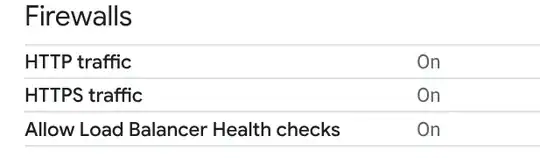
EDIT: Firewall screenshot

EDIT: Rule presence

EDIT: after shutting off ufw and with nginx still running certbot gives me the following error
Certbot failed to authenticate some domains (authenticator: webroot). The Certificate Authority reported these pro
blems:
Domain: dropin.today
Type: connection
Detail: 104.196.57.33: Fetching http://dropin.today/.we
ll-known/acme-challenge/bc97SrSBkyFkeFyhtdPbLN3T0S1enEGdU
bhTxYhJ7mA: Connection refused
Oddly when I turn off nginx the same certbot command complains port 80 is blocked