241

I need to test sub-domains on my localhost. How can I effectively have this result of adding *.localhost.com to my /etc/hosts/ file?

If it's not possible, how do I work around this problem? I need to test wildcard sub-domains on my localserver. It is a Django devserver, can the Django dev server handle the sub-domains? Can some other piece of software/routing give me the end result I want?

MikeN
  • 8,602

19 Answers19

196

Install dnsmasq (I do this on all my Linux desktops as a DNS cache anyways). In dnsmasq.conf add the line:

address=/localhost.com/127.0.0.1
tomchuk
  • 2,111
  • 2
  • 11
  • 3
91

It is not possible to specify wildcards in the /etc/hosts file. Either specify the required hostnames explicitly or alternatively set up a local name server with the appropriate rules.

ar.
  • 1,204
  • 7
  • 3
52

I have written a dns proxy in Python. It will read wildcard entries in /etc/hosts. See here: https://github.com/hubdotcom/marlon-tools/blob/master/tools/dnsproxy/dnsproxy.py

marlonyao
  • 636
18

You need to set up a DNS server and have each client use it for resolution. The server itself can be something as "light" as dnsmasq or as heavy as BIND.

Gerald Combs
  • 6,591
16

Simple Workflow (no need to install anything)

I personally like to create a PAC file for that and make my browser just use it.

Step 1: create a file e.g.: *.proxy.pac* somewhere (I use my $home folder)

Step 2: paste this code (example is with port 8000):

function FindProxyForURL(url, host) {
  if (shExpMatch(host, "*localhost")) {
    return "PROXY localhost:8000";
  }
  return "DIRECT";
}

Step 3: Make your Browser use this PAC file.

Youtube Video for PAC & Firefox

Step 4: Now you can test your app by accessing: http://mysubdomain.localhost/

Step 5: Enjoy :)

techraf
  • 4,403
Bijan
  • 101
6

I've tidied up an old project of mine:

https://github.com/airtonix/avahi-aliases

requirements:

  • linux where avahi and python-avahi are installable
  • you're ok with .local domains (avahi doesn't support any other kind)

Advantages over using dnsmasq or the python dns proxy:

  • other avahi/bonjour users on your local network can resolve the aliases you create and announce to the network ( providing you're allowing access to port 5353 )
airtonix
  • 171
5

You cannot use a wildcard in /etc/hosts.

Have a look here for a good walkthrough on how to accomplish on OS X using BIND, the built-in but inactive DNS server, and Apache.

pauska
  • 19,766
Trevor
  • 209
  • 1
  • 2
4

This DNS based solution worked perfectly in my case, without need to install anything : https://gist.github.com/fedir/04e60d679d5657d1f9f9aa10b3168282 (Mac OSX 10.9)

3

Copying from this blog here is how to do it on mac:

https://hedichaibi.com/how-to-setup-wildcard-dev-domains-with-dnsmasq-on-a-mac/

~ brew install dnsmasq

~ vim /usr/local/etc/dnsmasq.conf # or /opt/homebrew/etc/dnsmasq.conf

This file will be added to the configuration

conf-file=/Users/your_user_name/.dnsmasq/dnsmasq.conf

~ vim /Users/your_user_name/.dnsmasq/dnsmasq.conf

example.localhost will be resolved as 127.0.0.1, including subdomains

address=/example.localhost/127.0.0.1 listen-address=127.0.0.1

~ sudo brew services stop dnsmasq

~ sudo brew services start dnsmasq

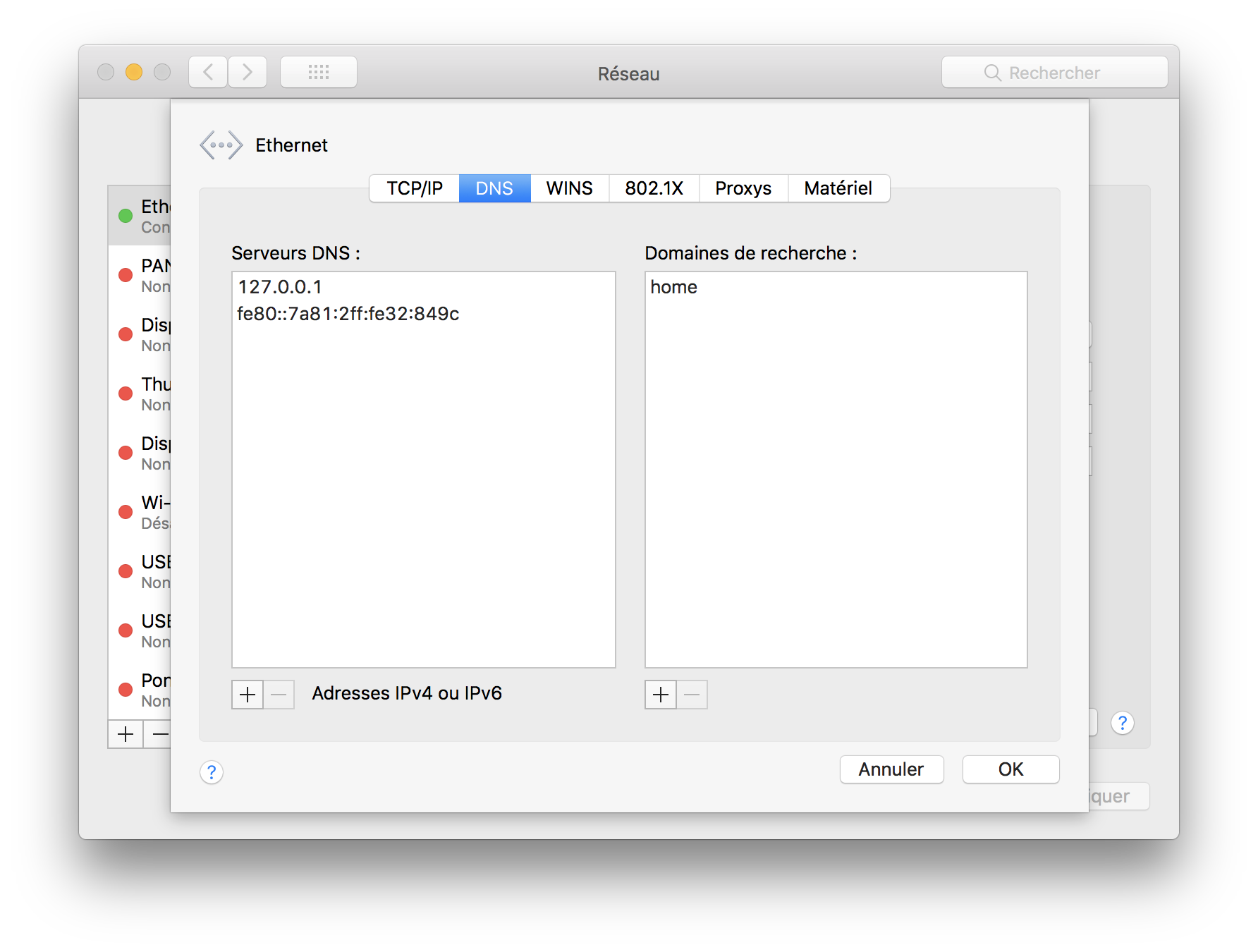
We need to tell macOS to use 127.0.0.1 as the first DNS resolver.

enter image description here

3

If you want to use dnsmasq with NetworkManager you can (or even must?) start dnsmasq from NetworkManager by adding

dns=dnsmasq

to /etc/NetworkManager/NetworkManager.conf. Then the dnsmasq config goes to /etc/NetworkManager/dnsmasq.conf or /etc/NetworkManager/dnsmasq.d/ resp.

TNT
  • 151
2

Short answer:

Your /etc/hosts/ file won't let you use wildcards or port numbers. You will need to create one entry for each of your subdomain

2

The short answer is you don't. The longer answer is you need to be clearer on what you desire to actually achieve, because there is perhaps either a better way, and a different way to achieve it.

For web-hosting (I've never seen it used otherwise) is done in DNS in combination with a virtual hosting aware web server. For more information on wildcard DNS records (Wikipedia), and an article Wildcard hosting with Apache and Bind for Linux using bind and Apache.

At worst, you could use a local DNS server I suppose.

mctylr
  • 873
2

dnsmasq worked for me, except I had to make some additional steps.

Here is the full procedure:

  1. Prepend /etc/resolv.conf with the following line

     nameserver 127.0.0.1
    
  2. Add the following lines to /etc/dnsmasq.conf

     listen-address=127.0.0.1
     address=/localhost.localdomain/127.0.0.1
     address=/localhost/127.0.0.1
    
  3. Restart dnsmasq (do not simply tell dnsmasq to reload the config files)

Jayen
  • 1,907
2

A common task for this subject is to map directories to subdomains. A very straightforward way for that is to append the directory-based entries automatically to the hosts file:

#!/usr/bin/python

import os

hostsFile = open("/etc/hosts", "a+");

lines = hostsFile.readlines()

for fileName in os.listdir('/opt/subdomainDirs'):

    entryExists = False
    for line in lines:
        if fileName in line:
            entryExists = True  

    if not entryExists:
        hostsFile.write("127.0.0.1 " + fileName + ".localhost\n");
2

Thank you tschundeee for what I consider to be the ultimate answer to this issue, wish I could just comment but here is the total configuration for those trying to accomplish the original goal (wildcards all pointing to same codebase -- install nothing, dev environment ie, XAMPP)

hosts file (add an entry)

file: /etc/hosts (non-windows)

127.0.0.1   example.local

httpd.conf configuration (enable vhosts)

file: /XAMPP/etc/httpd.conf

# Virtual hosts
Include etc/extra/httpd-vhosts.conf

httpd-vhosts.conf configuration

file: XAMPP/etc/extra/httpd-vhosts.conf

<VirtualHost *:80>
    ServerAdmin admin@example.local
    DocumentRoot "/path_to_XAMPP/htdocs"
    ServerName example.local
    ServerAlias *.example.local
#    SetEnv APP_ENVIRONMENT development
#    ErrorLog "logs/example.local-error_log"
#    CustomLog "logs/example.local-access_log" common
</VirtualHost>

restart apache

create pac file:

save as whatever.pac wherever you want to and then load the file in the browser's network>proxy>auto_configuration settings (reload if you alter this)

function FindProxyForURL(url, host) {
  if (shExpMatch(host, "*example.local")) {
    return "PROXY example.local";
  }
  return "DIRECT";
}
1

This might not be needed.

The .localhost suffix should be pointing to 127.0.0.1 in your OS by default.

Currently using Ubuntu 20.04.5 LTS and it works out of the box without installing any additional packges.

So you can name your test domains as mytestdomain.localhost and that'll point to 127.0.0.1. Anything with the .localhost suffix will point to 127.0.0.1.

You can try it: ping helloworld.localhost, should point to localhost.

$ ping test.localhost
PING test.localhost(ip6-localhost (::1)) 56 data bytes
64 bytes from ip6-localhost (::1): icmp_seq=1 ttl=64 time=0.023 ms
64 bytes from ip6-localhost (::1): icmp_seq=2 ttl=64 time=0.079 ms
64 bytes from ip6-localhost (::1): icmp_seq=3 ttl=64 time=0.043 ms
64 bytes from ip6-localhost (::1): icmp_seq=4 ttl=64 time=0.079 ms
64 bytes from ip6-localhost (::1): icmp_seq=5 ttl=64 time=0.053 ms

This behavior is described in this RFC2606 https://datatracker.ietf.org/doc/html/rfc2606#section-2

Also described here: https://www.freedesktop.org/software/systemd/man/systemd-resolved.service.html#Synthetic%20Records

Wadih M.
  • 1,102
0

I was looking for a similar solution recently and discovered the localhost.direct project.

These guys implemented a brilliant idea which works on any OS. You don't need to install anything.

SSL certificates are included.

igops
  • 111
0

On Ubuntu 22.04 with Snaps enabled, nss-myhostname appears to be enabled, or there appears to also be an APT package libnss-myhostname. Seems you can use any *.localhost (or *.localhost.localdomain) without any confiuration:

$ getent ahosts xxx.yyy.localhost
::1             STREAM xxx.yyy.localhost
::1             DGRAM  
::1             RAW    
127.0.0.1       STREAM 
127.0.0.1       DGRAM  
127.0.0.1       RAW    
0

If you do not mind relying on a third-party domain server, there are various easy options (no local OS changes needed). For example xxx.yyy.127.0.0.1.nip.io will resolve to 127.0.0.1. Docs