In windows 7 we now have the ability to create and attach VHD files as drives. Does anyone know how we can compact the dynamic disks from within windows 7?
Asked
Active
Viewed 1.0k times
7 Answers
14
You can compact a VHD in Windows 7 using diskpart.exe's COMPACT option. Also, if you don't mind a little coding, you can call the CompactVirtualDisk API (I'd post a link to it, but new users can't post hyperlinks - just search MSDN for it if you're interested).

mikekol
- 266
7
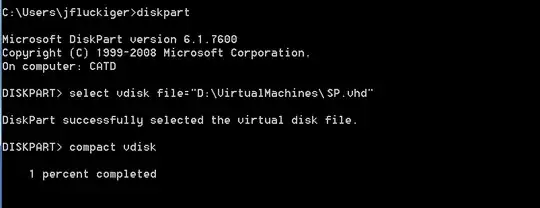
Using the diskpart command line utility in Windows 7 to compact a VHD file. It works great!

BrokeMyLeg
- 297
3
To Compact a VHD file in Windows Virtual PC (in Windows 7): -Open "Windows Virtual Machines" shell -Right-click on the VM you want to compact and open its Settings - Go to "Hard Disk 1" or anyone you have the VHD file attached to. - Click on Modify, then Compact Virtual Hard Disk
3
when in diskpart console type "select vdisk file="c:\windows7.vhd" then press enter then type "compact", that should compact your virtual drive.

0
What I ended up doing was to detach the VHD from within Disk Manager, and then i attached the file to my "Virtual Windows XP" in Windows 7. Once that was done, i was able to choose "Modify" on the disk, and then "Compact."
Once the compact was done, i removed the VHD's from the "Virtual Windows XP" VM - and then can use them as needed from there.
This seems like a kludgy solution - i was hoping someone would have a way to run the compact without having to attach them to the VM first, or better yet a way to run it thru power shell or script.

Scott Ivey
- 667
-1
https://linhost.info/2011/01/windows-how-to-compact-a-dynamic-vhd/
- Open your Windows command line (CMD).
- diskpart
- select vdisk file="X:\xyz.vhd"
- attach vdisk readonly
- compact vdisk
- detach vdisk
- exit
I am using a virtual hard disk including bitlocker. To compress a VDH file with bitlocker, following steps worked for me:
- Open Windows disk management.
- Append new virtual disk and choose read only mode.
- Unlock your new Windows drive with bitlocker.
- Open your Windows command line (CMD)
- diskpart
- select vdisk file="X:\xyz.vhd"
- compact vdisk
- detach vdisk
- exit

Sonne
- 1
- 2