45

Normally, when you load a saved session in PuTTY and connect to it, PuTTY will set the window title to the host name of the system you connected to (plus the string "PuTTY").

Now I have many different sessions that all connect to the same host, but on different ports (because the host runs several SSH tunnels on different ports). Therefore seeing the host name is not very helpful, since it's always the same.

So I'd like PuTTY to show the name of the loaded session in the window title. Is there a way to do this?

The only way I could find is to set the window title manually (Window / Behaviour / Window title). But I believe I'd have to do this manually for each session, which is rather tedious.

sleske
  • 10,234

10 Answers10

77

The solution below seems to solve this problem.

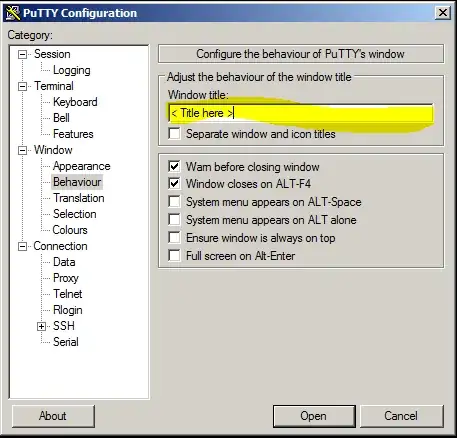
1) Go to the aforementioned Window/Behaviour/Window Title setting and put in a title that makes sense to you.

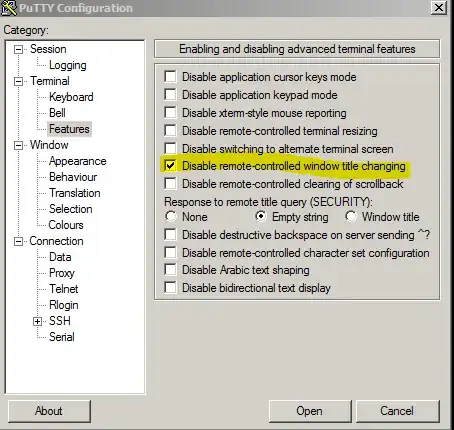
2) Go to the Terminal/Features settings and check off the Disable remote-controlled window title changing box.

Setting 1

Setting 2

Patrick Mevzek
  • 10,581
  • 7
  • 35
  • 45
Andy
  • 781
28

To change the PuTTY SSH session window title (one by one manually by the PuTTY GUI):

For Windows & Debian

  1. Load a session from PuTTY.
  2. On left side tree menu, click on: WindowBehaviour.
  3. On the right panel, in the Window title text box enter your title.
  4. Save the session.

To change the PuTTY SSH session window title (for all sessions by command line):

For Debian 8 (Jessie)

  1. Go to the folder where PuTTY stores sessions: /home/nolwennig/.putty/sessions

    Note: replace nolwennig with your username

  2. Assign to parameter WinTitle the saved session file name for each saved session file with something like this:

    find . -type f -exec sed -e 's/^WinTitle=/WinTitle=%f/g' {} \;

    It works fine if no WinTitle is recorded

For Windows

  1. PuTTY stores sessions in Windows registry HKEY_CURRENT_USER\Software\Simontatham\PuTTY\Sessions

    Note: not replace SimonTatham with your username.

  2. You can export this section with a command like this:

    C:> regedit /e "%userprofile%\desktop\putty-registry-sessions.reg" HKEY_CURRENT_USER\Software\Simontatham\PuTTY\Sessions
    
  3. It must be possible to make a script that updates the putty-registry-sessions.reg file to change the value of WinTitle for each of the saved sessions.


Sources & inspirations:

Nolwennig
  • 400
22

This function will set the title of your PuTTY window to the given string:

# Set title
title() {
  echo -ne "\033]0;"$1"\007"
}

You can use this to set the title from the command line or from scripts, e.g. from within .bashrc.

3

I was looking for how to make window titles stick when using PuTTY with session files.

So in .putty/sessions/ServerX, set a default title and no remote behaviour as:

NoRemoteWinTitle=1
WinTitle=Welcome to ServerX

And to give it a special title for some particular purpose, just override the default:

putty -load .putty/sessions/ServerX -title "ServerX:/var/log/messages"
DCG
  • 31
2

The only other route I'm aware of is to use the xterm emulation features to set the title from the system you are logged into (on Red Hat Linux and SUSE Linux, the Bash prompt is written to the titlebar by default).

See this page for a description of the process and the relevant escape sequence.

symcbean
  • 23,767
  • 2
  • 38
  • 58
1

In Windows, this will set the window title of every session to the very same name of the session:

FOR /F "tokens=6 delims=\" %i IN ('reg query HKCU\Software\Simontatham\PuTTY\Sessions') DO reg add HKCU\Software\Simontatham\PuTTY\Sessions\%i /t REG_SZ /v WinTitle /d %i /f & reg add HKCU\Software\Simontatham\PuTTY\Sessions\%i /t REG_DWORD /v NoRemoteWinTitle /d 1 /f
user517940
  • 11
  • 1
0

This is how you can set a custom window title in a command line script, no WinRegistry changes or pre-defined sessions required, script must use -t -m options to run a remote commands and stay in a bash shell without an automatic exit.

Script is using a \033]0;... window title remote command escape syntax.

PuttyTestNode1.bat

set name=TestNode1
set destip=11.22.33.44
set workdir=/usr/share/nginx/www
echo echo -ne "\033]0;"%name% %destip%"\007" > tempcmd.txt
echo cd "%workdir%" >> tempcmd.txt
echo /bin/bash >> tempcmd.txt
start "putty" c:\putty\putty.exe -pw "keyfilepwd" myuser@%destip% -i myprivkey.ppk -t -m tempcmd.txt
Whome
  • 101
0

If you use a recent version of bash, then you can use PROMPT_COMMAND to set the window title automatically, each time it displays a prompt.

For e.g.

PROMPT_COMMAND='printf "\033]0;%s@%s:%s\007" "${USER}" "${HOSTNAME%%.*}" "${PWD/#$HOME/\~}"'

In fact, depending on what version of bash/linux you use, you well may find bash does this for you, automatically, via /etc/bashrc.

You can disable this by unsetting or overriding PROMPT_COMMAND.

Another option is to create your own version of /etc/sysconfig/bash-prompt-xterm, which can be empty, or can contain the above printf command, or whatever else you works for you.

If you do create /etc/sysconfig/bash-prompt-xterm, you need to chmod +x it.

For the curious, \033 is escape and \007 is ^G, and you can use those instead, if you prefer, and if you don't intend to copy and paste the command around.

0

You can use the -loghost "title" option in Windows - it opens PuTTY with the specified title name. It also changes other stuff, so please check if that's not making any other problem for you.

I'm using it with VIRL, and it works perfectly fine.

-2

In Windows, this cmd line will set the window title of every session to the very same name of the session itself:

FOR /F "tokens=6 delims=\" %i IN ('reg query HKCU\Software\Simontatham\PuTTY\Sessions') DO reg add HKCU\Software\Simontatham\PuTTY\Sessions\%i /t REG_SZ /v WinTitle /d %i /f & reg add HKCU\Software\Simontatham\PuTTY\Sessions\%i /t REG_DWORD /v NoRemoteWinTitle /d 1 /f