9

I can tell what process is holding a lock using Unlocker.

But the problem is that, when there is a lock on a file on a remote machine, Unlocker doesn't show who or what process is locking.

Is there anyway what is holding a lock on a remote file (my remote file is mapped through a network drive)? and also how to remove the lock?

Joel Spolsky
  • 3,686
dance2die
  • 2,051

6 Answers6

11

Open up Computer Management, right click (my) Computer and click "Manage":

System Tools > Shared Folders > Open Files

To connect to a remote machine, select "Computer Managment (Local)" in the left pane, then pull up the "Action > Connect to another computer..." dialog, enter the computer name, and hit ok.

You can disconnect sessions from this interface as well.

Wedge
  • 1,617
5

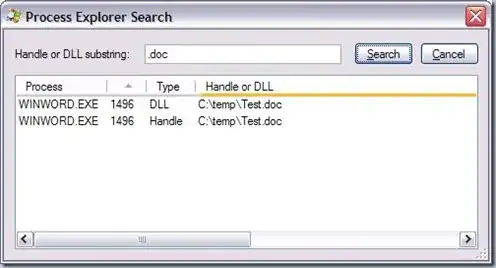
Process Explorer can search for handle on a file

enter image description here

On a remote machine however, you want to combine PsExec with Handle in order to execute Handle on the distant computer.

Bart De Vos
  • 18,171
VonC
  • 2,778
3

Look at handle from Sysinternals.

0

Unlocker is a great tool.

We have it on all of our Windows servers. It will unlock the file for you and show you what is using it.

0

I don't have experience in this, but the openfiles command might do what you want.

John Fouhy
  • 1,141
-3

If you're on Unix/Linux/BSD, lsof(8) should do what you want.

drewble:~$ lsof /home/drew/.purple/cap.db 
COMMAND  PID USER   FD   TYPE DEVICE   SIZE    NODE NAME
pidgin  6488 drew   13u   REG   8,18 679936 9971928 /home/drew/.purple/cap.db