649

One thing that annoys me no end about Windows is the old sharing violation error. Often you can't identify what's holding it open. Usually it's just an editor or explorer just pointing to a relevant directory but sometimes I've had to resort to rebooting my machine.

Any suggestions on how to find the culprit?

cletus
  • 10,179

18 Answers18

523

I've had success with Sysinternals Process Explorer. With this, you can search to find what process(es) have a file open, and you can use it to close the handle(s) if you want. Of course, it is safer to close the whole process. Exercise caution and judgement.

To find a specific file, use the menu option Find->Find Handle or DLL... Type in part of the path to the file. The list of processes will appear below.

If you prefer command line, Sysinternals suite includes command line tool Handle, that lists open handles.

Examples

  • c:\Program Files\SysinternalsSuite>handle.exe |findstr /i "e:\" (finds all files opened from drive e:\"
  • c:\Program Files\SysinternalsSuite>handle.exe |findstr /i "file-or-path-in-question"
bjoster
  • 5,241
Eddie
  • 11,524
328

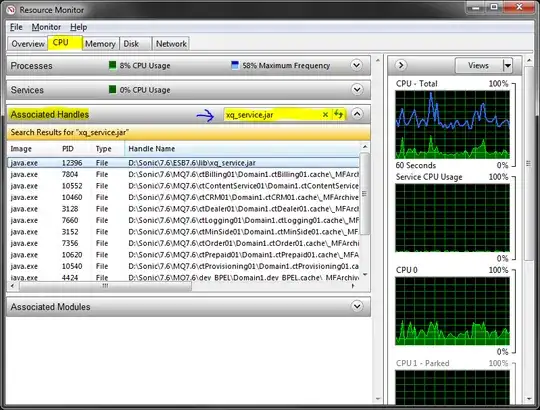
You can use the Resource Monitor for this which comes built-in with Windows 7, 8, and 10.

  1. Open Resource Monitor, which can be found
    • By searching for Resource Monitor or resmon.exe in the start menu, or
    • As a button on the Performance tab in your Task Manager
  2. Go to the CPU tab
  3. Use the search field in the Associated Handles section
    • See blue arrow in screen shot below

When you've found the handle, you can identify the process by looking at the Image and/or PID column.

You can then try to close the application as you normally would, or, if that's not possible, just right-click the handle and kill the process directly from there. Easy peasy!

Resource Monitor screenshot

Copied from my original answer: https://superuser.com/a/643312/62

Svish
  • 7,527
107

Just be very careful with closing handles; it's even more dangerous than you'd think, because of handle recycling - if you close the file handle, and the program opens something else, that original file handle you closed may be reused for that "something else." And now guess what happens if the program continues, thinking it is working on the file (whose handle you closed), when in fact that file handle is now pointing to something else.

see Raymond Chen's post on this topic

Suppose a search index service has a file open for indexing but has gotten stuck temporarily and you want to delete the file, so you (unwisely) force the handle closed. The search index service opens its log file in order to record some information, and the handle to the deleted file is recycled as the handle to the log file. The stuck operation finally completes, and the search index service finally gets around to closing that handle it had open, but it ends up unwittingly closing the log file handle.

The search index service opens another file, say a configuration file for writing so it can update some persistent state. The handle for the log file gets recycled as the handle for the configuration file. The search index service wants to log some information, so it writes to its log file. Unfortunately, the log file handle was closed and the handle reused for its configuration file. The logged information goes into the configuration file, corrupting it.

Meanwhile, another handle you forced closed was reused as a mutex handle, which is used to help prevent data from being corrupted. When the original file handle is closed, the mutex handle is closed and the protections against data corruption are lost. The longer the service runs, the more corrupted its indexes become. Eventually, somebody notices the index is returning incorrect results. And when you try to restart the service, it fails because its configuration files have been corrupted.

You report the problem to the company that makes the search index service and they determine that the index has been corrupted, the log file has mysteriously stopped logging, and the configuration file was overwritten with garbage. Some poor technician is assigned the hopeless task of figuring out why the service corrupts its indexes and configuration files, unaware that the source of the corruption is that you forced a handle closed.

Mark Sowul
  • 1,859
99

If you are having enough privileges, try the openfiles command.

You might have to enable listing of localy opened files by running openfiles /local on and rebooting.

Paul
  • 3,278
John Fouhy
  • 1,141
29

I've used Handle with success to find such processes in the past.

Greg Hewgill
  • 6,979
12

Lockhunter (http://lockhunter.com/) works on 32 and 64bit systems.

8

Just to clarify, this is more likely to be a result of misbehaving 3rd party apps not using the CreateFile API call correctly than it is to be anything in Windows itself. Perhaps it's a consequence of the design of CreateFile, but done is done and we can't go back.

Basically when opening a file in a Windows program you have the option to specify a flag that allows shared access. If you don't specify the flag, the program takes exclusive access of the file.

Now, if Explorer seems to be the culprit here, it may be the case that that's just on the surface, and that the true culprit is something that installs a shell extension that opens all files in a folder for it's own purposes but is either too gung-ho in doing so, or that doesn't clean up properly after itself. Symantec AV is something I've seen doing this before, and I wouldn't be surprised if other AV programs were also to blame. Source control plug-ins may also be at fault.

So not really an answer, but just some advice to not always blame Windows for what may be a badly written 3rd party program (something that can also happen on any other OS which has implicit file locking, but any unix based OS has shared access by default).

6

Apropos Explorer holding a file open: "When this happens on a file you need to delete, you have the choice of forcing the handle closed, or rebooting."

You can just end Explorer.

If this is a one-time thing (Explorer does not normally hold this file open) then I would guess logging off and logging back on will do the trick.

Otherwise, kill the desktop Explorer process and do what you want while it's gone. First start a copy of cmd.exe (you need a UI to do your intended cleanup). Make sure there are no non-desktop Explorers running. Then kill the last Explorer with, e.g., Task Manager. Do what you want in the command prompt. Finally, run Explorer from the command prompt, and it will become the desktop.

I'd guess there may be some residual unpleasantness if some systray programs can't deal with the shell restarting.

6

On a remote server, when you're checking on a network share, something as simple as the Computer Management console can display this information and close the file.

5

Who Lock Me works well and keeps people amused with the name!

yagmoth555
  • 17,495
5

Files can be locked by local processes (unlocker is the tool to use) and by file access that comes in through shares.

There is a built-in function in Windows that shows you what files on the local computer are open/locked by remote computer (which has the file open through a file share):

* Select "Manage Computer" (Open "Computer Management")
* click "Shared Folders"
* choose "Open Files"

There you can even close the file forcefully.

4

With Process Hacker you can identify what processes are holding your files easily:

Find Handles or DLLs

3

You can also do it programmatically by leveraging on the NTDLL/KERNEL32 Windows API. E.g. have a look at the following code in Python:

import ctypes
from ctypes import wintypes

path = r"C:\temp\test.txt"

-----------------------------------------------------------------------------

generic strings and constants

-----------------------------------------------------------------------------

ntdll = ctypes.WinDLL('ntdll') kernel32 = ctypes.WinDLL('kernel32', use_last_error=True)

NTSTATUS = wintypes.LONG

INVALID_HANDLE_VALUE = wintypes.HANDLE(-1).value FILE_READ_ATTRIBUTES = 0x80 FILE_SHARE_READ = 1 OPEN_EXISTING = 3 FILE_FLAG_BACKUP_SEMANTICS = 0x02000000

FILE_INFORMATION_CLASS = wintypes.ULONG FileProcessIdsUsingFileInformation = 47

LPSECURITY_ATTRIBUTES = wintypes.LPVOID ULONG_PTR = wintypes.WPARAM

-----------------------------------------------------------------------------

create handle on concerned file with dwDesiredAccess == FILE_READ_ATTRIBUTES

-----------------------------------------------------------------------------

kernel32.CreateFileW.restype = wintypes.HANDLE kernel32.CreateFileW.argtypes = ( wintypes.LPCWSTR, # In lpFileName wintypes.DWORD, # In dwDesiredAccess wintypes.DWORD, # In dwShareMode LPSECURITY_ATTRIBUTES, # In_opt lpSecurityAttributes wintypes.DWORD, # In dwCreationDisposition wintypes.DWORD, # In dwFlagsAndAttributes wintypes.HANDLE) # In_opt hTemplateFile hFile = kernel32.CreateFileW( path, FILE_READ_ATTRIBUTES, FILE_SHARE_READ, None, OPEN_EXISTING, FILE_FLAG_BACKUP_SEMANTICS, None) if hFile == INVALID_HANDLE_VALUE: raise ctypes.WinError(ctypes.get_last_error())

-----------------------------------------------------------------------------

prepare data types for system call

-----------------------------------------------------------------------------

class IO_STATUS_BLOCK(ctypes.Structure): class STATUS(ctypes.Union): _fields = (('Status', NTSTATUS), ('Pointer', wintypes.LPVOID)) anonymous = 'Status', _fields = (('_Status', _STATUS), ('Information', ULONG_PTR))

iosb = IO_STATUS_BLOCK()

class FILE_PROCESS_IDS_USING_FILE_INFORMATION(ctypes.Structure): fields = (('NumberOfProcessIdsInList', wintypes.LARGE_INTEGER), ('ProcessIdList', wintypes.LARGE_INTEGER * 64))

info = FILE_PROCESS_IDS_USING_FILE_INFORMATION()

PIO_STATUS_BLOCK = ctypes.POINTER(IO_STATUS_BLOCK) ntdll.NtQueryInformationFile.restype = NTSTATUS ntdll.NtQueryInformationFile.argtypes = ( wintypes.HANDLE, # In FileHandle PIO_STATUS_BLOCK, # Out IoStatusBlock wintypes.LPVOID, # Out FileInformation wintypes.ULONG, # In Length FILE_INFORMATION_CLASS) # In FileInformationClass

-----------------------------------------------------------------------------

system call to retrieve list of PIDs currently using the file

-----------------------------------------------------------------------------

status = ntdll.NtQueryInformationFile(hFile, ctypes.byref(iosb), ctypes.byref(info), ctypes.sizeof(info), FileProcessIdsUsingFileInformation) pidList = info.ProcessIdList[0:info.NumberOfProcessIdsInList] print(pidList)

Robert
  • 251
3

There have new PowerToys available from Microsoft.

File Locksmith utility for Windows | Microsoft Learn
https://learn.microsoft.com/en-us/windows/powertoys/file-locksmith

After installing PowerToys, right-click on one or more selected files in File Explorer, and then select What's using this file? from the menu.

Ivan Chau
  • 275
3

There is NirSoft's Opened Files View as well.

Screenshot

2

The above upvoted answers cover situations where a program process is holding the file handle open, which (fortunately) is most of the time - however in some cases (as is occurring on this system at the moment), the system itself holds a file handle open.

You can identify this situation by following the instructions to find the file handle holding process with process explorer above, and noting that the process name is listed as 'system', or by following the the instructions using resource monitor and noting that no image is shown having a filehandle open on your file of interest (Although obviously something does as you can't edit/delete etc the file).

If that happens, your option (so far as I'm aware) is to restart - or forget about doing anything with that file.

Blair
  • 31
  • 2
1

I got turned on to the Free Extended Task Manager a while ago by Jeremy Zawodny's blog, and it's great for tracking down further info on processes too. +1 for Process Explorer as above, too, especially for killing processes that the standard Task Manager won't end.

nedm
  • 5,710
0

There is a tool FILEMON and shows open files and handles. Its hard to keep up with its display if you watch it live, it does so quickly. But you can stop it from displaying live and you can watch all file open/write activity. Now owned by Microsoft but originally by Sysinternals