4

On my way to the office this morning, every website on our shared VPS started giving the same error (several times, not the typical memory_limit error which is fatal):

Warning: Unknown: Unable to allocate memory for pool. in Unknown on line 0

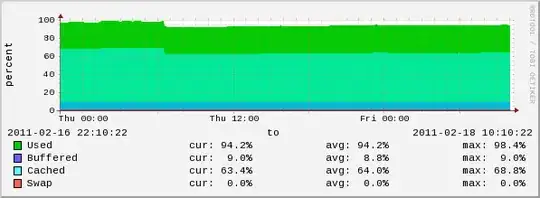
The shared server is a 64-bit OpenVZ container running cPanel. There are only ~6 VPSes on the host-- this is the largest one at only 4GB. The host itself has 24GB RAM. As the below graphs show, the memory usage on the host and VPS are both rather low. CPU Usage/Disk/Host all seem to be normal. RlimitMem was set to 583653034, yet the memory usage is about the same as it usually is.

Apache 2.2, PHP 5.2 (mod_php)

Restarting Apache has corrected the problem for now. However, I'd like to prevent it from happening again and I'm not sure what was limiting the memory. RlimitMem was set to 583653034, yet the memory usage is about the same as it usually is. There's seems to be plenty of memory: what caused this error?

VPS Memory Usage
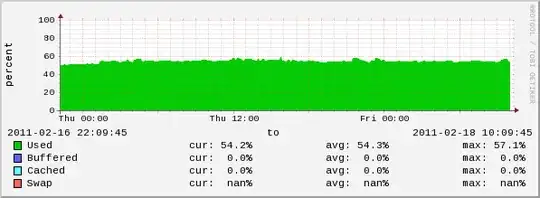
shared vm memory usage, hovering around 50%

Host Memory Usage

host vm memory usage, used hovering at 20%, cached at 65% until 6AM, where it dropped to ~60%, buffered at ~10%

APC Information

 apc.ttl=0
 apc.shm_size=0
 apc.mmap_file_mask=(blank)

1 Segment(s) with 32.0 MBytes (mmap memory, pthread mutex locking)

Reece45
  • 719

4 Answers4

6

That is definitely the error you get when APC runs out of memory. When I (re)build servers, I often forget to increase this value to 128 M (suitable for my application) and that is the exact error you see.

hobodave
  • 2,860
1

Any failcounts in /proc/bc/resources?

All failcounts should be 0 or stay same since the last incident.

You need to:

  1. Increase the resource limits with vzct set <CTID> ... --save on the resources that have fail counts (see man vzctl the set section). You can also modify the resource limits directly in /etc/vz/conf/. Probably in all cases you need to reboot the containers after increasing the limits.

    To be safe, increase the settings (both barrier and limit) for problematic resources to x2 (twice) the maxheld.

  2. Write down the current fail counts and keep an eye on them so that they don't increase any more.

For more info on controlling various resources, you can use http://wiki.openvz.org/Resource_shortage as a starting point.

0

Can you tell us a little more about how subscribed the host is? (e.g. how much total RAM have you committed to the VMs, how much RAM to each of the VMs on the host) I understand your largest is 4GB, but if the others are all 3GB and the system is subscribed to 19GB, that should show 5GB memory free for the hosting OS. Either my math, assumptions, or something else doesn't gel with the host memory graph above (showing 94% occupied RAM).

0

Shared memory allocation sysctl limits? Have a look at shmmax and friends in /etc/sysctl.conf.

Alternatively, are you running 32-bit PHP and/or Apache on a 64-bit OS? We've seen bizarre 'oh my god I'm out of memory and I'm gonna fill up swap even through there's 16GB free physical memory' behaviour from high-memory-usage 32-bit apps on 64-bit Linux.

Jeff Albert
  • 1,977