12

Somewhere some software install must have died. Now when I try to install software, I get popup message from the Windows Installer saying "Another program is being installed. Please wait until that installation is complete, and then try installing this software again.".

A search on serverfault brings up "Windows Installer Cleanup Tool" which Microsoft has stopped supporting. Another search lead me to WiseFixer which wants $50 to fix my computer.

I don't mind paying some money to fix my computer but I no longer trust things I find via most product review sites or web searches.

Ben Pilbrow
  • 12,031

5 Answers5

12

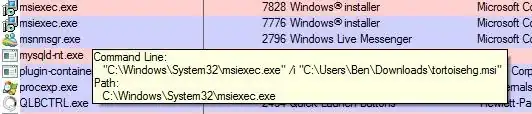
Fire up Process Explorer and hover your mouse over each instance of msiexec.exe. With a bit of luck you'll get the command line of what's installing which should give you some clues as to what it is.

Process Explorer msiexec example

I get this from time to time and it's my antivirus installing something which I can only guess is new definitions, because it happens frequently enough for me to notice.

Ben Pilbrow
  • 12,031
12

Open regedit and see if this key exists:

HKEY_LOCAL_MACHINE\SOFTWARE\Microsoft\Windows\CurrentVersion\Installer\InProgress

If so, remove it. Restart the Windows Installer service after removing the key.

Chris S
  • 78,455
2

Sorry if this is a basic response...but, do you have any pending windows updates that need to have their installation finalized via a reboot?

On a side-note, using Windows Installer Cleanup Tool was the biggest mistake I ever made. Just thought I'd throw that in. ;)

2

First thing is to try stopping the Windows Installer Service. That may resolve the problem in itself. Quite possibly Windows is installing updates in the background.

0

I had Acronis True Image (Home) running but didn't have the external drive attached where it wanted to make a backup. Stopping all (4) Acronis services from running allowed me to install/uninstall.

It was an educated guess that this was the thing causing the "lock" on installing/uninstalling. If you have installed software running as a service, you cold selectively stop/start each one to see if it helps.

NOTE: I tried all of the responses here, but none helped.

T H
  • 101