2

I had a little network glitch and since then one of my servers shows up wrong at some workstations when typing in \\server\.

Example:

On workstationA I go to Explorer and and type \\server\ and it brings me to our copier at 192.168.2.101. \\server.company.local\ gets me to the right place at 192.168.2.252.

Ping with server pings 192.168.2.252 - same correct result with ping server.company.com nslookup also shows correct result with both. reverse lookup by ip is correct also.

I flush the DNS on the workstation and the error still occurs. reboot same result.

At that point I give up and start remapping the shares to \\server.company.local\share just to get the user back working...

DNS Server has correct entries for that server. Can access the server via \\server\ on dns server, all looks fine.

Eventually the workstation figures it out by itself and \\server\ works again but my life wouldn't be as stressful if I had a clue what happened or how to fix it myself.

Thanks for your time looking and answering.

splattne
  • 28,776
Jimmy
  • 111
  • 6

2 Answers2

2

You're possibly confusing WINS and DNS.

\server\share

uses a WINS entry which holds the NETBIOS name to IP mapping

\server.company.local\share

uses a DNS entry which holds the FQDN (Fully Qualified Domain Name) to IP mapping

If you're running a local WINS server, you'll want to rectify the issue you have with the server's netbios name entry. You can manually modify the record, or just delete it and run the following command from the command prompt on your server.

nbtstat -RR

If you're not running a WINS service on your network, then you can disable it as the other answer has described. WINS is a legacy windows service that would store and serve up NETBIOS names on your network. DNS is a domain name resolution service that stores and serves up records which hold the FQDN (Fully Qualified Domain Names, such as www.microsoft.com) to IP mapping, or vice versa. There are other records that it can host, but these are the main two that most people need to know about.

Tatas
  • 2,099
1

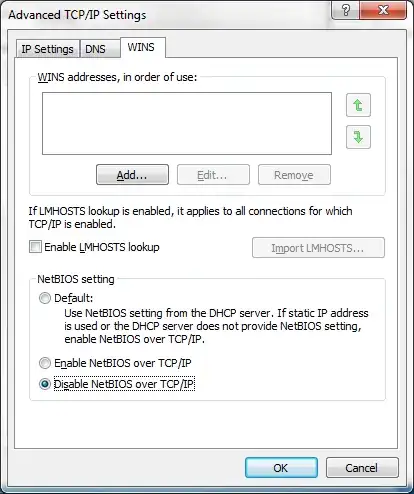
Try disabling NetBIOS name resolution.

Network adapter properties -> TCP/IP properties -> Advanced -> WINS tab -> Disable NetBIOS over TCP/IP

enter image description here

Strip out any WINS config, too, and make sure you aren't getting a WINS server configured by DHCP.

Shane Madden
  • 116,404
  • 13
  • 187
  • 256