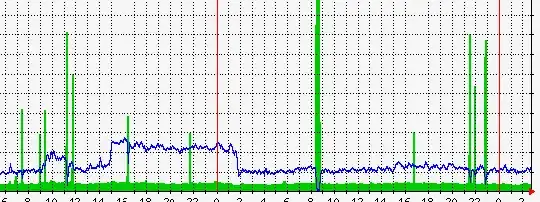
I run a popular tech website, and for weeks my site has been under DDOS attacks. The attacks happen at random times, and often about 10 times per day. Usually the attacks only last a few minutes, then it stops.
When my site is under attack, it become unreachable. The load of the server does not go up, services like MySQL, Nginx & FPM are not affected. It seems to be a SYN attack or something similar.
I run CentOS 5.6 (64bit), on a powerful machine. I have tried to harden SYSCTL a bit already, my settings can be found below. Also, I have setup iptables to block all ports except the ones I need. That script can also be found below.
I know this question has been asked many times before by people, but are there any further tips someone can give me to fight off these attacks? It is really becoming very annoying.
I am open for trying anything.
SYSCTL SETTINGS
net.ipv4.ip_forward                         = 0
net.ipv4.conf.default.rp_filter             = 1
net.ipv4.conf.default.accept_source_route   = 0
kernel.sysrq                                = 1
kernel.core_uses_pid                        = 1
net.ipv4.tcp_syncookies                     = 1
kernel.msgmnb                               = 65536
kernel.msgmax                               = 65536
kernel.shmmax                               = 68719476736
kernel.shmall                               = 4294967296
net.ipv4.conf.all.send_redirects            = 0
net.ipv4.conf.default.send_redirects        = 0
net.ipv4.tcp_max_syn_backlog                = 2048
net.ipv4.icmp_echo_ignore_broadcasts        = 1
net.ipv4.conf.all.accept_source_route       = 0
net.ipv4.conf.all.accept_redirects          = 0
net.ipv4.conf.all.secure_redirects          = 0
net.ipv4.conf.all.log_martians              = 1
net.ipv4.conf.default.accept_redirects      = 0
net.ipv4.conf.default.secure_redirects      = 0
net.ipv4.icmp_echo_ignore_broadcasts        = 1
net.ipv4.icmp_ignore_bogus_error_responses  = 1
net.ipv4.conf.default.rp_filter             = 1
net.ipv4.tcp_timestamps                     = 0
net.ipv4.conf.all.rp_filter                 = 1
net.ipv4.conf.default.rp_filter             = 1
net.ipv4.conf.eth0.rp_filter                = 1
net.ipv4.conf.lo.rp_filter                  = 1
IPTABLES SETTINGS
*filter
:INPUT DROP
:FORWARD DROP
:OUTPUT ACCEPT
-A INPUT -i lo -j ACCEPT
-A INPUT -p tcp -m tcp ! --tcp-flags FIN,SYN,RST,ACK SYN -m state --state NEW -j DROP
-A INPUT -m state --state RELATED,ESTABLISHED -j ACCEPT
-A INPUT -p tcp -m tcp --dport 21 -m state --state NEW -j ACCEPT
-A INPUT -p tcp --dport 22 --syn -m limit --limit 1/m --limit-burst 3 -j ACCEPT
-A INPUT -p tcp --dport 22 --syn -j DROP
-A INPUT -p tcp -m tcp --dport 22 -m state --state NEW -j ACCEPT
-A INPUT -p tcp -m tcp --dport 80 -m state --state NEW -j ACCEPT
-A INPUT -p tcp -m tcp --dport 443 -m state --state NEW -j ACCEPT
-A INPUT -p icmp -m icmp --icmp-type 8 -j ACCEPT
-A INPUT -p icmp -m icmp --icmp-type 11 -j ACCEPT
-A OUTPUT -o lo -j ACCEPT
COMMIT
MRTG graph of the last 24h. Spikes are attacks, and that is when the server becomes unreachable.