As developers we sometimes need querying LDAP. Do you know useful tools for this task?
edit: I don't mean in code, I mean utility/tool (command-line or gui, mostly gui) for just to look/confirm data, or if possible to alter...
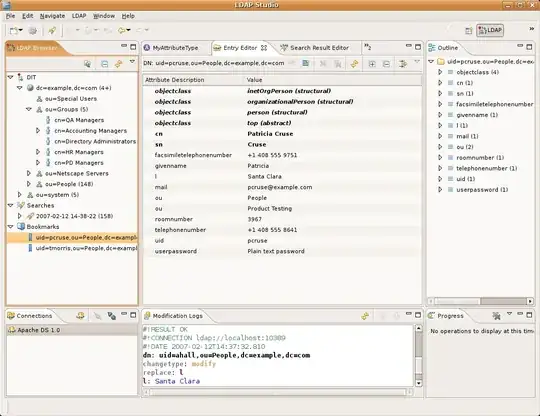
It's not exactly lightweight, but it is an excellent tool for doing ad hoc inspection and modifications to an LDAP database

ldapsearch is pretty lightweight... Part of the standard bits that come with openLDAP. What platform, etc?
ldapsearch -h ldapserver -b ou=people,dc=example,dc=com -D uid=root,dc=example,dc=com -x -W "(|(uid=foo)(cn=*bar*))"
I'd suggest setting up an alias or script that prefills in the boring bits that are always the same. My example assumes authentication. read the manpage.

For Windows there's LDP. I use it all the time. It's part of the Windows Support Tools.
Update: For Win7 and Win10 install RSAT (Remote Server Administration Tools). Install through Control Panel | Programs and Features | Turn Windows features on or off and selecting the desired tools underneath Remote Server Administration Tools.

ldapvi - it returns the results of the search into $EDITOR, where you can change all of them at once, then just save and it handles the details. Much better than faffing around with LDIF. As for a more heavyweight LDAP browser, I second Apache Directory Studio.

As has already been suggested, Apache Directory Studio is a great desktop application, I really do love it a lot. Usually though I just want something, as you said, lightweight and preferably command line. Just recently I stumbled across Shelldap.
When you launch shelldap it operates like a pseudo shell where your working directories are actually the branches of your LDAP tree. It responds to operations like:
I really like it. Like with the ldapsearch and ldapmodify tools included in the standard client packages it supports config files to remember your server, ou, bind dn, passwords, etc.
Shelldap is...
...available via the FreeBSD  ports system, OS X via  macports, Debian/Ubuntu
via  apt, and NetBSD's  pkgsrc.
Check out their website: http://projects.martini.nu/shelldap

I've used Softerra LDAP Browser (http://www.ldapadministrator.com/) before in the past. It's reasonably lightweight (GUI based, but pretty nice for perusing LDAP - made my life easier on multiple occasions!). Windows only though unfortunately.
They also offer a commercial version called LDAP Administrator, but I've no experience with that product. I certainly recommend the freeware version though!

If you are looking for tools which give you deep insight of ldap directory the two good ones are JXplorer or LDAP Admin Tool.
On *nix I've used luma a bit for poking around with a gui-tool and then there's, well, ldapsearch (from OpenLDAP). ldapsearch, while perhaps taking some getting used to, works very well once you get your head around the manual-page and options.

If you're only concerned about Windows and Active Directory, adsiedit.msc is hard to beat. It lets you get right in under the bonnet with absolutely everything. Better hope you don't have admin rights when you're using it though! Can be very dangerous...

Ldap Admin is free Win32 administration tool for LDAP directory management. Is pretty lightweight and useful for simple query operations. For more complex scenearios I prefer Apache Directory Studio.

Forgive me, I'm a newbie here. I wanted to "reply" to geoffc's post but couldn't figure out how.
I also use LDAP Browser/Editor and it's currently available for download at http://www.novell.com/communities/node/8652/gawors-excellent-ldap-browsereditor-v282

LBE, LDAP Browser/Editor would fit your bill. Less than a meg or so, and fast! Very useful.
Alas, the author, Gowar seems to have disappeared and all references to download it seem to be dead. I still have and use a copy, and would love to find a 'live' source to tell others to get it from.
Found a location to get a copy.

If you are a developer you could feel confortable using some ldap libraries for scripting languages.
I use ruby. You can use irb from the command line for fast queries like this:
$ irb
>> require 'ldap'
=> true
>> ldap.search(BASE_DN, LDAP::LDAP_SCOPE_SUBTREE, filter) do |result|
?>     ... do something with result array ...
?> end
The advantage over ldapsearch is that you can do better post-processing of the ldap results while still being a fast, lightweight solution.

There's ud. Should be part of the OpenLDAP distribution when I last looked at it a decade ago.


