38

How do I restart a single website in IIS7+ using commandline only?

Same functionality as the circled menu item in the image - but from the commandline.
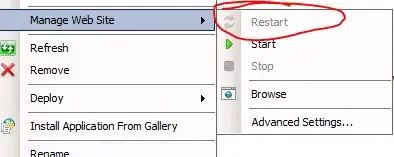
enter image description here

Iisreset does not have any options to deal with individual sites, and I found some ancient references to Iisweb.vbs, which seems to be outdated.

Kjensen
  • 1,129

4 Answers4

47

What you are looking for is the appcmd command. Take a look at its TechNet manual.

To list your sites out:

For 32-bit OS: %windir%\system32\inetsrv\appcmd list site

For 64-bit OS: %windir%\syswow64\inetsrv\appcmd list site

To restart your site, stop it and then start it:

appcmd start site /site.name:string

or

appcmd stop site /site.name:string

Rick
  • 103
Wesley
  • 33,060
10

I know this is an old thread and the OP specifically asked for IIS7 and a command line, but since I stumbled here and there were a few recent comments I thought I'd save someone the trouble of searching further for doing the same in IIS10 with PowerShell. This is what works very simply for me to stop and restart a website from a PowerShell Admin prompt:

(replace 'example.com' with your website name)

PS C:\Users\Administrator> Import-Module WebAdministration 
PS C:\Users\Administrator> Stop-WebSite example.com
PS C:\Users\Administrator> Start-WebSite example.com

Hope this helps someone.

6

I'd personally suggest not stopping and starting sites, but recycling the associated Application Pool.

This should be closer to imperceptible for end users, while a stop/start will probably produce 503s while the site's down.

APPCMD LIST WP

APPCMD RECYCLE WP

are the command-line versions of this...

TristanK
  • 9,173
  • 2
  • 30
  • 39
-1

List your existing web sites with:

C:\> iisweb.vbs /query

and you can then restart a specific website by executing:

C:\> iisweb.vbs /stop <website> && iisweb.vbs /start <website>
quanta
  • 52,423