After attempting to upgrade my PHP version on Windows 7, I cannot start Apache. I get this error message:
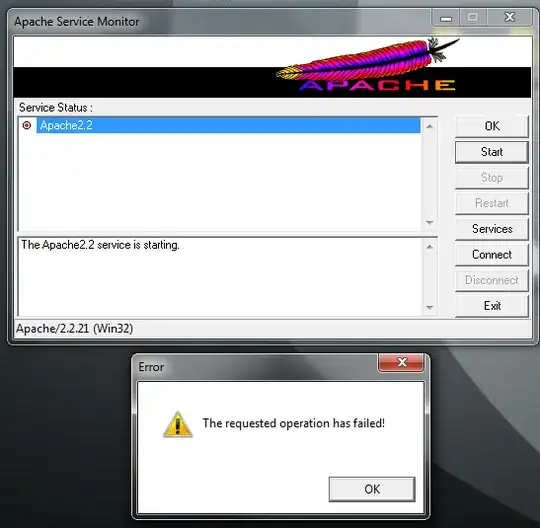
- I used the Windows installer to upgrade to PHP 5.3.8 from 5.2, afterwards I was unable to start Apache. I had stopped the server before the upgrade.
- I ensured all virus software was disabled during all upgrade and repair attempts, and rebooted between each. Default installation settings were used in all cases.
- I did not see anything in
error.log - I tried the "Repair" option in the PHP installer, as well as different installation settings.
I tried reinstalling Apache, but it did not seem to help and I got this error during the installation:
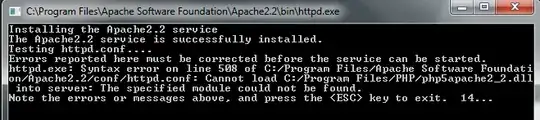
I see this in httpd.conf:
#BEGIN PHP INSTALLER EDITS - REMOVE ONLY ON UNINSTALL
###PHPIniDir "C:/Program Files/PHP/"
###LoadModule php5_module "C:/Program Files/PHP/php5apache2_2.dll"
#END PHP INSTALLER EDITS - REMOVE ONLY ON UNINSTALL

#BEGIN PHP INSTALLER EDITS - REMOVE ONLY ON UNINSTALL
##PHPIniDir "C:/Program Files/PHP/"
##LoadModule php5_module "C:/Program Files/PHP/php5apache2_2.dll"
#END PHP INSTALLER EDITS - REMOVE ONLY ON UNINSTALL

#BEGIN PHP INSTALLER EDITS - REMOVE ONLY ON UNINSTALL
#PHPIniDir "C:/Program Files/PHP/"
#LoadModule php5_module "C:/Program Files/PHP/php5apache2_2.dll"
#END PHP INSTALLER EDITS - REMOVE ONLY ON UNINSTALL

#BEGIN PHP INSTALLER EDITS - REMOVE ONLY ON UNINSTALL
PHPIniDir "C:/Program Files/PHP/"
LoadModule php5_module "C:/Program Files/PHP/php5apache2_2.dll"
#END PHP INSTALLER EDITS - REMOVE ONLY ON UNINSTALL
...but I have no idea what to do with it.
Nothing I've found on this site has been helpful although I have found similar questions. I'm guessing that more information would be needed from me, but I'm not sure what, but I'm happy to provide it.
How can I resolve this?
