This is a "continuation" of ewwhite's answer:
You would need to rewrite your data to the expanded zpool in order to
rebalance it
I wrote a PHP script (available on github) to automate this on my Ubuntu 14.04 host.
One just needs to install the PHP CLI tool with sudo apt-get install php5-cli and run the script, passing the path to your pools data as the first argument. E.g.
php main.php /path/to/my/files
Ideally you should run the script twice across all of the data in the pool. The first run will balance the drive utilization, but individual files are going to be overly allocated to the drives that were added last. The second run will ensure that each file is "fairly" distributed across drives. I say fairly instead of evenly because it will only be evenly distributed if you aren't mixing drive capacities as I am with my raid 10 of different size pairs (4tb mirror + 3TB mirror + 3TB mirror).
Reasons for Using a Script
- I have to fix the problem "in-place". E.g. I cannot write the data out to another system, delete it here and write it all back again.
- I filled my pool over 50%, so I could not just copy the entire filesystem at once before deleting the original.
- If there are only certain files that need to perform well, then one could just run the script twice over those files. However, the second run is only effective if the first run managed to succeed in balancing the drives utilization.
- I have a lot of data and want to be able to see an indication of progress being made.
How Can I Tell if Even Drive Utilization is Achieved?
Use the iostat tool over a period of time (e.g. iostat -m 5) and check the writes. If they are the same, then you have achieved an even spread. They are not perfectly even in the screenshot below because I am running a pair of 4TBs with 2 pairs of 3TB drives in RAID 10, so the two 4's will be written to slightly more.
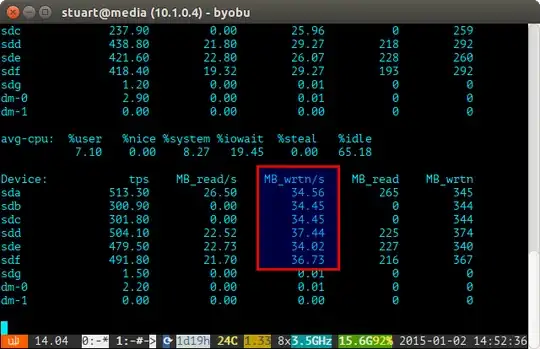
If your drive utilization is "unbalanced", then iostat will show something more like the screenshot below where the new drives are being written to disproportionately. You can also tell that they are the new drives because the reads are at 0 since they have no data on them.

The script is not perfect, only a workaround, but it works for me in the meantime until ZFS one day implements a rebalancing feature like BTRFS has (fingers crossed).


