The server works fine via the Amazon assigned DNS entry, but I cannot reach it (using a browser) via the Elastic IP address Amazon assigned the box. Ping does not work either. I am trying to confirm it is reachable before I add the IP address to my own DNS entries.
Asked
Active
Viewed 1e+01k times


5 Answers
41
Things to check:
- Your elastic IP associated with your instance?
- Your security group of instance permits incoming connections?
- Your instance firewall permits incoming connections?
- Your application listens?

Stone
- 7,279
29
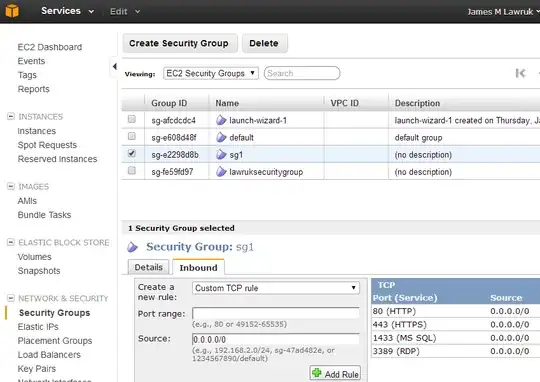
As others mentioned, the security group for your EC2 instance may not allow the HTTP port.
First,find the Security Group your instance is using.
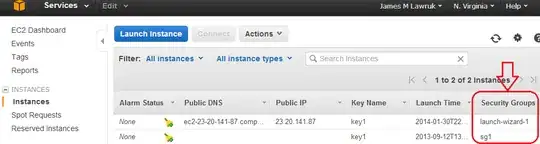
Then, under Network & Security, go to the Security Groups section. Select your instance's security group and add an Inbound Custom TCP rule for Port range 80.

James Lawruk
- 637
18
Also make sure Route table of VPC is set to enable IP address outside the VPC (0.0.0.0/0) to flow from the subnet to the Internet gateway.
Navigate to VPC > Route Tables ; Route tab. Check Destination is 'mapped' to Target Internet Gateway Id (apart from local).

G Seth
- 181
11
Just adding this reply as it might help other EC2 Newbies. If the Public DNS for your EC2 instance is: Public DNS: ec2-46-137-53-149.eu-west-1.compute.amazonaws.com you can access the instance using the numeric portion of the DNS Address. In the above case http://46.137.53.149/
Obviously you will need to have the relevant TCP Port open in the security group/profile associated with your instance as mentioned above.
The private IP (e.g. 10.235.47.101) is not accessible from outside the AWS network and is only useful when you have a cluster of EC2 nodes and want faster communication between them.

nelsonic
- 211
5
Couple questions: what port are you trying to access? Do you have that port open on the security groups? Do you have an application listening on that port?
If I had to guess your security groups are not setup right. Make sure to open them to the correct ip addresses or to the world (0.0.0.0/0) if you are going access that port from multiple IPs.
If all that is not it, then dissociate and reallocate the IP to the instance.

chantheman
- 353