I have an Amazon EC2 instance running and I will like to add another security group to that instance and then remove the current security group from that instance. Is this possible?
Asked
Active
Viewed 1.1e+01k times

9 Answers
107
Update: As of January 2014, you can now change security groups for running AWS EC2 instances.
AWS Console
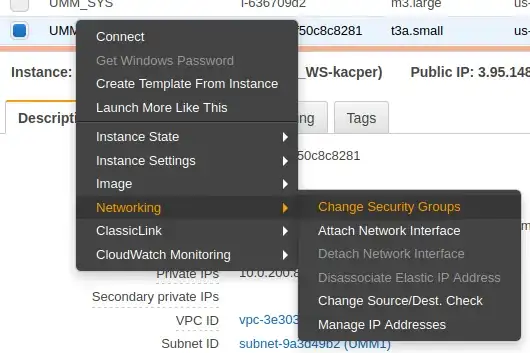
Simply right-click on an instance, and click on Change Security Group
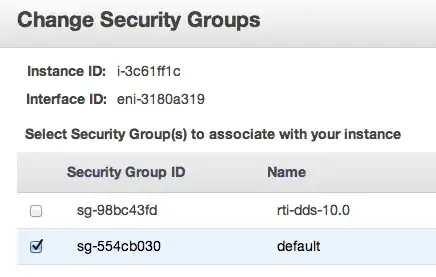
Add/remove security groups as appropriate and click Assign Security Groups when done
EC2 Command Line
Use the following command:
ec2-modify-instance-attribute <instance-id> --group-id <group-id>
AWS Command Line
Use the following command:
aws ec2 modify-instance-attribute --instance-id i-12345 --groups sg-12345 sg-67890
Note, you must specify all security groups with which you'd like the instance associated.

Kacper Cichecki
- 195

hanxue
- 1,407
59
Update 2015-02-27:
This is now possible, see the answer below.
Old reply:
Amazon's FAQ says it's not possible to define a security group anywhere but at launch time.


8
It is now possible to do this. Click on the actions menu and Change Security Groups - Select the Security Groups you would like to use.

Dan Fried
- 100

user193616
- 81
6
- Create an AMI image from the instance you want to move to a different security group.
- Launch a new instance using that image, now we can assign this new instance to a different security group.
- Discard the previous instance.
This requires downtime on your instance. There may be some other options available using the API.

Rajan
- 61
5
As towo said you can't change a security group of an instance anywhere but launch time.
Unless you are using a VPC where security groups differ from EC2 security groups.
This page outlines the differences between EC2 and VPC security groups.
http://docs.amazonwebservices.com/AmazonVPC/latest/UserGuide/VPC_SecurityGroups.html
So if you require the extra functionality of the VPC groups (Changing groups, control ingress/engress traffic, etc.), you may want to look at the additional functionality provided by VPCs.

idiom
- 61
1
If you are using boto3 you need to call modify_attribute and pass a list of group ids
http://boto3.readthedocs.io/en/latest/reference/services/ec2.html#EC2.Instance.modify_attribute
response = instance.modify_attribute(Groups=['string'])

Groups (list) --
  [EC2-VPC] Changes the security groups of the instance. You must
  specify at least one security group, even if it's just the default
  security group for the VPC. You must specify the security group ID,
  not the security group name.

James Morgan
- 111
- 3
1
As of 2016 Nov 24. above answer given by @hanxue is right but not complete. There are two types of instances in AWS: instances inside private cloud called vpc instances and public instances called Ec2 Classic. You can only change security groups of VPC instances but not EC2-classic. Aws official documentation screenshot you would like to see. docs you would like to see


Balman Rawat
- 111
0
In the new AWS GUI, just select the instance that you want to add a security group to, select actions on the top navigation area, then select on security. You are welcome

-1
However according the this FAQ "modify the settings for the current security group - which will affect all instances running in the specific group" you can change gradually redefine the existing ones. As I'm trying this now for my scenario through the EC2 console, my records where all erased!

robi
- 99