50

I have a Windows Server 2008 SP 2 Task Scheduler task that should run every 10 minutes.
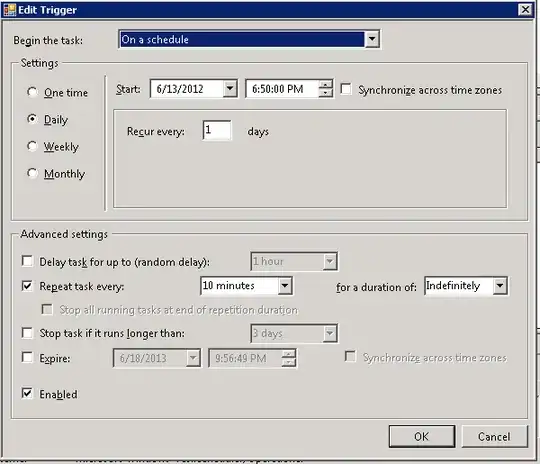
enter image description here

The trigger says "At 6:50 PM every day - After triggered, repeat every 10 minutes indefinitively."

Looking at the Next Run Time, it says 6/18/2012 8:00 PM. However, when I let that time pass, the Next Run Time just changes to 8:10 PM but the task has not started and the Last Run Time is unchanged from yesterday. Last Run Result is "The operation completed successfully. (0x0)".

It worked when I first created it a few days ago, but today I disabled then re-enabled it and now it just won't start automatically. I can still manually trigger it and that works.

How can I get this task to automatically run every 10 minutes when enabled no matter what?

Dan C
  • 641

11 Answers11

33

My fix was simple... I had already manually ran the scheduled task, but I created the scheduled task for the intent of using it daily... I had several TB to copy over to a backup server so I could not schedule the task just yet. My fix was to update the Start date to the current day, and that for some reason resolved it. Detailed info: Previous start date was Jan 3 which was when I created the task and manually ran it. The task was enabled to run daily and failed on Jan 5th. Went into the settings and updated the date to the current day (Jan 6), ran that night and completed on Jan 7). Location: Server 2012 R2, Task Scheduler, Open task, Triggers Tab, Open Trigger, Update Start Date to current day.

Hope this helps others.

advgmni
  • 331
29

I'm late to the party, but for anybody suffering from the same problem :

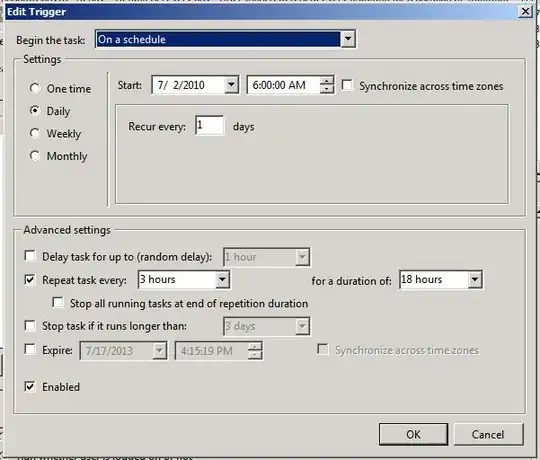
When using a Daily schedule and the Repeat task every: option in the trigger's Advanced Settings, do not use Indefinitely in the for a duration of: option. Change it to 1 day

This does not make any sense but solves your problem. Windows 2016 still has this problem.

Appleoddity
  • 3,990
11

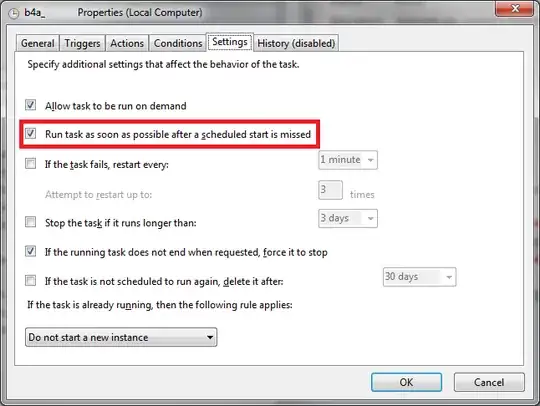
This may not be relevant now, but in case you enable\disable scheduled task(s) manually you can use an option of starting the task asap after the scheduled start was missed. enter image description here

10

Probably too late to be any help on this 3-year old topic.

On the General tab make sure you choose the "Run whether user is logged on or not" option.

The default setting is "Run only when user is logged on" which means the task will not run until someone logged on to the server.

Robert
  • 201
7

Check the job start date/time. This can trip you up (it has snagged me before).

4

I had similar issue. The task scheduler stopped working due to some reason at remote location. but when the machine restarted task scheduler did started. I told them to run the task scheduler job and then I hope it would pick up the next run, nut it didnt start. The only last thing is I have to go to the server location, then change the start date from old date to current date and also change the time ahead to current time, after this change only it start working. However, I thought it should start by itself when the machine restarts. I could nt found any setting that worked except to manually and change the date time to current and next ticking time.

3

I think you want to set the task to run once every 10 minutes for 24 hours as you are triggering it to repeat once daily. so it would run daily, repeating every 10 minutes for 24 hours and then repeating the process.

screen cap from task scheduler

Might also need to set the "Stop task if it runs longer than" option under "Settings" for the task. Might be skipping the scheduled task because task scheduler thinks the task is still running when it is not...

MikeAWood
  • 2,586
2

Make sure both the task and the trigger are enabled.

I came here because I had the same problem. Turns out, the trigger was disabled. For some reason task scheduler uses disabled triggers in the "Next Run Time" box...

1

CHECK the CONDITIONS tab under POWER: if you are plugged in or not...it is causing a different treatment!

Not sure if this is still helpful, but I had the same issue and was looking for a solution a couple of hours.

Before it worked on a server and now I was trying to do something on my own windows environment. But this was not why it first worked and after not anymore.

The difference was that my computer was plugged in before and now it wasn't. UNCHECK the box 'Start the task only if the computer is on AC power'.

1

Do you have Windows Live installed? I was pulling my hair out over this, but then found if you disable the Windows Live \ SOXE task everything comes back to life

http://social.msdn.microsoft.com/Forums/en/winserver2008appcompatabilityandcertification/thread/6fa3c7fa-511b-498d-9b37-1201e1ff2e59

Mark Sowul
  • 1,859
1

It's a Windows bug in Task Scheduler

I setup a task to fire every 15 minutes similar, however, it got stuck in "Task has not run yet" state even though the next run time was updating correctly

After approximately a day it started working as expected

user630342
  • 11
  • 1