11

I've got a CentOS VM (release 6.2) running under HyperV. I have integration services installed (part of base now), and CentOS shows the current clocksource is hyperv_clocksource, however my time in the VM is about 10 minutes fast after a week of uptime. My understanding of the new IC and plugable clocksource is that this shouldn't happen any more. Is there any additional configuration necessary to get the plugable clocksource to "work?"

I know there are plenty of links about setting kernel options to PIT and various stuff like that, but those all seem to pre-date the integrated clocksource support, and as I understand it shouldn't be needed anylonger. Nor should ntpd nor adjtimex.

Edit: Was running 3.2 of IC (what ships w/Centos 6.2), upgraded to 3.3 today, machine has been up for 1 hour 22 minutes and clock is already 5 seconds fast. So I'm now running the latest IC and still have the same problem.

WaldenL
  • 1,270

3 Answers3

3

I've had this issue in the past and corrected it by tweaking the startup switches (notsc divider=10) and ntp settings:

# grub.conf generated by anaconda
#
# Note that you do not have to rerun grub after making changes to this file
# NOTICE:  You have a /boot partition.  This means that
#          all kernel and initrd paths are relative to /boot/, eg.
#          root (hd0,0)
#          kernel /vmlinuz-version ro root=/dev/VolGroup00/LogVol00
#          initrd /initrd-version.img
#boot=/dev/hda
default=0
timeout=5
splashimage=(hd0,0)/grub/splash.xpm.gz
hiddenmenu
title CentOS (2.6.18-164.6.1.el5)
    root (hd0,0)
    kernel /vmlinuz-2.6.18-164.6.1.el5 ro root=/dev/VolGroup00/LogVol00 hda=noprobe hdb=noprobe notsc divider=10
    initrd /initrd-2.6.18-164.6.1.el5.img
title CentOS (2.6.18-164.el5)
    root (hd0,0)
    kernel /vmlinuz-2.6.18-164.el5 ro root=/dev/VolGroup00/LogVol00
    initrd /initrd-2.6.18-164.el5.img

Sample ntp.conf:

tinker panic 0
restrict 127.0.0.1
restrict default kod nomodify notrap
server 0.vmware.pool.ntp.org
server 1.vmware.pool.ntp.org
server 2.vmware.pool.ntp.org
driftfile /var/lib/ntp/drift

Source:

Correcting Linux Clock Drift on Hyper-V on Server 2008 R2
http://hardanswers.net/correct-clock-drift-in-centos-hyper-v

Greg Askew
  • 39,132
3

Hyper-V Linux guest clock drift under load is sadly quite common (clock drift in unsynchronised VMs is somewhat unavoidable). See Linux clock loses 10 minutes every week and Hyper-V Machine drifts time all over, even with NTP for other posts talking about it. Anecdotal evidence I've seen says the following:

Anon
  • 1,293
2

First, check if hyper-v is detecting the integration services. The only way i know how is using system center virtual machine manager, but i assume there must be a way using hyper-v's mmc.

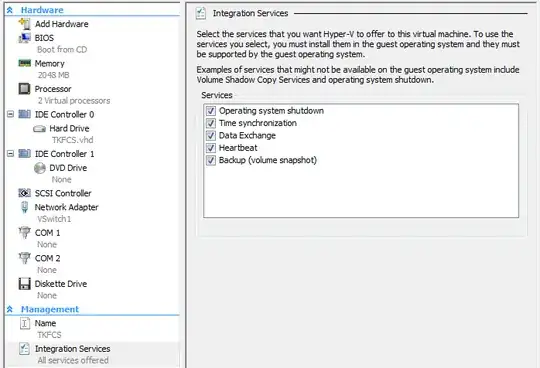
Also, I have seen this happen when clock sync is disabled in the VM configuration. Why the clock runs faster is beyond me. I've attached a screenshot of the vm configuration for your reference. enter image description here

longneck
  • 23,272