271

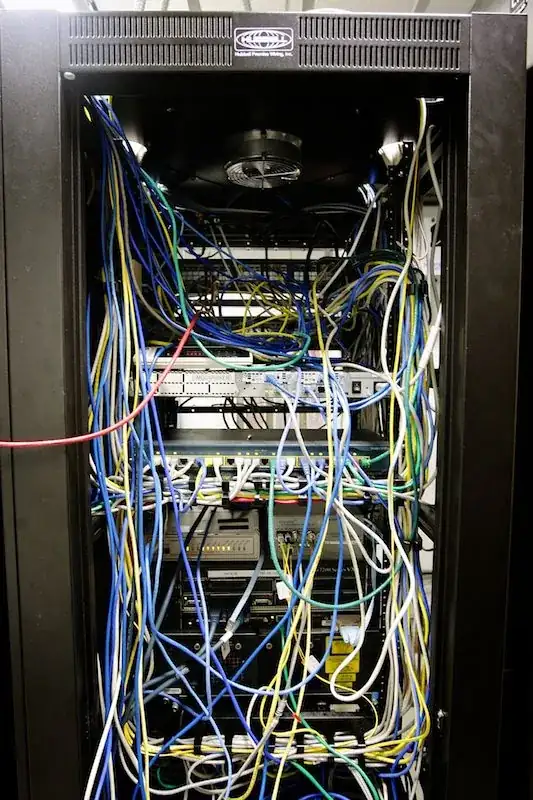
You know, you see pictures like below and sort of chuckle until you actually have to deal with it.

I have just inherited something that looks like the picture below. The culture of the organization does not tolerate down time very well, yet I have been tasked to 'clean it up'. The network functions as it is, and there doesn't seem to be rush to get it done, but I will have to tackle the bear at some point. I get the ugly eye when I mention anything about weekends.

So my question goes, is there sort of a structured approach to this problem?

My Ideas thus far:

  • Label, Label, Label
  • Make up my patch cables of desired length ahead of time
  • Do each subnet at a time (appears that each subnet are for different physical locations)
  • Replace one cable at a time for each subnet
  • It's easier to get forgiveness than permision?

A Rat's Nest

ewwhite
  • 201,205

15 Answers15

152

In no particular order here are some suggestions that have been helpful to me over the years-

  1. Can any of the equipment in those racks be eliminated, upgraded or consolidated? It's hard to tell what's there, but in my experience these kinds of messes tend to be aggravated by gear that should have been pulled out years ago.

  2. Once you've got some idea of the minimum set of equipment then consider how best to lay it out. The criteria here may vary, but grouping by technology type or business function might make sense. Clearly the proximity of high density devices (i.e. switches) and patch panels and such will immediately be apparent.

  3. Use cable management!!! There are both horizontal and vertical cable management solutions. Use both - horizontals around patch panels and other significant concentrations, verticals next to switches and to facilitate risers.

  4. It's always surprising, but how power cables are routed should be considered. UPS units in the bottom of racks, PDU selection and diversity all need to be considered before pulling a cable.

  5. Keep inventory of common cable lengths. It's late at night and you want to go home. A 3' cable is what's necessary but the closest you have handy is 5'. This is how these kinds of messes develop.

  6. Documenting is part of the game, but the importance of labeling cannot be overstated. With clear labels and efficient/clean cabling the number of mistakes will be vastly decreased and troubleshooting simplified.

  7. Limit who can pull cables!!! Differing styles and degrees of attention to detail can yield chaos pretty quickly.

Jeff Atwood
  • 13,264
rnxrx
  • 8,203
144

Please call a cabling contractor in to spend a day or two onsite to "dress" your cables. I used to spend time dealing with this type of work on my own, but realize that cabling contractors are faster and more organized.

A good cabling contractor is better at this than you are!

They will have the right resources to tag, test, get custom lengths, dress cabling and install the right type of management infrastructure.

It's worth the time and expense in order to end up with a cleaner, more manageable solution.

If cost is an issue, then you can reduce the hired man-hours by bringing the contractor to handle any structured cabling needs (re-terminating patch panels, testing existing runs, etc.)... Looking at that photo, there will be a need... You can buy or have them provide a variety of patch cable lengths and perform that work on your own, tagging and labeling as needed.

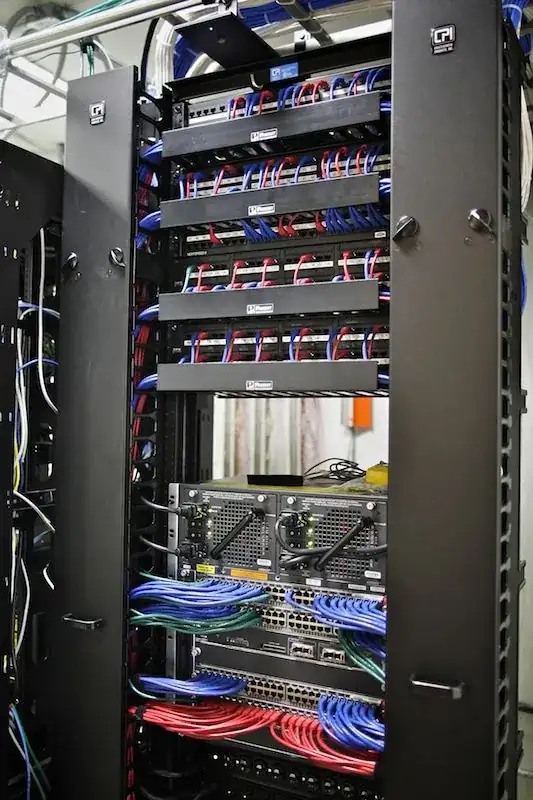
I went from this before-to-after by using this approach. It took 6 hours of contractor help, and 8 hours of my work to get the result.

enter image description here

enter image description here

ewwhite
  • 201,205
70

A co-worker and I recently cleaned up a mess that was pretty bad (I might post pictures later if I get some time) and I wholeheartedly disagree with the contractor approach. You will learn significantly more about the system itself and what deficiencies it has if you do the work yourself. Also when you make a mistake, as you or any other mortal is likely to do, you will have a much better idea of how to fix it. Having said all of this here are my suggestions.

  • Take your time: this is a marathon not a sprint.
  • First remove all the items that are not plugged in on one end. This took a surprising amount out in our situation.
  • Label, label, and label again.
  • Do a switch at a time.
  • Take your time and check your work.
iconoclast
  • 1,890
  • 2
  • 19
  • 30
PlTaylor
  • 1,077
58

My sympathies to you. I was tasked with a similar problem for a number of cabinets, equally as horrendous.

The approach I took was as follows:

  1. Use a spread sheet to make a list of which port is connected to which port on which piece of equipment (arduous manual process of cable tracking). Try to use a spread sheet cell to represent a port, and order collections of cells as a visual representation of each piece of equipment.
  2. For each port, also note the VLAN/subnet etc (I did this via a web interface/cli)
  3. Write a small macro to theoretically re-wire your equipment based on cabling distance, or other factor of your choice. The result should give you which switch port maps to which patch panel port (or other equipment). It should also indicate how many cables you need and how long they need to be. I did this in a spread sheet by using cells as switch/patch-panel ports and it worked well. It produced a visual diagram of the wiring by drawing lines between cells and colouring the cells with conditional formatting to show their VLAN number(s).
  4. Once I had the schematic it took less than an hour after working hours to pull out all the cables and patch them up according to the generated diagram. Then another 30 minutes the next day to fix the "why can't I connect?!" problems :-)

There's really no easy way to do it, but at least the above approach saved me from pulling my hair out.

Good luck!

Screen shots:

Before:

Before

After:

After

Jak
  • 1,018
28

All these answers are incorrect because they omit the critical first step: Define the project. Before you can use any of these ideas (many of which are very good), you need to be able to answer the following questions with absolute certainty

  • What systems you are touching-- when and for how long can they go down?
  • Which departments will be hit and when will they agree to be inconvenienced?
  • If there is a critical system, when can I shut it down? is it backed up?
  • How much money can I spend to do this?
  • How many people can I borrow?
  • How long can I take? (meaning both man-hours to do it and time when it must be done)
  • Is there any documentation and should I trust it?

Maybe you know all these things and you didn't go into detail. But unless everyone is on board with your plan, you can end up writing one of those "How I blew up my company" Infoworld columns.

I had this situation once. Turned out we had a box that had to be on and connected. Pull a wire for too long, it would hiccup and crash. If it went down, anyone using it was screwed. Plus, two other systems-- who rarely used it but continually monitored its status-- would freak.

It only took a few minutes with the manual to figure out the order the systems needed to be shut off and a few phone calls to schedule it and one "Don't log into this system remotely over the weekend!" mass e-mail. But that's the difference between nobody noticing and people hating you forever.

Management's responses to definition questions will help you plan other projects. Your work requires them to make occasional choices and you need to learn what, how and why they will choose. You might find you can't hire anyone to help, can't buy 1-foot cables to replace 8-footers, can't shut people down, can't stop taking "can you unjam my printer?" calls while you do it, can't get overtime and can't come in early, stay late or work weekends if it means you won't be there M-F. If so, you know you need a new job.
Geoff
  • 381
  • 2
  • 3
21

If you cannot (for whatever reason; it's usually that the company doesn't want to spend the money) get a contractor:

  • Schedule a weekend outage. Nothing will be guaranteed to work during this time. If you can do full shutdowns, so much the better.
  • Get the boss to agree to comp your food, drink, and time.
  • Beforehand, map each cable run, source and destination.
  • Install the cable management
  • Have appropriately-sized cables on-hand beforehand. If you must crimp them yourself, do it before the outage. Label both ends of each cable now.
  • Pre-print labels. (BTW, buy a labelmaker, extra labels, and spare batteries.)
  • Replace one cable at a time (unless impossible).
  • Turn things back on with fingers crossed.
  • Test that things still work. Reboot a client PC and make sure that you can still get to things.
  • Go home victorious
gWaldo
  • 12,027
16

I am amazed no one else has already said this:

Yes document, record, spreadsheet etc etc but photo photo photo and more photos. They won't help you put it back together, but they will save you going insane when you inevitably have to problem solve. Plus when it all goes wrong they will serve as a reminder why never to do it again! :)

I also like the comment of "removed things which aren't plugged in to anything" its amazing how much stuff like that there is!

Tim
  • 161
14

If you can get a contractor to take care of it as ewwhite suggests, then let them figure it out.

Otherwise:

  1. I'd start by identifying exactly where everything is and where it goes.

  2. I'd suggest keeping an inventory (simple spreadsheet should work to start) of each device and it's connections, VLANs, source port, destination port, IPs, and any other pertinent information.

  3. Have your cables pre-made and pre-labeled before you start. Use cables that aren't overly long but still leave room for some movement/ slack.

  4. If you can't do it all in one go, start device by device.

  5. Use vertical and horizontal cable management as needed, and velcro to secure sections (generally every one foot).

  6. Something that may help, is to use a different color cable for your each logical subnet to help visualize things in the future.

  7. Test to make sure things are as they were before you started. It's useful to have a pre-made document of tests to perform so you can go through, perform the test, and document the result.

After you are finished, make sure to keep up with the cable management and avoid quick runs to get something up and going. You'll almost never come back to properly finish the job. You may also want to develop a standard policy/ procedure for all cabling. That way, moving forward, you won't create these sort of issues. The person inheriting it from you will thank you :)

HostBits
  • 11,945
11

On labeling cables

  • I learned one important rule of labeling cables: Don't label your cables with the device/port, unless this is an absolute requirement and you're given the resources (label printer, blanks, where and when you need them.) If you do, the moment you have to repatch a cable you will be required to relabel the thing.
  • The best labeling scheme that I worked with involved labeling each cable with the same tag on both ends, perhaps followed with an 'A' or 'B' tag. That way, when you run across all of your panels and devices, you can match end-to-end connectivity with relative ease.
  • In the past I've worked with custom made cables, which actually had an offset length printed in ft and/or m. on the cable at regular intervals. This helped in actually identifying cables in a big ball of spaghetti. However, prefab cables are much more reliable but sadly lack that length indication.
10

Wow is all I can say. Here are my suggestions for all it's worth:

  1. Don't look to tackle this in a specific time frame. With a mess like this there's no need to put undue pressure on yourself to have it cleaned up by X date.

  2. Map out and document all of the physical connections (port x on device X connects to port x on device y, etc.).

  3. Map out the network logically (subnet A is for office A, subnet B is for DMZ, etc.).

  4. Figure out how you're going to organize/route the cables that takes into account the new layout in existence with the current layout. A cabling contractor can help with this. I'm not sure I'd want them doing the actual work though as they won't have any knowledge of network topology/dependencies and if things get connected incorrectly they'll be no help in figuring it out.

  5. If your proposed layout allows for you to swap/reroute one or a few cables at a time then do it that way. Find a few minutes every day where you can swap/reroute a handful of cables into the new layout. You'll need to plan for small windows of downtime/unavailability for those systems whose cables are being swapped out. As you stated it's easier to ask for forgiveness then permission but you don't want to over do it.

joeqwerty
  • 111,849
7

Just thought I would post with something NOT to do.

I was in a similar situation a while ago although I only had two racks to deal with and not quite so many wires.

I thought I had a great idea which was okayed by the boss - the idea being that TCP/IP on windows is tuned to retry and timeout after 5 secs so if a cable is unplugged for a second or two it's not a big deal.

So I commandeered an assistant and we would get the new cable in place all nice and tidy, then simultaneously we would swap both ends with the old cable.

This was when we discovered one application we needed that was dependant on a flat file database was very sensitive to this and it's db got trashed so we had to restore that from backup!

Robin Gill
  • 2,503
5

My only suggestion would be about roll back process.

If you can yourself or one of your internship guys would take a picture of every single step. Or record video of important steps in case of there is a problem and want to rollback process.

I will be helpful also for further references if somebody else will join your team and tell him what you did.

teoman
  • 51
4

If your boss is not willing to give you overtime, yet also wishes to avoid downtime as much as possible, it might be a good idea to inquire about coming in around 3pm one day, and staying late. This way, there will be no downtime and the company won't be ponying up for overtime. I've pulled jobs like that in the past, when the company didn't want to overtime me, and it was honestly fun. Bring some speakers with you, and your ipod, and cable like a madman to some metal.

acolyte
  • 417
3

I think nobody mentioned this yet:

I would ask my boss whether we could get a full new round of equipment to replace the old installation in new racks. Depending on its age that might even be cost effective.

ZaphodB
  • 663
2

I have an idea that might also help, I think someone already mentioned color coding your LAN segments, but to make life a little easier you could simply buy whatever patch cables you will need in advance, rather than building them yourself and testing. I use a site called Monoprice, they are awesome, they have various cable length options and the cables are cheap. I will post a couple of links to the site below, hopefully this will help make the job go easier.

Cat 5e Ethernet Cables

Dave M
  • 4,494
Frank R
  • 141