0

enter image description here

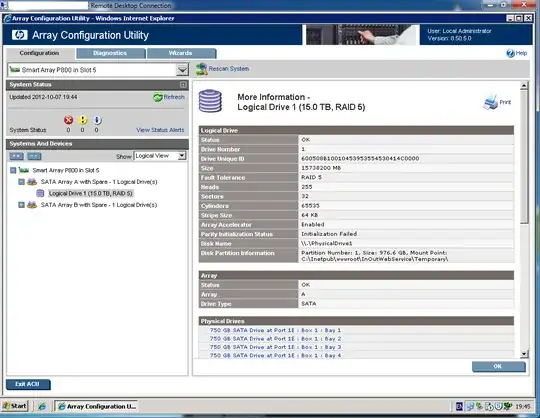
I put in a new drive due to a hard drive failure. When the rebuild got to 100%, the controller fails and I need to reboot the server to bring it online. I had to do this about three times and it eventually finished rebuilding. But I found that it says parity initialization status failed. I've left it for a few hours but it didn't seem to reinitialize. Then I ran the insight online diagnostic tools and it reported the disk that I put in reached read/write error threshold. So I'm beginning to think that the brand new disk I put in is faulty. Before I put in the disk, the parity initialization was at a finished state.

Should I replace the new disk I put in? I'm very worried as I think the parity is broken. Or is there a way to kick start the initialization process?

ewwhite
  • 201,205
lbanz
  • 1,619
  • 5
  • 24
  • 31

2 Answers2

3

Another reason to be wary of large RAID 5 arrays...

Imagine what your rebuild times will be when (not if) you have a failure. Please consider using fewer SATA disks in your setup. There's a chance you already have errors on your existing disks!

Smart Array RAID controllers run a background parity initialization upon the creation of a new logical drive.

From the controller technology guide:

When you create a RAID 1, RAID 5, or RAID 6 logical drive, the Smart Array controller must build the logical drive within the array and initialize the parity before enabling certain advanced performance techniques. Parity initialization takes several hours to complete. The time it takes depends on the size of the logical drive and the load on the controller. The Smart Array controller creates the logical drive, initializing the parity whenever the controller is not busy.

Please see:

"Parity Initialization Status: In Progress" for long time

Slow parity initialization of RAID-5 array on HP Smart Array P411 controller

ewwhite
  • 201,205
-1

If the diagnostic utility reported the new disk is past the read/write error thresholds, then it sounds like there is indeed something wrong with the drive. When you say "new", do you mean fresh from the manufacturer? If so, consider returning it for a replacement. No brand-new drive should do that.

If the array is already acting screwy, I recommend that you avoid running any sort of "trial and error" types of tests on it (such as testing spare drives to find a replacement that works). Every time that you rebuild, you are doing more than 15TB of I/O. If these drives are already near the end of their useful life, the additional stress from a rebuild may be enough to push one of them over the edge and tank your array.

bta
  • 546
  • 2
  • 8